I am sure you and the team have been busy with the Bricks 2.0 release.
Just wanted to note that this topic came up again yesterday with another client—the use case is similar but not related to mobile.
The end user wants to be able to set a custom header background (custom field), OR, if not set, default to the post’s featured image.
This is because in some cases the featured image is suitable for showing on the page and in query loops, but not always as a background image (e.g., the “aspect ratio” of the header area is rather different).
The issue becomes that, similar to the first case, currently if the user neglects to put a custom image for the background on every post, it will simply break (in this case, no header background image will be shown).
I’ve struggled with image fallbacks months ago. According to the Bricks team, @fallback-image doesn’t work with image fields, and fixing it would require refactoring a huge part of the builder, which processes dynamic data.
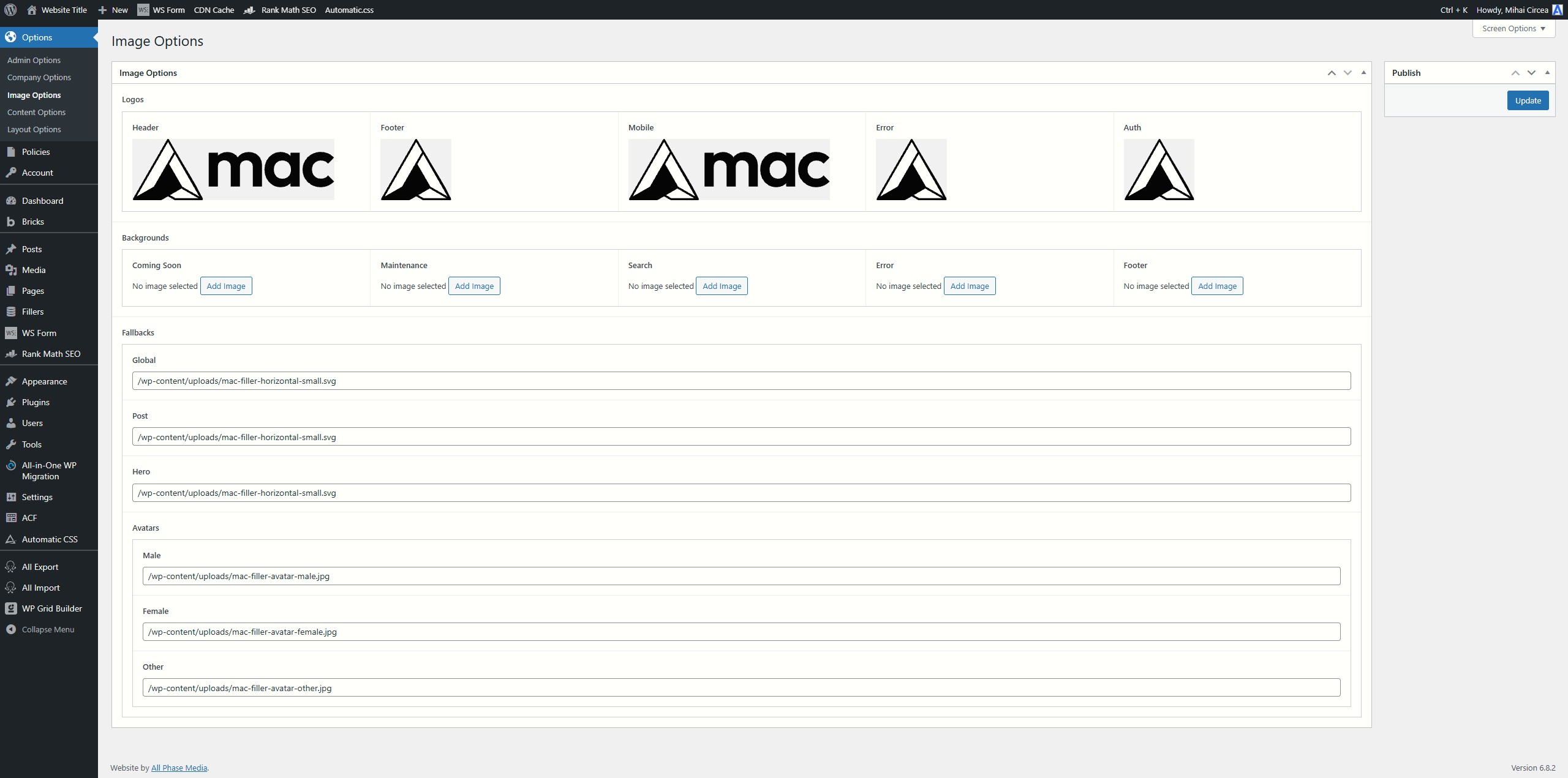
The solution I’ve found for having dynamic fallback images was using a text input field.
In your case, I’d say just make that image custom field required, or use my approach and set a global fallback image instead of using the featured image as the fallback.
1] I have found that @fallback-image works for images; just not background images.
2] Thanks for sharing your example, but I don’t quite follow your workflow or use case here.
I can see you are setting some image fields which appear to have some kind of global usage (my use case is single post level stuff), and some text-based image paths as fallback…
… And then doing what with them? By what logic are you calling for the fallbacks? And how are you working with image field data vs text field paths?
In my most recent application/post, I did the dreaded duplicate sections with conditions thing… haha. But I don’t want to do that for the OP project.
In your case, I’d say just make that image custom field required
Not wanting to do that.
BUT - Perhaps I could dynamically map the custom field to the featured image field as a “default” value (I am using Pods and will look into that).
@ddcbf
To clarify, the image fields at the top aren’t being used as fallbacks. They’re used in templates (header, footer, etc.).
The text fields at the bottom are used as fallbacks with the @fallback-image tag, because unless the Bricks team fixed this recently, @fallback-image doesn’t support ACF image fields. It might look like it works sometimes (the image appears on the frontend), but if you open your browser’s Network tab and reload the page, you’ll see that the site ends up doing a redirect to the image file. So even though a fallback image appears, it’s not functioning properly under the hood and even the redirect only happens for some images - others won’t appear.
That’s why I use plain text fields containing the image URL for the fallbacks. They work perfectly fine with @fallback-image.
I have some CPTs with an ACF image that sometimes are empty and I want to use the featured image of each post as a fallback. Any idea of how it can be done? I tried the below and it doesn’t seem to work. Does Bricks allow inline @fallback?