Browser: Chrome 110
OS: macOS
Video: https://download.johannes-glaser.de/bricks-bug-report-broken-template-style.mp4
Steps to replicate:
- Create a “Section” template. Include anything in it that has custom styling (e.g. a red icon)
- Create a post with Bricks with the following setup
- Add a query loop over other posts and include the section template in it.
- Add the section template itself outside of the query loop.
- Disable the template wrapper for all templates (I’m not sure if this is needed)
Expected result:
- The post context for the template within the query loop is each respective post.
- The post context for the template outside of the query loop is the post where it was added itself.
- The template is just shown + 1 times normally with styles, e.g. n+1 red icons.
Actual result:
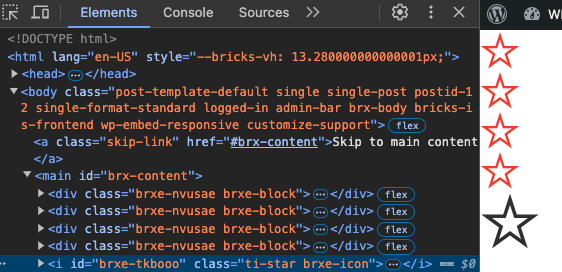
The CSS of the last usage of the template breaks. E.g. the last icon isn’t shown in red.
Technical reason: This is because the CSS style of the custom styling settings for the template is scoped to the elements in the query loop and therefore don’t apply to the outside template any more.
Screenshot:
In this screenshot you can see the same template embedded four times using a query loop and one time directly. The styling of the last star breaks.