I have a Component with a slot. The block in which the slot sits has a row gap of 100px. When using the component instance with several objects in the slot, the gaps are ignored in the builder. This is because the slot has a separate div element. On the rendered frontend, it looks all fine since the slot has no separate div element and the gap settings for the parent block take effect.
Steps to reproduce:
- Create a Block and gibe it a row gap of 100px.
- Make it into a component and add a Slot into the Block
- Leave the component editing and add objects in the slot
- Notice the gap is ignored
- Show page on frontend: Gap is working
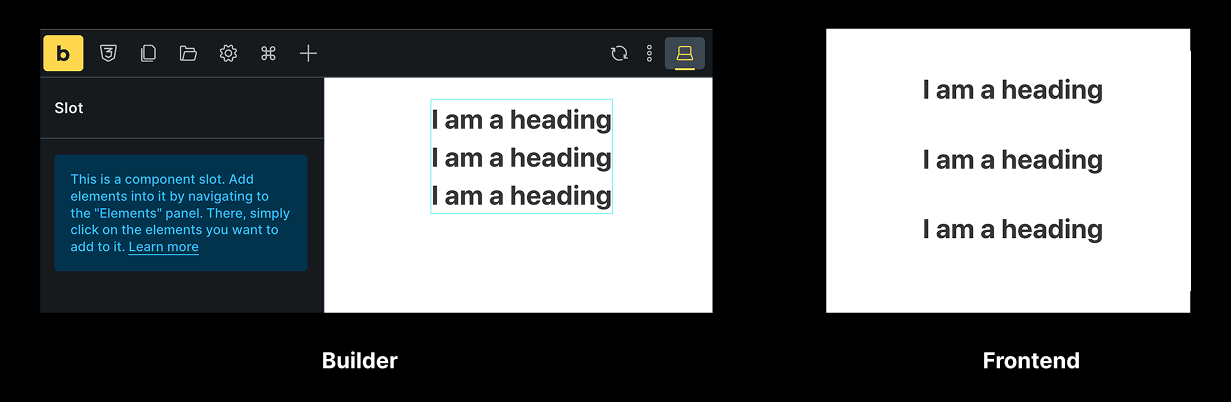
I first noticed this issue when using global classes for the parent block. This also causes other strange issues where the arrangement of objects suddenly changes or – when using an icon element as the first item – the entire layout within the builder breaks (sometimes it only removes the icon in the builder preview; this is not fully reproducible). On the frontend, everything remains fine. See screen recording: https://drive.google.com/file/d/12kll8Hp0pNDS81fScPrTj9xdL7zkpOjO
 Hmm yeah seems like the temporary placeholder div we’re using to identify the slot is causing issues. I have added this to our bug tracker to see how we can get rid of the placeholder slot div in the builder.