Browser: Chrome 143.0.7499.110
OS: Windows
Hi,
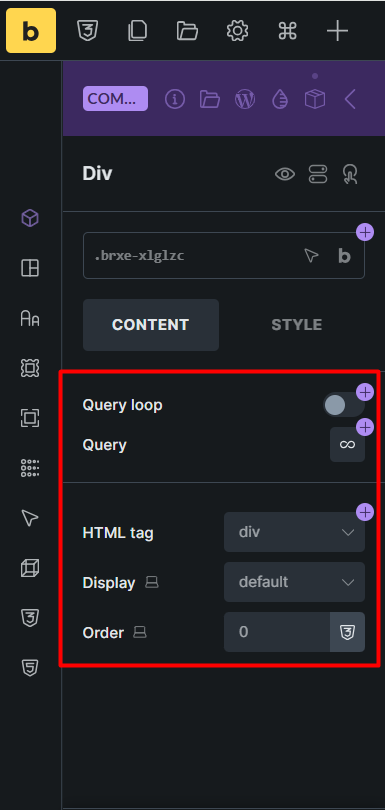
If we click the Edit button in the Components panel, the layout controls are displayed incompletely.
Browser: Chrome 143.0.7499.110
OS: Windows
Hi,
If we click the Edit button in the Components panel, the layout controls are displayed incompletely.
Hi Hosein,
Thanks so much for your report!
Unfortunately your second screenshot is still uploading, so I can’t see the actual issue  Please reupload it. Thanks!
Best regards,
timmse
Hi Stefan,
Sorry for the mistake. Screenshot uploaded. Thanks
Thank you! I’m not quite sure what’s missing there, as these are the default settings for a div? 
No, Even though I have set the Div Display to Flex in the theme style, it also happens for block and other layouts. This problem seems to occur if the component is not used on that page. Please watch the video below.
Hi @HOSEIN,
@timmse is currently away, so I’ll take it from here. Thanks to your video (that’s why we always say video is the best  ), I was able to replicate it, and I’ve recorded it in the internal bug tracker.
Thank you,
Matej
We fixed this issue in Bricks 2.2 RC, now available as a manual download in your account (see changelog).
Please let us know if you are still experiencing issues.
As with any pre-stable release, please do not use it on a production website. It is intended for testing in a local or staging environment only.