Browser: Chrome 120.0.6099.129
OS: Windows
URL: Daveden Tutorial
Video:
Add a Comments Element to a Single Page Template to replicate the issue. Then test it as a visitor on the front end using a screen reader like NVDA or VoiceOver. The labels for the input form do not get announced to screen readers.
The reply form creates inputs like the author, email, etc. with corresponding labels. However, the labels are not connected to the input using the for attribute, so screen readers don’t announce it.
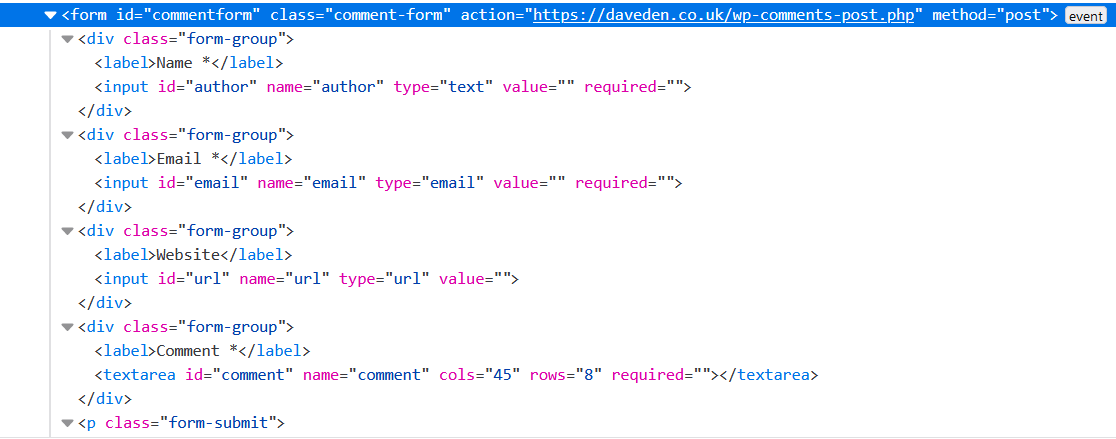
I believe it should be something like this:
<div class="form-group">
  <label for="author">Name *</label>
  <input id="author" name="author" type="text" value="" required="">
</div>
<div class="form-group">
   <label for="email">Email *</label>
   <input id="email" name="email" type="email" value="" required="">
</div>
<div class="form-group">
   <label for="url">Website</label>
   <input id="url" name="url" type="url" value="">
</div>
<div class="form-group">
   <label for="comment">Comment *</label>
   <textarea id="comment" name="comment" cols="45" rows="8" required=""></textarea>
</div>