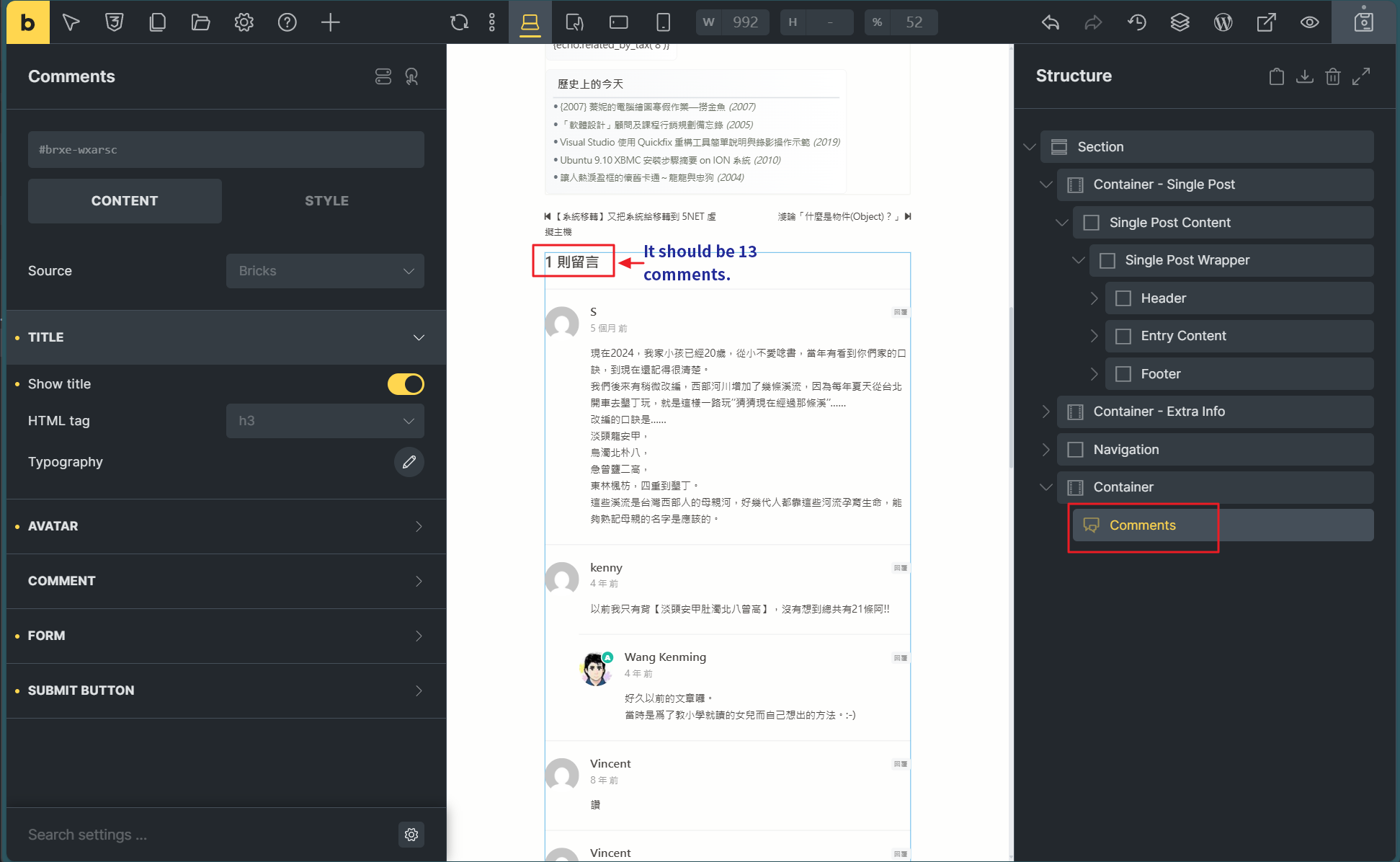
Browser: Edge & Chrome OS: Windows URL: Localhost Ver: 1.12.3
I used the Comments element in the Single Post Template to list all the comments and their count for that post.
There is no issue listing all the comments, but the total comment count always shows as 1, while the post actually has 13 comments. I tested with other posts, and the result remains the same.
I tested using {echo:get_comments_number()} and it correctly returned 13. However, the comment count using Bricks’ comment element always displays as 1.
Even when I added only: in the code element, the count was still incorrect (but it correctly displayed the comment content).
Looking at the Bricks PHP code, I found that calling comments_template() first invokes comments.php in the bricks parent theme
But I copied the comments.php into the child-theme from the parent theme and modified the parameters being passed, but it had no effect.
I don’t understand why such a simple count would be incorrect. This issue has been bothering me for two days. Is it a bug or is there a problem with some settings?
Unfortunately, I cannot reproduce the issue. Please send temporary login credentials, information on where we can see the problem, and a link to this thread to help@bricksbuilder.io using the email address you used during the purchase.
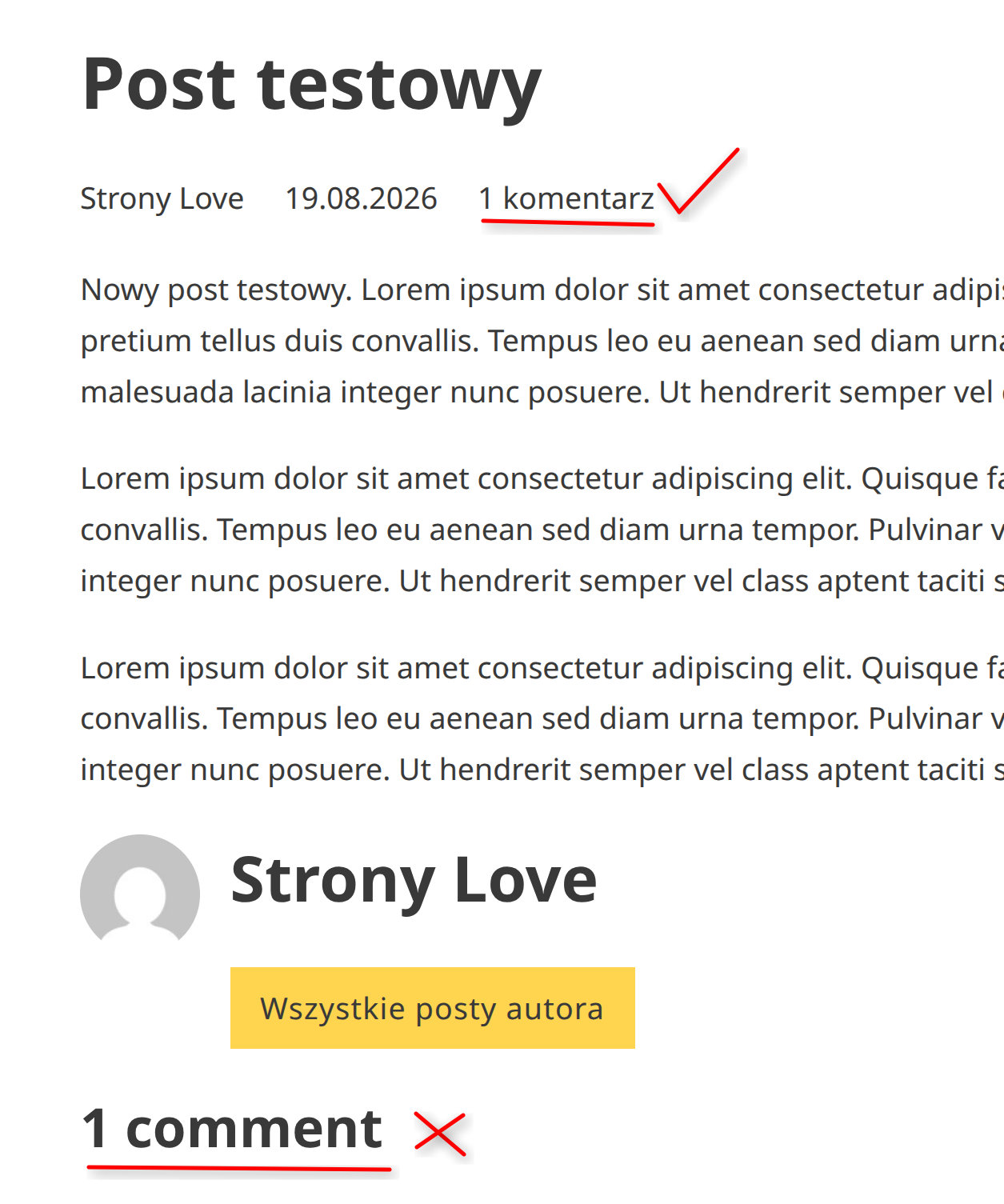
I too, have this issue, on one of my production sites. Bricks 2.3.10
The post meta shows number of comments correctly, but the comments heading shows only “1 comment” no matter how many comments there are.
I’ll send you a link to see it on a production site in PM; I’ll also try and set up a test environment where you can play with it via admin.
–
Sent you a link in PM. The issue only appears when I switch the site language to other than English. In English, I get proper amount of comments + the word “comments” properly in plural/singular.
When I switch to Polish, in Meta I get the right amount, but the word “comments” is in singular form; then above the Comments section I get incorrect “1” + “comment” in singular form as well.
Changing back to English I get the correct amount displayed + correct plural/singular (“comments”).
That’s the crucial hint - it seems to happen only with some languages – in your case Polish, and probably Chinese (or similar) , as can be seen in the thread starters screenshot . With German, for example, it’s correct.
Is that a translation issue now, where we just need the translation code to also update, as the number looks correct, but the output is in wrong language (I’ve set mine to Polish but I still get “3 comments” in English)?
It seems the language files weren’t generated correctly, so “comment” or “comments” are still in English.
I just fixed that manually for Polish (it should work in theory—unfortunately, I don’t speak Polish). The language files will be overwritten with the next update—but the fix should already be included by then.
Download the zip, unzip and replace both files in bricks/languages:
Um.. so I did that… and now bricks is in english I changed back in admin to english, then again to polish, flushed cache - no go. Bricks still in english. And so are the comments elements, naturally Maybe it checks some md5sum-like hash of the files that I manually overwrote, and reverts back to english?
That’s strange… I’d suggest we just wait for the actual fix before we keep on experimenting
Just re-download the theme from your account, upload it and the language files will be overridden. That should restore the language to its original state.
That’s all correct so far—the new translations aren’t included in 2.3.12 yet. We expect to include them in the next 2.4 beta, since we’ve completely revised them.
We’ve addressed this in Bricks 2.4-rc (release candidate), now available for manual download from your Bricks account.
Comments element headings now keep their translated singular and plural labels when the comment count updates.
Please read the changelog entry before testing, and let us know if you experience any issues. Release candidates are not recommended for production sites.




 I changed back in admin to english, then again to polish, flushed cache - no go. Bricks still in english. And so are the comments elements, naturally
  Maybe it checks some md5sum-like hash of the files that I manually overwrote, and reverts back to english?