SOLVED: Clear Dot position in component properties

Browser: Chrome 110
OS: macOS / Windows / Linux / etc.
URL: Link to a page that illustrates this issue
Video: Short screen recording that illustrates this issue (free tool: jam.dev)

Hello,

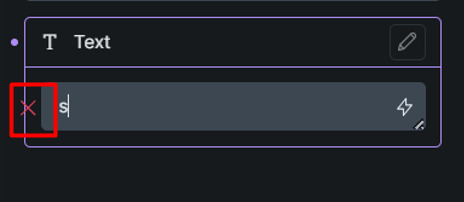
In the component properties, the Clear Dot is attached to the border.

On the other hand, as you can see in the screenshot above, each property has two Clear Dots with the same function. Removing one of them doesn’t seem wrong.
Hi again,
Thanks so much for your report!

I reproduced the issue and added it to our bug tracker.
We’ll update this thread once it’s fixed.

Best regards,
timmse

We fixed this issue in Bricks 2.2 RC, now available as a manual download in your account (see changelog).

Please let us know if you are still experiencing issues.

As with any pre-stable release, please do not use it on a production website. It is intended for testing in a local or staging environment only.