Browser : Chrome 110OS : macOS / Windows / Linux / etc.URL : Link to a page that illustrates this issueVideo : Short screen recording that illustrates this issue (free tool: jam.dev )
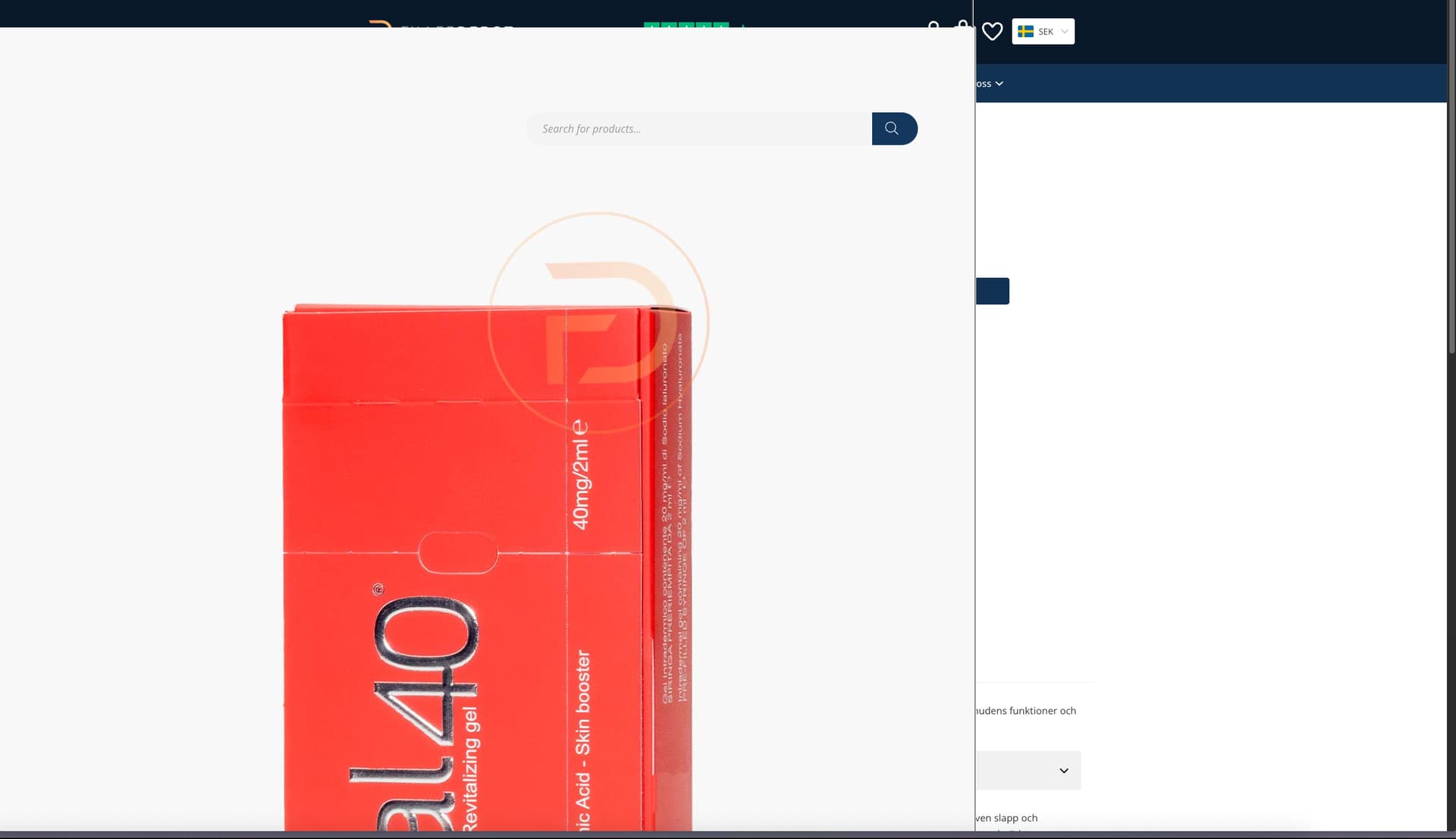
Bricks version 2.0.2 breaks the image lightbox. Disabling the Bricks cascade layer fixes the issue, so it’s probably related to that.
timmse
August 25, 2025, 12:04pm
2
Hi,
Please provide a live link so we can see the issue and what exactly overwrites the lightbox styles - I cannot reproduce the problem in a simple installation.
Best regards,
You can access the live staging site here: https://old-neck.localsite.io/produkt/ejal40-1x2-ml/
Username: admin
I’m so sorry, please try again now (:
timmse
August 26, 2025, 11:35am
6
Thanks! Now I can replicate the issue.
This workaround works. Thanks!
When you fixed can you let us know. Because I want to use cascade layer options to.
I’m also seeing the same problem with WooCommerce and also without WooCommerce. Running Bricks 2.02.
Matej
September 9, 2025, 11:40am
10
Yep, we will update this topic once we release the fix.
What do you mean “without WooCommerce”?
Matej
I’m having the same issue using Brick’s Lightbox.
just curious if there is any sort of eta on this whatsoever? even if vague.
Matej
September 10, 2025, 10:40am
13
Can you post a link here, because I can’t replicate this locally? But maybe I have different setup than you.
Sadly no, I can’t give you any ETA on this. However, as there are quite a few reports about this, I would say this would be sooner rather than later.
Matej
I"m running Bricks 2.0.2 for both sites. I cloned the main website.GrooveWorx Trailers – RiderWorks - This site displays the Lightbox using the Cascade layer when toggled ON.https://dev.riderworks.com/project/grooveworx-trailers/ - This cloned site doesn’t display the Lightbox using the Cascade layer when toggled OFF.
temp solution for those that don’t want to disable the cascade layer for all:
<?php
/**
 * Fix WooCommerce Photoswipe CSS @import error in Bricks Builder
 * This solution prevents the cascade layer wrapping and ensures proper CSS loading
 */

// Method 1: Remove the problematic @import styles completely and re-enqueue them properly
add_action( 'wp_enqueue_scripts', function() {
    if ( ! function_exists( 'is_product' ) || ! is_product() ) {
        return;
    }

    // De-register WooCommerce's photoswipe styles to prevent Bricks from wrapping them
    wp_deregister_style( 'photoswipe' );
    wp_deregister_style( 'photoswipe-default-skin' );

    // Re-register and enqueue them properly without cascade layer interference
    wp_register_style(
        'photoswipe',
        plugins_url( 'assets/css/photoswipe/photoswipe.min.css', WC_PLUGIN_FILE ),
        [],
        WC_VERSION
    );

    wp_register_style(
        'photoswipe-default-skin',
        plugins_url( 'assets/css/photoswipe/default-skin/default-skin.min.css', WC_PLUGIN_FILE ),
        [],
        WC_VERSION
    );

    wp_enqueue_style( 'photoswipe' );
    wp_enqueue_style( 'photoswipe-default-skin' );

}, 20 ); // Run after WooCommerce registers its styles (priority 10)

// Method 2: Override the style_loader_tag filter to prevent cascade layer wrapping
add_filter( 'style_loader_tag', function( $tag, $handle, $href, $media ) {
    // Only process photoswipe-related styles
    if ( ! in_array( $handle, ['photoswipe', 'photoswipe-default-skin'] ) ) {
        return $tag;
    }

    // If Bricks has already wrapped it in @import, unwrap it
    if ( strpos( $tag, '@import' ) !== false ) {
        // Return a proper link tag instead
        return sprintf(
            '<link rel="stylesheet" id="%s-css" href="%s" media="%s" />%s',
            esc_attr( $handle ),
            esc_url( $href ),
            esc_attr( $media ),
            "\n"
        );
    }

    return $tag;
}, 100, 4 ); // Very high priority to run after all other filters

// Method 3: Clean up any remaining @import styles via JavaScript
add_action( 'wp_footer', function() {
    if ( ! function_exists( 'is_product' ) || ! is_product() ) {
        return;
    }
    ?>
    <script>
    (function() {
        // Remove any style tags containing photoswipe @import rules
        document.querySelectorAll('style').forEach(function(style) {
            if (style.textContent.includes('@import') &&
                style.textContent.includes('photoswipe')) {
                // Extract URLs from @import rules
                const matches = style.textContent.matchAll(/url\(['"]?([^'"]+)['"]?\)/g);

                for (const match of matches) {
                    const url = match[1];
                    // Create proper link element
                    const link = document.createElement('link');
                    link.rel = 'stylesheet';
                    link.href = url;
                    link.media = 'all';

                    // Insert before the problematic style tag
                    style.parentNode.insertBefore(link, style);
                }

                // Remove the problematic style tag
                style.remove();
            }
        });
    })();
    </script>
    <?php
}, 1000 ); // Very late priority

// Debug logging (optional - remove in production)
add_action( 'wp_head', function() {
    if ( function_exists( 'is_product' ) && is_product() ) {
        echo "<!-- Photoswipe CSS Fix Active -->\n";
    }
}, 1 );
solution 2 working in my case
timmse
September 24, 2025, 12:32pm
16
We fixed this issue in Bricks 2.1 beta, now available as a manual download in your account (see changelog ).
Please let us know if you are still experiencing issues.
As with any pre-stable release, please do not use it on a production website . It is intended for testing in a local or staging environment only.