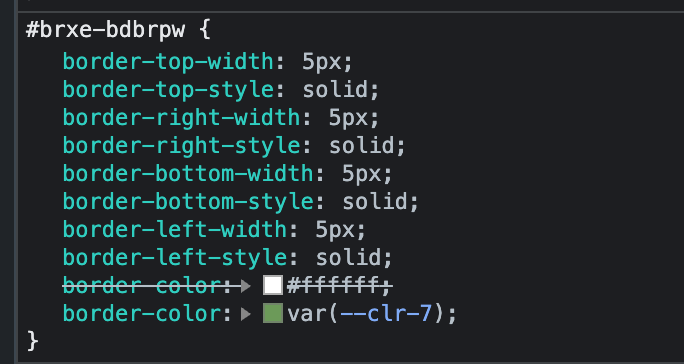
I have a grid of images with white borders that change to a color on mouse hover. The first image in the grid does not show the color in the builder. It works fine on the front-end.
It is due to the builder writing the declaration at the top of the block, rather than at the bottom. The normal declaration overrides it. The other blocks have the declaration written at the bottom of the block.
Thanks for the login credentials. Looking at your site, the styles show as expected.
No duplicated border-color on #36546e and the hover border color shows on :hover
It works if you hover over it with the mouse. When you select Hover State in the builder, it will show all the hover effects. In this case it shows all the border colors except the upper left border.
Interesting: In my test, it gets added at the end. Maybe it’s due to a different order in adding the styles. Seems to be a marginal case.
Edit: Yep, if you add the default style first and after that the :hover, it’s working as expected. For me, this is the logical sequence, but it may well be that some users do it the other way around