Browser: Chrome 110
OS: Windows
URL: Link to a page that illustrates this issue
Hi,
I was trying to customize the slider for a new site I was building following the splidejs guide.
I inserted the autoscroll extension with the CDN found from the splide.js site.
By inserting this code into a script in the header it started to work, but it doesn’t have an infinite loop and at a certain point you see a white screen when the images end.
<script src="
https://cdn.jsdelivr.net/npm/@splidejs/splide-extension-auto-scroll@0.5.3/dist/js/splide-extension-auto-scroll.min.js
"></script>
<script>
	document.addEventListener('DOMContentLoaded', (event) => {
  setTimeout(() => {
    // Accedi all'istanza dello slider usando l'ID 'hlbozx'
    const mySlider = window.bricksData?.splideInstances['hlbozx'] || false;

    if (mySlider) {
      // distruggo la precedente istanza e la reinizializzo
          mySlider.destroy(true);
    mySlider.mount(window.splide.Extensions);
      // Configura le opzioni per il drag libero
      mySlider.options = {
        type   : 'loop',
        drag   : 'free',
        perPage: 3,
        autoScroll: {
          speed: 1,  // Imposta la velocità di auto-scroll
        },
      };

    }
  }, 10); // Ritardo per dare tempo a Bricks di inizializzare gli slider
});
</script>
I would like to have the infinite loop, but I don’t understand what’s wrong.
These are the bricks slider settings, although I don’t think they interfere.
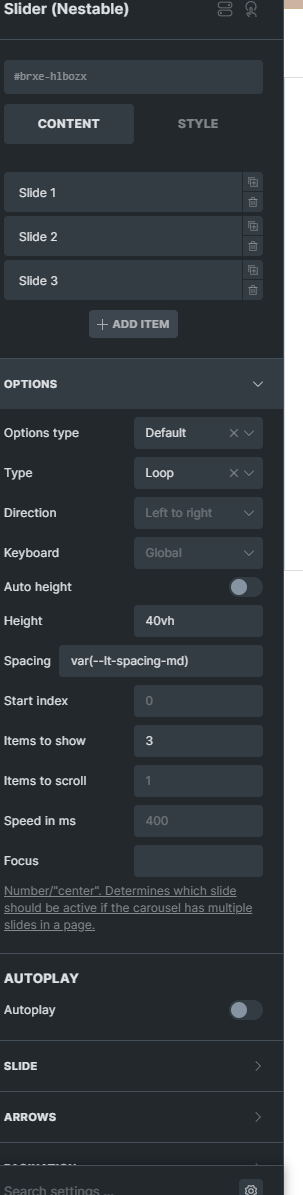
Try the site directly to better understand the problem.
Thank you
[Please describe this bug in as much detail as possible so we can replicate & debug this bug]