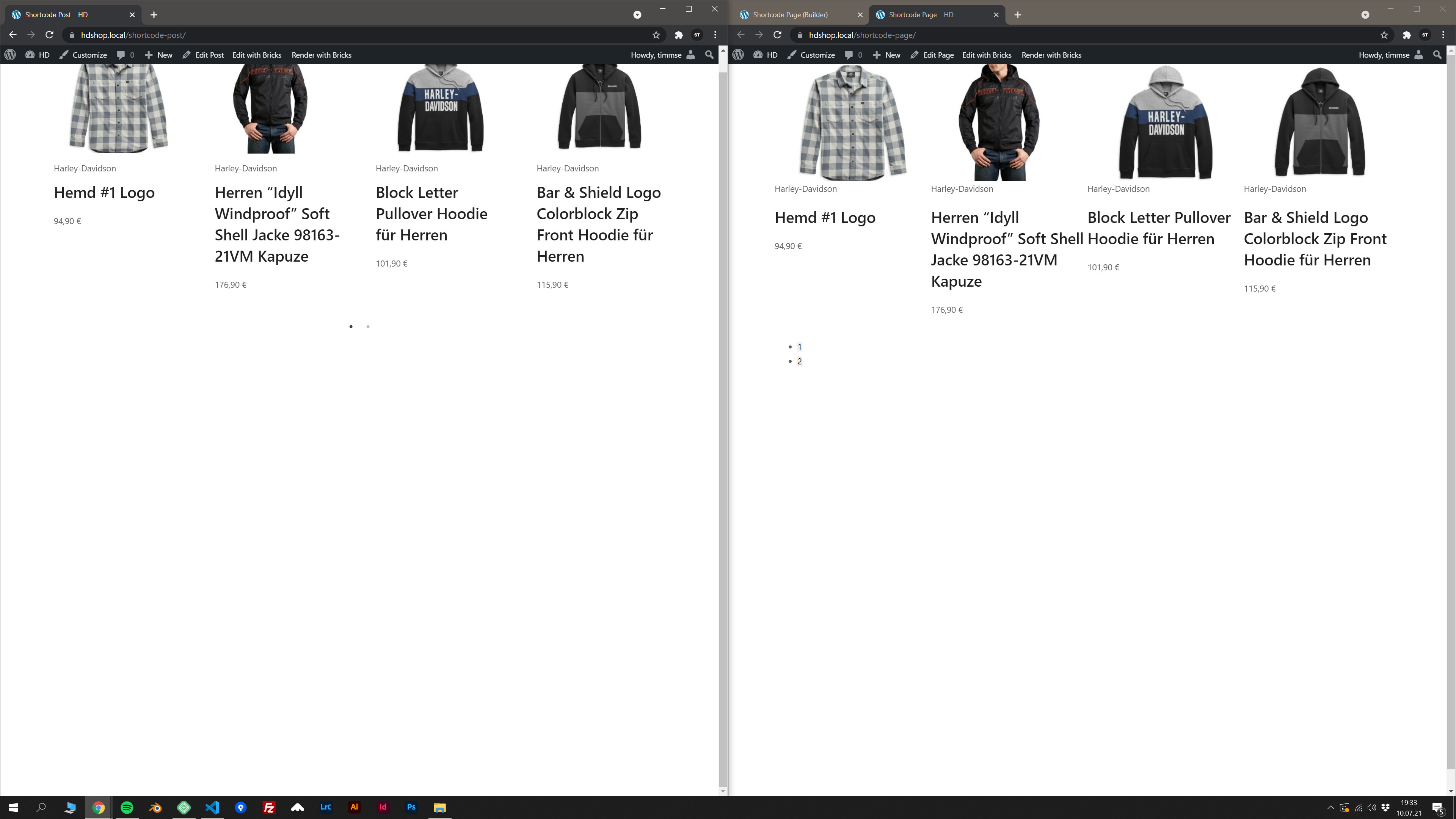
I just encountered a problem when placing a shortcode on a page. The Shortcode loads a slick-slider product carousel, but the styling does not get applied (see the bullets). If i do the exact same thing in a new post, it works as expected.
Thank you for reporting this problem and providing a video.
It appears that you’re actually using Bricks v1.3.1 so just update that in the post if possible so that it doesn’t cause confusion.
Which plugin provides the shortcode you’re using? Are you using any Theme Styles? Theme Styles have conditions, so it’s possible that you have Theme Styles applied to posts but not pages.
you´re right, the version is v1.3.1 - but i cannot edit my post… the edit button is gone
The Plugin who provides the shortcode is an eCommerce Plugin (attached to a ERP system especially for motorcyle dealers), which is unfortunately not available for public (damn). No, I checked again to see if Theme Styles are applied, but neither posts nor pages have any applied.
Then i took a deep dive… and found the problem. The outer wrapper of the carousel get´s removed on pages (but not on posts, which is still strange), therefore the styles that refer to the outer wrapper are not applied.
The outer wrapper is built within a function inside the eCommerce Plugin:
public function wrap_content( $content = null ): string {
	if ( null === $content ) {
		$content = $this->gutenberg_template_post->post_content;
	}
...
If i change the if condition to
if ( is_null($content))
the outer wrapper will be inserted an everything is working as expected on bricks pages. Woohoo!
The problem really only shows up in bricks. I tested TwentyTwenty, TwentyTwentyOne and OceanWP (the recommended theme of the Plugin Developer), all of them work straight away without any plugin code changes…
I would really like to mark the post as solved… but there is still the problem with the edit button and the question, why does it work on posts, but not on pages?
This sounds hard to debug without taking a closer look.
If it is possible, please send us an email at help@bricksbuilder.io with a link to a site where this is happening and create a temporary admin account for us to use. Also link to this forum thread in the email.
I’d be happy to help figure out why this is happening.
The shordcode is render inside a loop, and the css style has only the id code: lile “#bricks-element-cdkknl” so if is looped, then the “.bricks-element-cdkknl” does not appear.
if I change condition in file /includes/templates.php line 163, to true, then the styles appears.
PROBLEM FOUND:
The problem is that i first used the component outside a loop and then used inside a loop, and this makes that as the first is loaded outside the loop the inline css is render with #bricks-element-id instead of .bricks-element-id, so then the ones inside the loop it does not render properly…
I haven’t dealt with my problem since then, so I don’t know if it works now or not.
What kind of shortcode are you dealing with? Where does it come from, what does it do?
Did you try to create a component and load it in the same page twice? one outside a loop, which prints #id only css and then load inside a loop, which does not apply #id to the element?