Hi everyone,
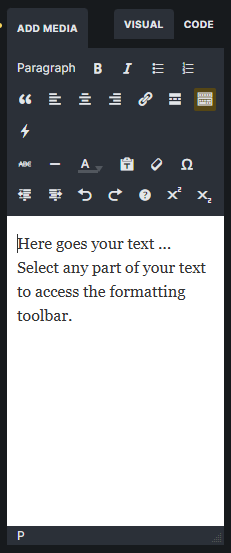
I’ve been using Bricks for quite a while and have built a good number of projects with it. One thing I still run into surprisingly often is a fairly basic limitation of the Rich Text editor.
There are two things I’m missing:
1. Underline option in the editor UI
When writing or editing text directly in the left panel, there is no underline option in the toolbar. However, when I select text directly on the canvas, underline is available in the floating toolbar.
This can work as a workaround, but when the text is inside a component, that option is no longer available. The only way to underline text then is to edit the HTML/code manually.
It would make sense to have the underline option available directly in the Rich Text editor toolbar as well.
2. Fullscreen mode for the Rich Text editor
For example, I often work with longer GDPR or privacy policy content. I have my own template, adjust it for the specific website and paste the entire text into a single Rich Text element. I then style the headings with a few lines of CSS and the content is basically done.
What is really missing here is the ability to open the Rich Text editor in a fullscreen popup. Finding and editing something in a longer text inside the left panel can be quite difficult.
We can already open some other editors in a larger popup, such as the code editor. A similar implementation for Rich Text would be very helpful, especially when working with components or when clients edit their own content.
This has already been mentioned here, but unfortunately the topic has not received any response:
https://forum.bricksbuilder.io/t/ability-to-open-rich-text-editor-fullscreen/33749
Bricks is already a great builder, and I’d be happy to see another quality-of-life improvement in this area.