I’ve got a relationship field on a Projects CPT which connects the associated Services, returning a Post Object.
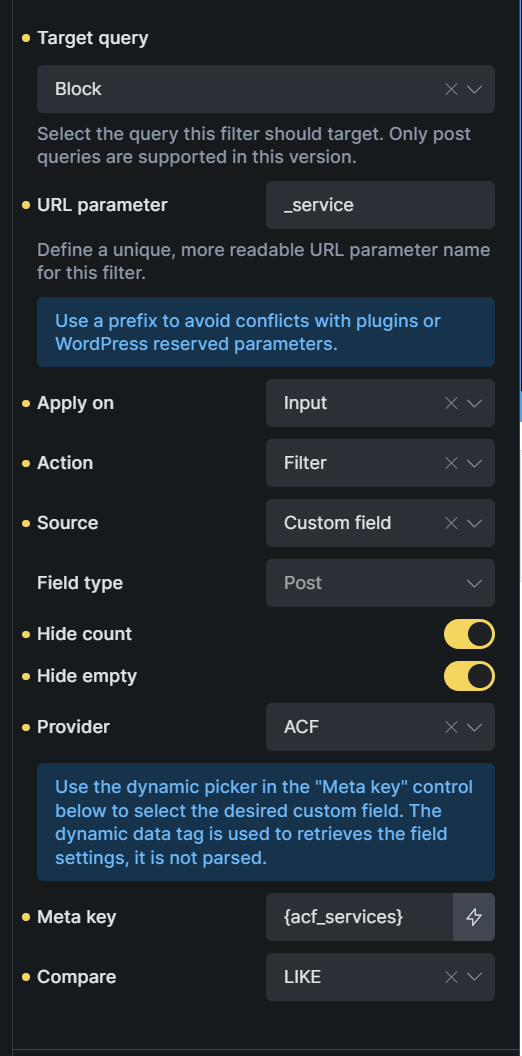
On my Projects page, I’ve set up a filter, which uses the ACF field as the meta key and works correctly to filter the projects by service.
However, when the filter is applied, the appended url parameter displays the service post ID (e.g. ?_service=169). Is there a way to have this display the service name/slug instead to make it slightly more readable (e.g. ?_service=web-design)? Even if the filter query is still using the ID behind the scenes.
Great, thanks for the video - definitely looks to be working there with Metabox. Makes me wonder if this is something to do with ACF’s implementation of the relationship field then, rather than Bricks.
Hmm, good question, I wonder. I will do a test in the morning with ACF and see if I get the same result or if I get the same issue you are facing. Does that work for you?
Ok, so I tried your approach with ACF/SCF. The issue is that ACF relationship fields store term IDs, not slugs or names. Bricks’ Select Filter is passing these IDs directly to the URL. When you filter by a taxonomy category directly, Bricks knows to use the term slug, but with a relationship field, it’s just passing the stored value (the ID).
I have tried a couple code options, but the URL parameter is always the ID. So unless someone else has a cool ACF hack for this, I feel the better approach would be to use a custom Taxonomy, as they have better URL structure/cleaner, native filtering, better performance, and works amazing with Bricks.
Below you can see the video I did showing you how I could replicate the issue you were having (the reason why above) and a solution.
Thank you so much for spending the time looking into this - I really appreciate the video. I definitely agree that taxonomies are the ‘cleaner’ option to use most of the time, and they’re so easy to set up in Bricks.
I ended up spending a few hours yesterday coming up with a pretty convoluted, hacky solution which uses a few Bricks filters to do what you allude to in the video - capture the ID, convert it into a slug for the URL, and back into the ID for the actual query itself.
I’m sharing below should anyone else have the same issue. It’s probably not a great approach, but it’s working for now at least. In most cases though, like you say I think it’s better off to just use a taxonomy field or accept the ID in the URL. Thanks again for your help.
<?php
/**
 * ACF Relationship Filter – Human-readable URL Parameters
 *
 * Bricks Builder filters using ACF relationship fields store and transmit post IDs,
 * resulting in ugly URL parameters like ?_service=161. This code replaces those
 * IDs with readable slugs (e.g. ?_service=content-creation) across all filter
 * interactions and direct URL navigation.
 *
 * Before using this code, replace the following placeholders:
 *   [FILTER_ELEMENT_ID]  – Bricks element ID of your filter select element
 *   [QUERY_ELEMENT_ID]   – Bricks element ID of your query loop element
 *   [URL_PARAM_NAME]     – The URL parameter name assigned to your filter (e.g. _service)
 *   [POST_TYPE_SLUG]     – The post type slug of the related posts (e.g. service)
 */


// 1. Replace filter option values with post slugs instead of IDs
add_filter( 'bricks/filter_element/populated_options', function( $options, $element ) {
    if ( $element->id !== '[FILTER_ELEMENT_ID]' ) {
        return $options;
    }

    foreach ( $options as &$option ) {
        if ( ! empty( $option['is_all'] ) || ! empty( $option['is_placeholder'] ) ) {
            continue;
        }

        $post = get_post( $option['value'] );

        if ( $post && ! is_wp_error( $post ) ) {
            $option['value'] = $post->post_name;
        }
    }

    return $options;
}, 10, 2 );


// 2. Intercept Bricks REST API requests to translate between slugs and IDs as needed
add_filter( 'rest_pre_dispatch', function( $result, $server, $request ) {
    if ( $request->get_route() !== '/bricks/v1/query_result' ) {
        return $result;
    }

    $selected_filters = $request->get_param( 'selectedFilters' );

    if ( empty( $selected_filters ) || ! is_array( $selected_filters ) || empty( $selected_filters['[FILTER_ELEMENT_ID]'] ) ) {
        return $result;
    }

    $value = $selected_filters['[FILTER_ELEMENT_ID]'];

    if ( is_numeric( $value ) ) {
        // ID → slug: so the re-rendered select element shows the correct selected option
        $post = get_post( (int) $value );
        if ( $post && ! is_wp_error( $post ) ) {
            $selected_filters['[FILTER_ELEMENT_ID]'] = $post->post_name;
            $request->set_param( 'selectedFilters', $selected_filters );
        }
    } else {
        // Slug → ID: so the ACF relationship meta query finds results in the database
        $post = get_page_by_path( sanitize_title( $value ), OBJECT, '[POST_TYPE_SLUG]' );
        if ( $post ) {
            $selected_filters['[FILTER_ELEMENT_ID]'] = (string) $post->ID;
            $request->set_param( 'selectedFilters', $selected_filters );
        }
    }

    return $result;
}, 10, 3 );


// 3. JS: restore select displayed value after AJAX, and trigger filter on page load from URL param
add_action( 'wp_footer', function() {
    ?>
    <script>
    (function() {

        // After each filter query, re-apply the correct selected value to the select element
        document.addEventListener('bricks/ajax/query_result/displayed', function(e) {
            if (e.detail.queryId !== '[QUERY_ELEMENT_ID]') return;

            const filterInstance = window.bricksData?.filterInstances?.['[FILTER_ELEMENT_ID]'];
            if (!filterInstance?.currentValue) return;

            const select = document.querySelector('.brxe-filter-select[name="form-field-[FILTER_ELEMENT_ID]"]');
            if (!select) return;

            if (select.querySelector('option[value="' + filterInstance.currentValue + '"]')) {
                select.value = filterInstance.currentValue;
            }
        });

        // On page load, detect a slug in the URL and trigger the filter query
        document.addEventListener('DOMContentLoaded', function() {
            const slug = new URL(window.location.href).searchParams.get('[URL_PARAM_NAME]');
            if (!slug) return;

            // Hide "no results" message until the query completes to prevent a flash
            document.body.classList.add('service-filter-loading');
            document.addEventListener('bricks/ajax/query_result/displayed', function handler() {
                document.body.classList.remove('service-filter-loading');
                document.removeEventListener('bricks/ajax/query_result/displayed', handler);
            });

            // Small delay to allow Bricks to finish its own DOMContentLoaded setup
            setTimeout(function() {
                const filterInstance = window.bricksData?.filterInstances?.['[FILTER_ELEMENT_ID]'];
                const queryInstance  = window.bricksData?.queryLoopInstances?.['[QUERY_ELEMENT_ID]'];

                if (!filterInstance || !queryInstance) {
                    document.body.classList.remove('service-filter-loading');
                    return;
                }

                filterInstance.currentValue = slug;
                bricksUtils.updateSelectedFilters('[QUERY_ELEMENT_ID]', filterInstance);
                bricksUtils.fetchFilterResults('[QUERY_ELEMENT_ID]');
            }, 100);
        });

    })();
    </script>
    <?php
} );
No worries, glad to help where I can. Sorry I wasn’t able to provide a solution exactly, but you outcome sure looks like it fits your specific needs – and at the end of the day, if it is doing what you need, great job! =]
Sorry to jump on this thread. In your first example that you posted on streamable. Was that an actual relationship or a post field in MB? I’ve been getting frustrated over the Filter - Select not working with the MB relationship.
No worries. It is just a custom taxonomy and not the relationship option with MB. I found the relationship option to be too complicated and was able to achieve the same result with just taxonomies – cleaner as well.
Okay. The example you posted first was a custom field, so I thought it was a working solution.
I haven’t been able to get it two work property with either ACF or MB. ACF at least returns something, but it’s not correct. LOL.
It seems with any of the builders and plugins you find so much good, and then that one thing you really want, it just doesn’t work without some custom work around.
I would have covert almost 900 authors to taxonomies and associate them to 15 years worth of posts.
Well, it does work when you use taxonomies, custom or native – this is why I used that approach as it is an easier implement. Relationships are cool, but in the end they can be a pain and I find can get confusing if they get very advanced.
I hear yah that you have lots of data and it can be a pain. The main obstacle is the difference in how data is stored.
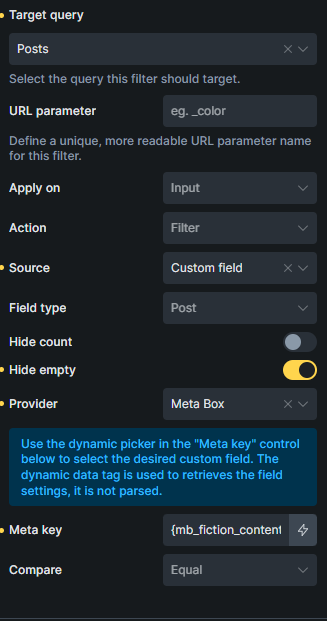
Meta Box Relationships store connections in a separate, dedicated database table. This is great for performance and scalability but means the data isn’t in the standard wp_postmeta table where Bricks normally looks for it .
Bricks Query Filters are designed to work seamlessly with taxonomies, standard post fields, and simple custom fields stored in the wp_postmeta table . They don’t have a native setting to query the special Meta Box relationship table.
This is why I chose the taxonomy route.
Just a second note – I do use Bricks conditions to filter through MB relationships and works great, but it is not using the Filter element. You can see how that is done here: https://www.youtube.com/watch?v=GQ8g5oV0KTg
I’ve got a use case for this, which would be great if it was resolved. Rather than using a taxonomy, the filtered results use the same acf custom field to then link to the custom post type.
This site has a location list, with an acf relationship field that holds services offered. Those services are themselves a custom post type, and site links to the service from the location pages.
When using the services relationship field as a on page filter (checkbox type, displayed as a button), it works fine, but reloading the page, or trying to access using a URL causes zero results to be returned.
Cant set custom labels on the filter as these services can be added to/removed by the client at any time.
Ideally: the URL would be ‘pretty’ using the Post Title rather than Post ID, and the filter correctly fires as currently we can’t link 'back’ and auto set the filter (ie a button that takes user back to the location page with the services filter set)