Here is what I am trying to do:
I have a custom Post Type of Communities
Taxonomies with the following:
So just to be clear each Custom post Type Entry has each of the above filled out:
For example:
Custom Post Type Communities
Post title = Seattle
City = Seattle
County = West
Zip Code = 93899
I have hundreds of Communities with all different cities, counties zip codes etc.
On the bricks community template I am trying to do the following:?
When a page loads for communities I want to take the County of the page:
And grab all unique values for city, and Zip code where county = Seattle
Hey John,
thanks for getting in touch.
I am having a hard time to understand your exact setup regarding custom post types, taxonomies and their relation and what exactly you’re trying to achieve. A small screencast showing your setup and explaining it a bit more detailed could help. Then I’m happy to assist.
Best,
André
Let me explain what I have going:
CPT: Called Listings…
Each Listing has a custom Taxonomy of the following:
County
City
Subdivision
Zip Code
Each Taxonomy has values of all counties, Cities, Subdivisions and zip codes. So every Listings Post has values for each Taxonomy.
So If I load a Listing Page called Tampa I want to be able to bring in all Taxonimes for Zip Code and Subdivisions where city of the page = other pages with the same city. So I Am getting a list of all Taxonomies based on the city…
Than I can display the following on each listing page:
Similar Zip-codes
Similar Subdivision
IF the page is a subdivision page:
It would show
Similar Zip Codes
Similar Cities
etc etc…
I feel like it’s not clear what you mean by taxonomy.
When you say taxonomy - do you mean CPT terms (the same as post categories). So you’ve created multiple taxonomies, and added all the states to them, all cities etc…
Because that’s a weird approach and a hell of a lot of work.
or
Do you mean you have a custom post type and have added custom fields? Which would be more sensible, much easier, and also greatly simplify what you want to achieve?
Why would it matter if its a custom field or a tag. Either way the data still had to get entered. If its a field you would have to manage a pick list of all cities, zip codes areas. With the tag you could create them as you go on the page. I guess you could create a text field but there is no standardization in the naming. Mistakes could easily occur.
When I say Taxonomies I mean in ACF creating Taxonomies and adding a value under each Taxonomy.
Pretty simple and straightforward.
The way I look at it in order to have relationships between City, Zip, Subdivision or whatever the data has to be entered per page. Now getting the data in the page can easily be automated.
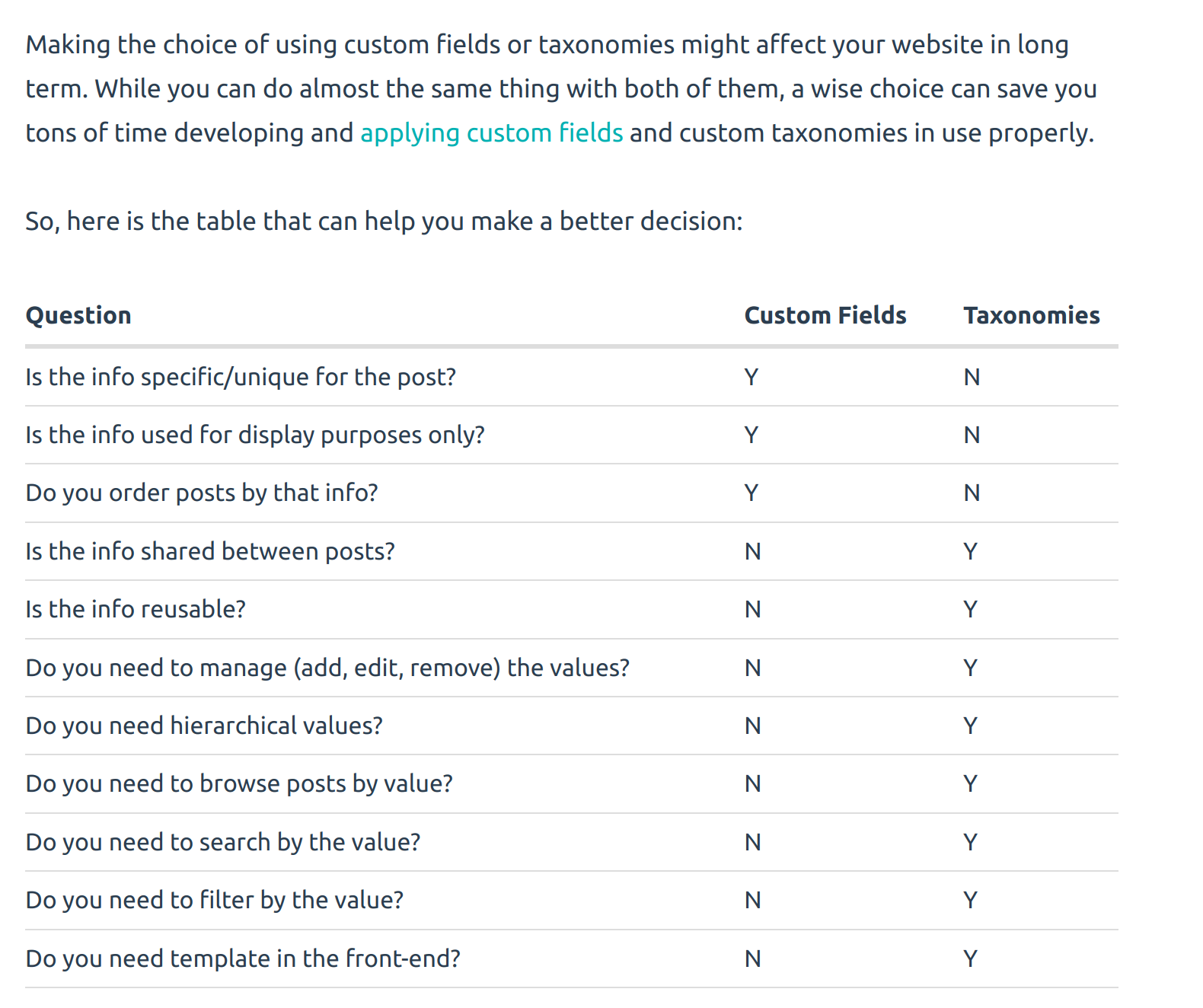
- If you have meaningful metadata to assign to a post, use custom fields. If that data is used to group posts together, use taxonomies.
- Custom fields are bits of information that are specific to the post item itself. Taxonomies are bits of information shared, in a meaningful manner, by many different items.
querying posts by taxonomy is faster than querying by custom fields .
It’s worth remembering that taxonomies are built to organize things and provide a way of filtering down to a specific set of posts . Post meta should only be used for information that isn’t going to be searched or filtered for .
So TAGS then, which yes is a good method. It gets confusing because a taxonomy could be categories, CPT terms, or tags.
ACF have only just released the ‘CPT / Taxonomy’ addition - so it’s new to hear people say ‘creating taxonomy with ACF’. Far more common to hear people misuse terminology.
I just wanted to check.
How do you ‘get the County of the page’. Is this a page TAG or custom field?
The tags can be fetched using a Bricks Query - query for TERMS.
If the page has the county in a custom field then you can just do ‘get terms where (cpt-term) = {custom_field}’.
If you have assigned the page a taxonomy, then you can do ‘get terms where (cpt-term) = {term_id}’