Looking at a Bricks made site, and by extending ?post_type=bricks_template, I can access all the template saved. How do I disable this?
2 Likes
I tested it in my site and found it’s true. How to prevent it?
@Matej any thoughts on that? Sorry for mentioning here.
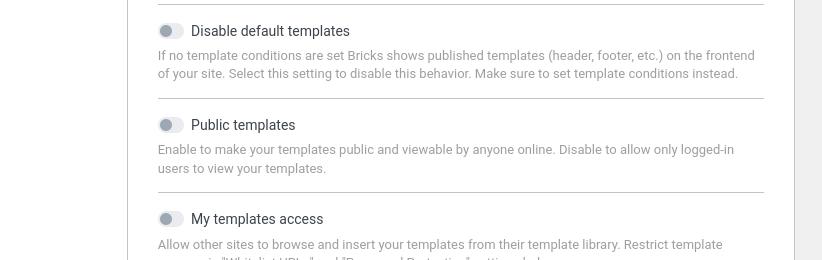
Have you tried Disabling public access to your Templates? Bricks Settings - Template tab - public templates
1 Like
Confirmed. I have a private site with all my templates and Bricks settings show “Public Templates” setting is disabled. Still can see a poorly formatted template grid list with template name and creation date, even tho I’m not logged in and even with a private window.
Not good!
1 Like
Redirect the URL using the Fluent Snippets or another snippets plugin!
How to use the Fluent Snippets plugin?
- Log in to the WordPress admin dashboard.
- Navigate to Fluent Snippets > Add New.
- Enter the name of the snippet, for example: “Bricks Template Redirect”.
- Paste the following code into the snippet editor. Replace the YOUR DOMAIN / URL section with your own URL!
add_action(‘template_redirect’, function() {
if (isset($_GET[‘post_type’]) && $_GET[‘post_type’] === ‘bricks_template’) {
wp_redirect(‘https://YOUR DOMAIN / URL’, 301);
exit;
}
});
- Configure the following settings:
Scope: Choose whether the snippet should run in the admin area, on the front-end, or both. In this case, select Front-end.
Activation:** Enable the snippet. - Save and activate:
Click the “Save” and “Activate” button.
2 Likes
Your code may work, didn’t test yet. But it supposes to work by default. Shouldn’t Bricks team look at it?
thank you but this seems like a bandaid solution. is there a way to configure this within bricks?
Pretty sure the “Public Templates” is only for viewing within the template library. Vs frontend. Could be wrong…
None the less, it should be hidden for sure on the front end. It does make sense that its not, considering its just a custom post type.
Also, i have implemented the action above and it works perfect! (just check the code when pasting…need to replace the accent characters (‘) with apostrophes (').)