Browser: Edge
OS: Windows
In the accordeon element, <ul> is behaving weirdly : no “native” line break. And if you go:
<ul>
<p>
<ul>
the p lose any “native” margin: I have to force big LBs with enter.
Browser: Edge
OS: Windows
In the accordeon element, <ul> is behaving weirdly : no “native” line break. And if you go:
<ul>
<p>
<ul>
the p lose any “native” margin: I have to force big LBs with enter.
Hi Maxime,
Welcome to the forum, and thanks so much for your report!
Unfortunately, I don’t understand what this report is about. Would you please record a screencast and show what you are doing? That would make it much easier. Thank you!
Best regards,
timmse
Hey timmse,
Thanks for welcoming me =)
Here is a quick video of the issue: Bug ? Text in accordeon | Loom
Hope it helps!
Thanks for the video!
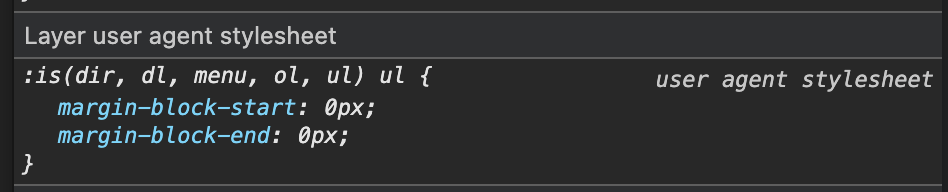
The browser sets the ul margin to 0 because it’s a ul in a ul (the accordion uses the ul tag, too).
Since we don’t have ul margin defaults and again rely on the browser defaults, we don’t add a “magic number” to add a margin if there’s a ul in the accordion. But you can do it, if you want/need to.
Just add this to Bricks » Settings » Custom Code » Custom CSS or the “Stylesheet” tab in your theme styles:
.accordion-content-wrapper ul {
  margin-block: 1em;
  list-style-type: disc;

}
Oh, thanks a lot for the explanation! I’ve added the snippet to my stylesheet and I’ll make sure to remember that detail =)