I have created a stylesheet and set a condition for the entire site. The colour variables are showing both on frontend and backend, but the typography and spacing variables are not working on the backend, in the editor. The show up in the variable dropdown, but the styling does no apply to the content. It does apply on the font end. It is not loading in the editor view.
I have tried many things and spent way to many hours trying to get this working.
sadly, I can’t replicate this issue locally with current details. Please send a short screen recording showing:
the stylesheet/theme style condition
the exact typography and spacing variable values
the element/control where each variable is selected
what changes in the editor preview versus the frontend
With that we can test the same setup directly. And if we still won’t be able to replicate the issue, then I’ll ask for login credentials.
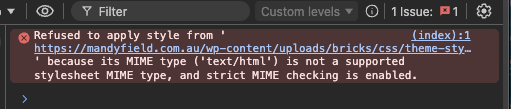
But maybe before the screen recording, can you check what exactly you have in the stylesheet? Because it appears that it’s not loaded. Please ensure that you only include valid CSS inside. Check this and let me know.
This is a error that I see in the console:
Thanks Matej,
here is a link to a video grab:
As far as I know I haven’t added anything to the stylesheet. I have only used what the variable generator created. The only other thing I can think of, is that I did use a bricks wireframe at one point that brought in a whole lot of classes, which I then deleted. Where would I check what is in this stylesheet?
is the problem solved, because I don’t see the JS error anymore? If not, can you send me a temporary login credentials to your site via the email (help@bricksbuilder.io) using the email that you used to purchase the license?
thank you for the login. I think we identified the issue and fixed it. Can you check the website now, if it works?
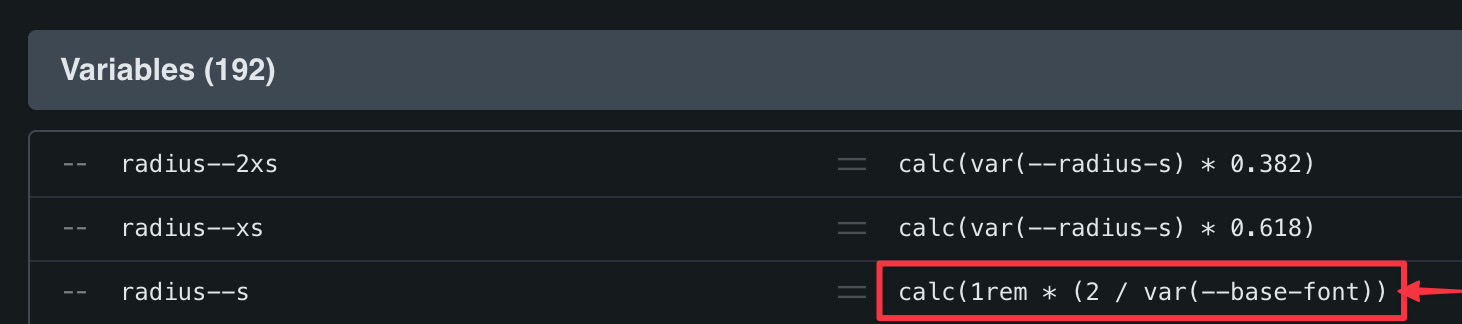
The problem was that one variable (radius--s) was missing the closing parenthesis, which can be seen from the picture. After adding it, the layout looks correct.