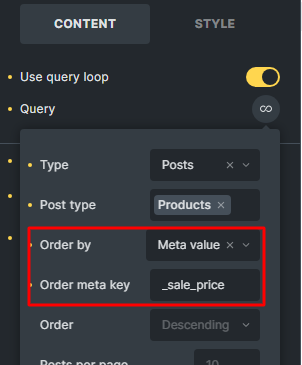
I tried to display the sale product as shown below. But there are two important problems.
1- If Cache query loops are enabled in the settings, when we add and remove a product from the sale, there is a problem in displaying the product in the front end. When Cache query loops.
2- If we have a variable product and only one or more variables have a sale price, that product is not known as a sale product. But if we add the products element and activate the On sale option, the variable products will be known as sale products without any problem. Therefore, this problem exists only in the query loop.
this is the purpose of the object cache. If it is not cleared, it shows the cached data. If your products change frequently you should not use this option.
we use a function provided by WooCommerce in the products element. If you use a custom loop, you are responsible for the correct query and due to the complexity of variable products, the simple orderby setting is not sufficient.
a) Add this to the query editor (without any other query settings)
It is really great that you are working on this feature. I think it would be great if you could add a new section to the query loop to have all the important queries and be easily selectable. Queries such as :
on sale
top sales
featured products
related (for posts and custom post types)
cross sells
up sells
recently viewed
And add the hide out of stock products option as a switcher button. That would be really great.