NO BUG: Problem with popup template

Browser: Chrome 110
OS: Windows

Video: Short screen recording that illustrates this issue

Hi,

There is a strange behaviour of bricks popup template.

I use Jet Engine Listing grid, on grid items i have the popup template and the trigger button.

In the first page of the grid everything works correctly.

When i move to next page, clicking on a button that triggers the listing item popup, it opens all popups of previous page and i have to click close X number of items in order to close them all. It opens so many that causes the backdrop to be completely black. Any idea what is going on? Video attached. I tried disable wp rocket and all the extra plugins, cache clear and issue remains.

Also on home page on first loaded items, the button doesnt trigger the popup, no lazy load is enabled. In all the other listing items and grids it work.

Hi @konlal and welcome to the forum :partying_face:,

thank you for sharing the video with us. I’ve checked on your website (https://frattisauctions.gr/?taxonomy=onsite-auction-events&term=77), but I can’t replicate the issue.

Is the issue already fixed, or do I need to test it more, maybe differently?

Thank you,
Matej

Hello, thank you for the answer and your time that you spent to investigate the issue. The problem was that i didnt have force ajax loading enabled.

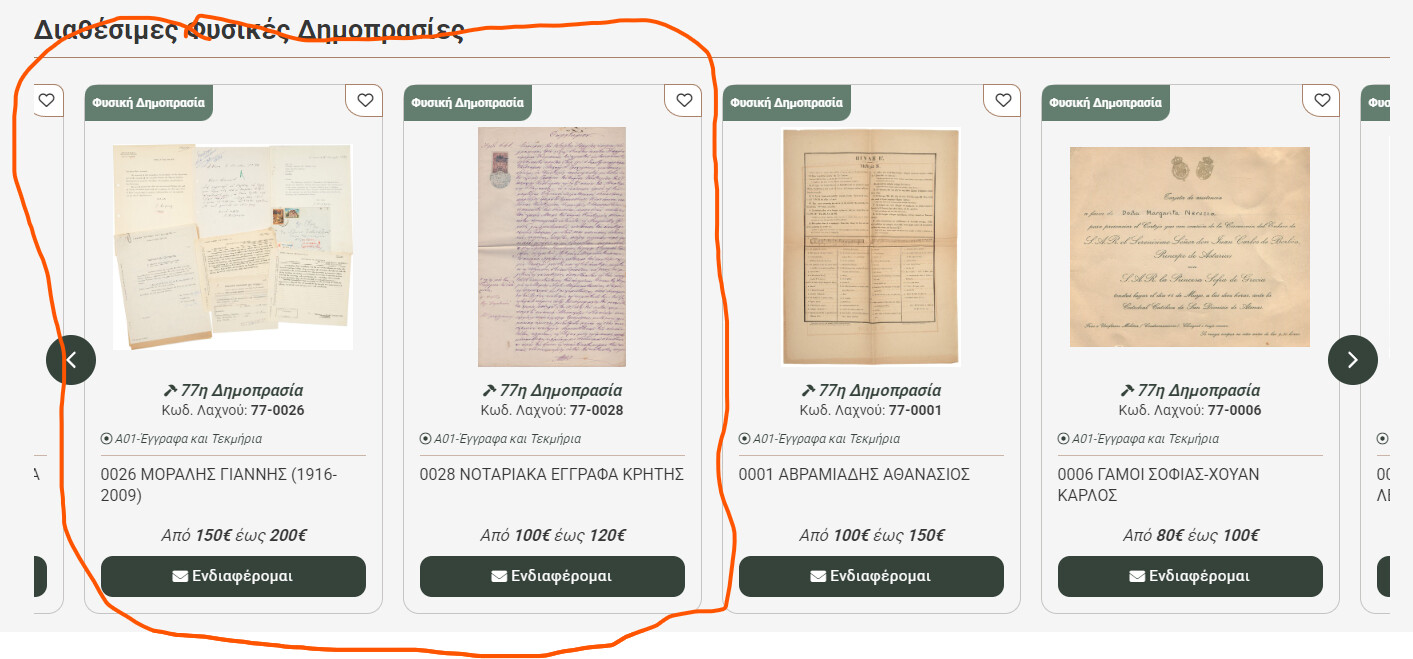
However the problem in the homepage (https://frattisauctions.gr/) remains. When the page loads, the 2 left listing items doesnt open their popup unless i click any of the other that is next to it (0001,0006 etc) or the previous. Those two items are the last in the query result. When i click any of the other and then click on them again, it opens the popup. I dont know what else to try. This only happens on the first grid. I tried to duplicate the same grid below and it was working correctly. I dont have lazy load enabled on the listing grid and also already tried to disable wp rocket.

Hi @konlal,

I see. Looks like the JS events are not registered on those buttons on page load and are only added later.
However, I tested locally, using slider nestable + popup, but I was unable to replicate the issue.

Before I would need access to the website, can you just copy the slider or the section and paste it here, so I can try locally with the same settings as you have?

Thank you,
Matej

U use same slider(jet listing grid slider mode) correct? Sure here is the section:

{"content":[{"id":"vflgom","name":"section","parent":0,"children":["kzogla"],"settings":{"_widthMax":"1440px","_margin":{"bottom":"50"},"_conditions":[[{"id":"moehcc","key":"jedv_condition","compare":"==","value":"[jet_engine_condition jedv_condition=\"query-has-items\" query_id=39]"}]]}},{"id":"kzogla","name":"container","parent":"vflgom","children":["gcidtk","aanalf"],"settings":{"_rowGap":"16px"}},{"id":"gcidtk","name":"container","parent":"kzogla","children":["zbrjgp"],"settings":{"_border":{"width":{"bottom":"1"},"style":"solid","color":{"hex":"#a98269","id":"edxybs","name":"Color #2"}}}},{"id":"zbrjgp","name":"heading","parent":"gcidtk","children":[],"settings":{"text":"Διαθέσιμες Φυσικές Δημοπρασίες","_padding":{"bottom":"8"}}},{"id":"aanalf","name":"jet-engine-listing-grid","parent":"kzogla","children":[],"settings":{"list_tags_selection":"ul_li","columns":"4","column_min_width":240,"post_status":["publish"],"posts_num":6,"max_posts_num":9,"not_found_message":"Δεν βρέθηκαν προϊόντα.","load_more_type":"click","hide_widget_if":"always_show","slides_to_scroll":1,"arrows":true,"arrow_icon":"fa fa-angle-left","autoplay":true,"autoplay_speed":5000,"infinite":true,"effect":"slide","speed":500,"scroll_slider_on":["desktop","tablet","mobile"],"horizontal_gap":"20px","vertical_gap":"20px","prev_vert_position":"top","prev_hor_position":"left","next_vert_position":"top","next_hor_position":"right","pause_on:hover":true,"lisitng_id":"15637","custom_query":true,"custom_query_id":"39","equal_columns_height":true,"columns:laptop":"3","columns:mobile_portrait":"2","carousel_enabled":true,"dots":true,"center_mode":true,"lazy_load_offset":"200","center_moder_padding:mobile_portrait":"0","_overflow":"hidden","arrows_border":{"radius":{"top":"50%","right":"50%","bottom":"50%","left":"50%"}},"arrow_bg_color":{"hex":"#35433b","id":"whnfdx","name":"Color #1"},"prev_left_position":"12","next_right_position":"12","dots_bg_color_active":{"hex":"#35433b","id":"whnfdx","name":"Color #1"},"dots_border":{"width":{"bottom":"1","top":"1","right":"1","left":"1"},"style":"solid"},"arrows_size:mobile_portrait":"20","arrows_box_size:mobile_portrait":"32","horizontal_gap:mobile_portrait":"16px","vertical_gap:mobile_portrait":"0","_padding:mobile_portrait":{"bottom":"0","top":"0","right":"0","left":"0"},"columns:mobile_landscape":"2","prev_top_position:mobile_portrait":"40%","next_top_position:mobile_portrait":"40%"},"themeStyles":[]}],"source":"bricksCopiedElements","sourceUrl":"https://frattisauctions.gr","version":"2.1.4"}

Ah, yeah, this might be why it’s working on my end :sweat_smile: I just assumed what you have is basic query loop.
As I’m not power user of JetEngine, what is the purpose of JetListing over the native Query loop?

If it’s only happening with the Jet listing grid, have you tried contacting JetEngine about the issue?

Best regards,
Matej

I contacted them, but they don’t know what is happening, never mind I will use the native slider with a query loop :slight_smile:

Hi,

thank you for the update. I’ll mark this topic as no-bug then, as it is related to only the JetEngine listing element.
If you ever have further information about this, please let me know.

Thank you,
Matej

Thank you for this. I found the issue is happening only when i turn on the slider mode of the jet engine listing grid and the center mode is On. Only on the last two items of the query result, something is happening with the scripts of the visible elements i guess because the center mode shows in viewport the last two results of the query as first items correctly in order for it to work. I will inform for any updates.

1 Like