Browser: Chrome
OS: Windows 11
Server: Linux/LiteSpeed
URL: locked
Hi guys. I’m loving Bricks 2.1.3 (and before). Long term user now… but I have a strange set of ‘phantom’ css styles that must somehow be cached somewhere in Bricks/system but Bricks (and the browser) are overriding settings applied in Bricks Builder and seem (actually are) overriding my Bricks-based settings with previous/older settings.
NB the following grab…

…shows a query loop which has feint top/bottom borders (although you may not be able to see them) which is part of a previous version of the styling applied. The Chrome css summary of which is here…
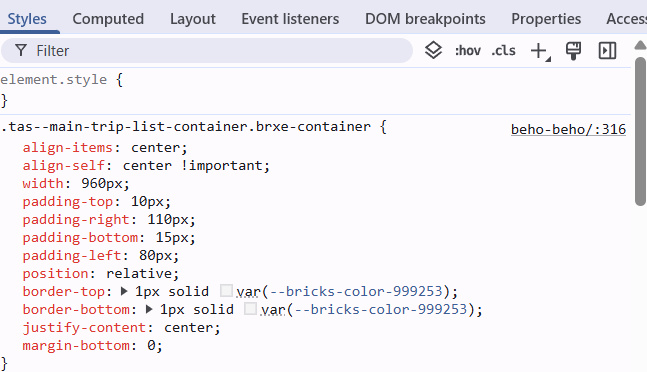
And seems to referencing row 316 in the css but the actual live settings in Bricks are as follows…
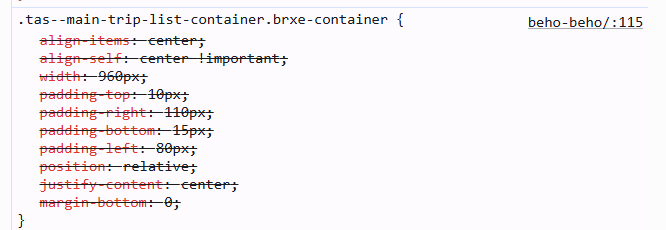
Which you can see refers to row 115 - and does not contain any top/bottom border styling.
And so the phantom (cached) css overriding the actual css/settings is whatever (or wherever) that row 316 data is?
Let me know if that doesn’t make full sense - although I believe the grabs should be fairly self-explanatory. I have been back and forth in the code multiple times now, purging and clearing the browser cache each time, to no avail.
The site is current development and is locked so can’t be shared with you directly (unless you need a temp login/password) or if you already know what this phantom behaviour most likely is?
I have noticed other elements on the site (which was mostly put together before bricks 2.0 release) with similar style element errors that I can never find in the builder - so I presume there must be some kind of known bug/fix for this?
Any help/workrounds would be more than appreciated as the site is de to go live very soon and we simply have to be able to fix these kinds of gremlins.
Many thanks - in advance.
Q.
