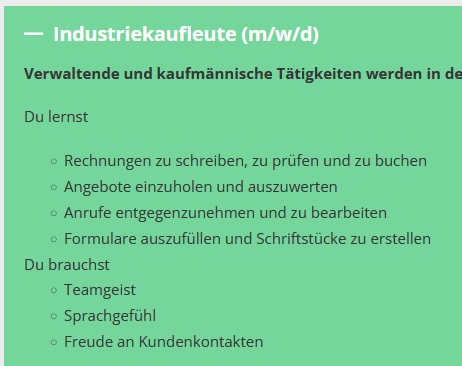
When a p tag follows an unordered list element within the non-nestable accordion element, it does not get any bottom margin. However, when a p tag is followed by an unordered list, it gets a 18px bottom margin.
The <p> tag has a margin-bottom by default to create a space between the following paragraph/element. At the last <p>, this margin is removed because you don’t want it there in 99% of the cases.
The “problem” will probably occur in some other places, but changes to it would probably lead to more problems, or optical deviations, for a lot of users.
You can solve your problem easily by telling the element that all <p> tags should get a margin-bottom. Add this to the accordion » custom CSS or if you want this globally, add it to Bricks » Setting » Custom CSS without %root%:
%root% .accordion-content-wrapper p {
  margin-bottom: 1.2em;
}