Browser: Chrome
OS: Windows
I am trying to create a nestable accordian with multiple subjects. I have not selected “expand first item” but it opens by default anyway.
Please advise how to start with the accordions all closed.
Browser: Chrome
OS: Windows
I am trying to create a nestable accordian with multiple subjects. I have not selected “expand first item” but it opens by default anyway.
Please advise how to start with the accordions all closed.
Hi @msc007,
I’m unable to reproduce the bug. Can you please share a screenshot or steps to reproduce this?
Thank you.
Best regards,
Charaf
Hi. Thanks for getting back to me. I rebuilt the accordion 3 times, and now it seems to work. Just a linked question - I saw a bricks screenshot that there was a way to transform or turn the icon from within bricks, without using CSS etc. I can’t see this option anymore - is this still available, but just missing on my version? If it is gone, what is the easiest and best way to turn the icon, e.g. from a side arrow to a down arrow, etc.
Hey Maurice,
if you want the same icon for both states (opened & closed) and just rotate it this should be what you are looking for.
Let me know if that helps.
Best,
André
Thank you. That worked.
Found myself in a similar situation, so for anyone experiencing mentioned “bug”, here’s what’s causing it…
Nested Accordion structure is defined as soon as you add it to your page.
Accordion item consists of a Title and a Content block.
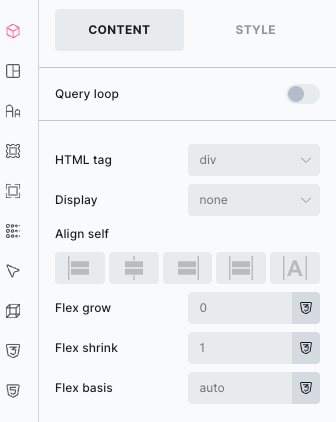
A Content block is not identical to the standard Block element, and if you change its Display setting from “none” to “grid” or “flex”, it’ll cause the parent Item to expand on front-end.
At least that’s the case on my end.
So if you need to change the Content element layout, just drop in (nest) a “real” Block element inside and build whatever your need from there. A Content must remain display: none by default.