Bricks Version: 1.7.beta Browser: Chrome Version 109.0.5414.120 (Official Build) (64-bit) OS: Windows(PC) / Linux(Webserver). URL: (a link to a page that illustrates the issue would be really helpful)
[Please describe in as much detail as possible how we can replicate this bug]
After upgrading to 1.7 beta heading and text styles max widths which where set via a separate class no longer allowed setting the max width.
Just create a header or a text element and try to set the max width
When I just set the width, it works fine, but not if I set the max width
I have downgraded a test installation (no plugins or custom CSS at all) to 1.6.2, inserted heading, basic text and rich text, and provided each with a class that has a max-width of 200px. I used inline styles as the style method.
then I upgraded to 1.7 beta and checked the frontend - all good.
then I changed to external files, regenerated the styles, and checked the frontend - all good.
then I deactivated class chaining, regenerated styles, and checked the frontend again - all good.
then I switched back to inline styles: all good.
So I would recommend that after the update you regenerate the styles or switch the style methods, activate class chaining and all the crazy new stuff bit by bit, and see if that changes anything.
I took out all plugins, except acss and frames and then switched style methods to inline and back, still not working, I then turned on class chaining and back off, still no luck.
Turned add element id & class as needed on and off and still no luck.
The strange thing is that when I style the heading on the ID level, it works, but when I style it on the class level, nothing happens in the frontend.
What I do see in the frontend is that the changed value shows up in the css, BUT the id setting over rules the class setting.
aslotta, thanks for a workaround fix, BUT that is not what I need. That would mean I would have to start adding lots of extra things…
…in fact, going this route would mean that I would now end up becoming the person who starts chaining classes myself, and was it not the purpose to bring that chaining to an end?
I understand that it is an automatic css rule, but in 1.6.2 this just works, and it is only in 1.7 beta that this problem pops up.
Posting here to help the team get sight on the problem and see what causes it.
Also posted on the ACSS forum, so we’ll see what happens, thanks for pointing out that it might have to do with ACSS.
Thanks for thinking along though, definitely appreciated!
OK, one step further, I got a reply on the ACSS group and apparently if I add !important; to the max width setting, it will force it to work front end, but the problem is not solved.
I tried on a second site and the exact same thing happened.
I heard back from the ACSS people, they told me this:
Due to the way Bricks chained classes in earlier versions the Automatic.css bricks over-rides had to take that into account.
We will change the Automatic.css behaviour in a future release, but it will require that toggle to be set on, it’s not possible to have Automatic.css handle both on and off settings.
For now it would make more sense to revert your site to the original Bricks behaviour for a while.
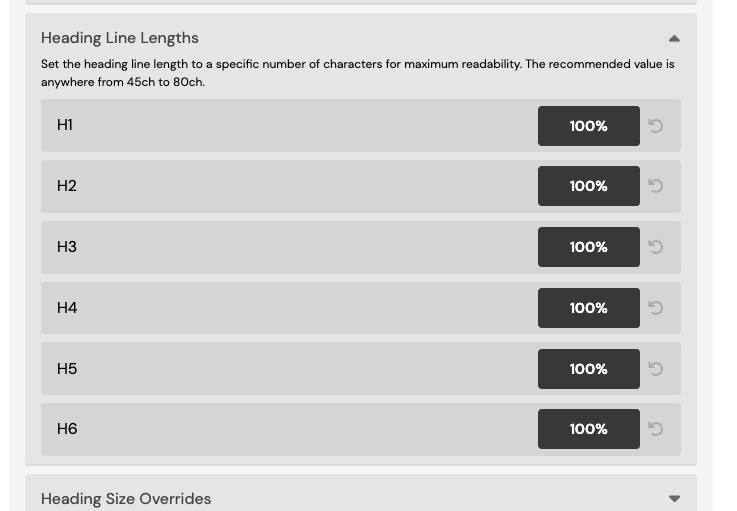
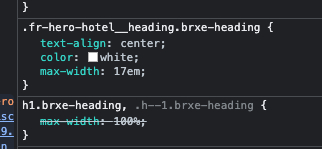
The way ACSS / Frames implemented the CSS is different on this installation compared to your initial example. As you can see on the screenshot it uses the native Bricks class system (which adds the .brxe-heading to the selector – which makes it more specific than the general ACSS max-width: 100%; rule) where in your previous (1.7) example it uses a “regular” selector (.fr-hero-hotel__heading) without any chaining.
Exactly, and it is ACSS doing one thing because of bricks doing the chaining.
And ACSS did this because of the chaining, as long as that is in place, the fr-hero-hotel__heading is chained to brxe-heading and somehow takes precedence over the h1.brxe-heading
Once I activated 1.7 beta it all went haywire.
At least it is now on the radar of the good ACSS people and they will come up with something there, until then this won’t work well with frames and ACSS
True, it is in the hands of ACSS to solve the problem. :where(h1.brxe-heading) could help, for example, but Kevin and co certainly know what they are doing and how to solve this problem.