Hi Bricks team,
I’m currently testing a custom Bricks build based on Bricks 2.4.2, which was provided to me by itchycode because of a separate issue related to contextual spacing and Gutenberg.
While testing this build, I noticed another Gutenberg-related styling issue. I’m not sure whether this is connected to the recent Gutenberg/theme style changes or whether it is a separate issue.
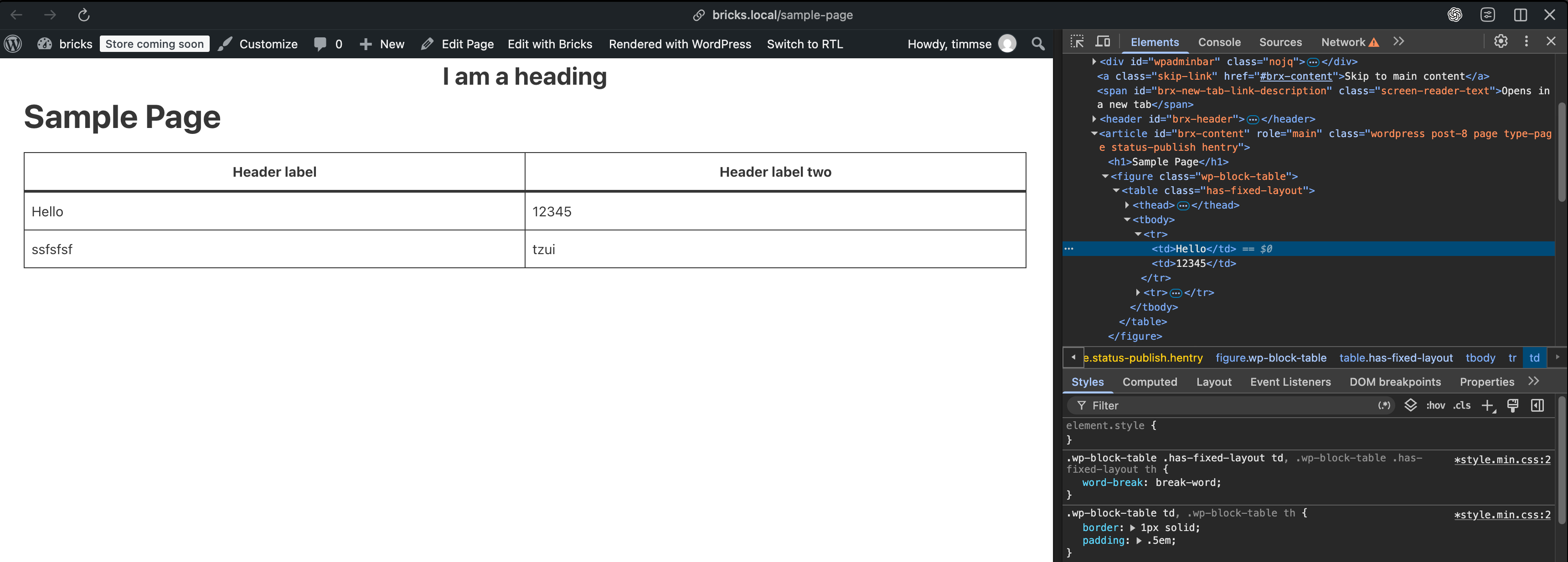
Gutenberg tables are displayed correctly inside the Block Editor, but appear essentially unstyled on the frontend.
The table markup on the frontend appears to be correct, for example:
<figure class="wp-block-table"> <table class="has-fixed-layout">
However, the expected table styling does not seem to be applied on the frontend.
When inspecting the table cells (td) in DevTools, I only see the following Bricks rule:
border-color: var(–bricks-border-color);
Apart from that, the cells mainly receive the browser’s default styles. There is no corresponding padding or border styling that would produce the table appearance shown in the Gutenberg editor.
The same applies to th, apart from the browser’s default bold styling.
I’m aware that there are currently several reports in the forum regarding Gutenberg styling and the changes introduced around Bricks 2.4. However, I couldn’t find an existing report that specifically describes this issue with Gutenberg tables on the frontend.
Before adding custom CSS as a workaround, I wanted to check whether Gutenberg tables should normally receive frontend styling from Bricks and whether this behavior could be related to the recent changes.
Could you please have a look and let me know if this is expected behavior or a potential issue?
Thanks!

 ..
..