
I am turning on custom font preloading on every site but when loading the website, I still get a flash of unstyled text
Hello again,
Thanks for your report!
We don’t have any current reports on this, so could you please provide specific details about your setup and a link to your website so we can reproduce the problem if necessary (or at least see it)? Thanks in advance!
Best regards,
timmse
No caching plugins, as LSC is problematic with Bricks. Hosten on LiteSpeed servers, with Hostinger.
I can record videos with OBS if that helps.
Thanks for the links! Seems as if there are only preload tags for certain font files, but not all of them. I don’t know how to replicate this issue, so please send temporary login credentials to one of the sites and a link to this thread to help@bricksbuilder.io using the email address you used during the purchase.
Sent over via email, thank you
Thanks for the login credentials to Edyta Domaradzka Photography 
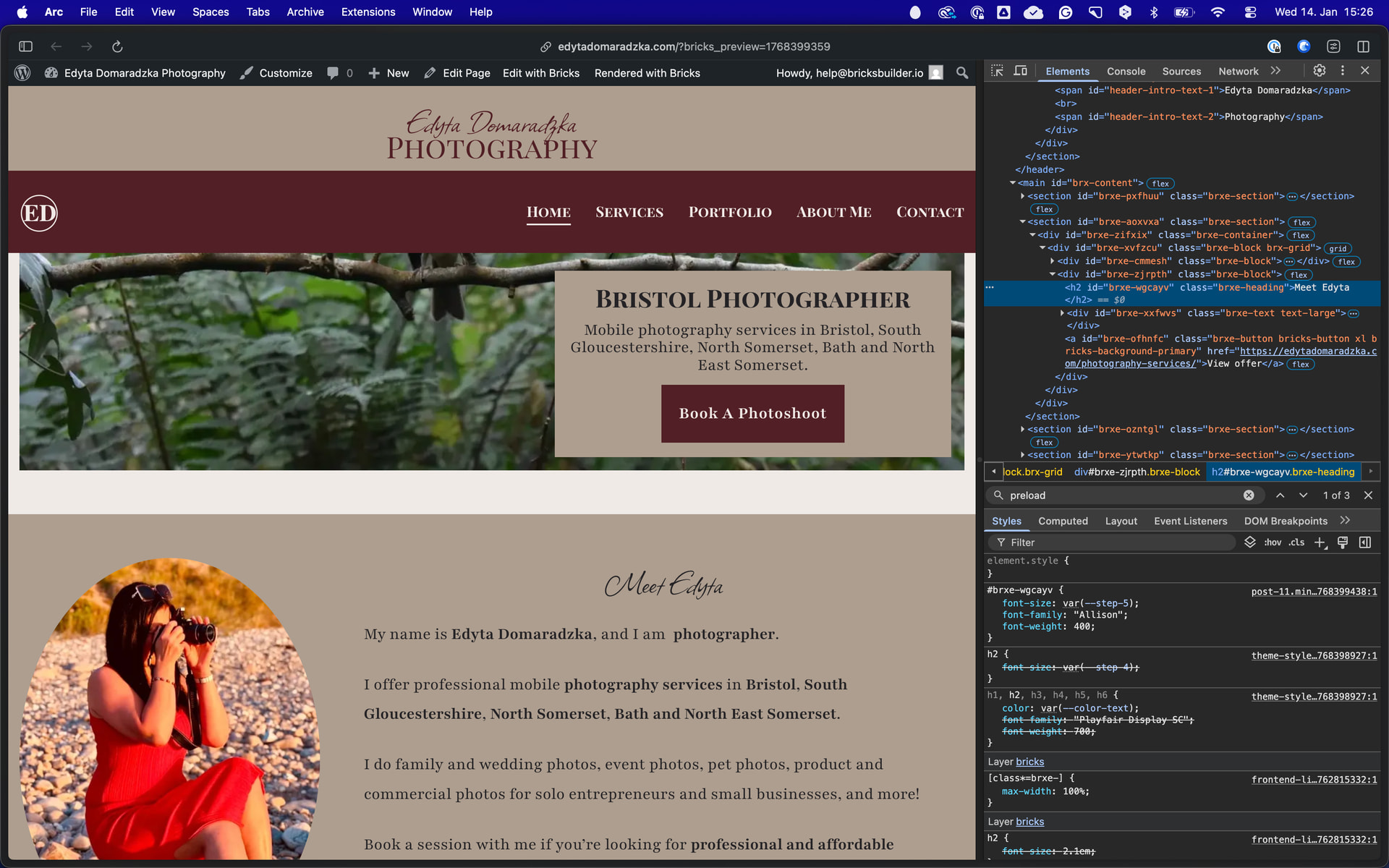
The reason the fonts are not preloading is actually quite simple: you set the font family and weight in custom CSS, but not through the element’s UI (apart from the theme styles for body and headings, which are preloaded perfectly fine), which is required to make this work automatically.
To prove this I just outcommented the custom CSS and added the typography settings through he UI and and preload tag shows up as expected:
You can find a similar report and explanations here:
As mentioned in the linked thread, if you want to keep the “custom CSS” route, just add the preload tags manually to the head scripts of your header to ensure that they are always preloaded.
Any plans on making this work eith custom CSS as well? User interface is very disorganized and slow compared to using the custom CSS tab. Its much easier and faster to just type in CSS instead of clicking through countless tabs.
I understand your preference for working with custom CSS, but the feature request you’re making doesn’t align with how font preloading fundamentally works.
Why automatic preload can’t work with custom CSS? Bricks would need to parse every line of custom CSS across your entire site, extract font-family declarations, match them to uploaded font files, and generate preload tags dynamically. This would happen on every page load and create significant performance overhead - the exact opposite of what preloading is meant to achieve.
The UI-based approach exists precisely becuse it allows Bricks to track font usage at build time, not runtime. When you set typography through the UI, Bricks knows exactly which fonts are used and can generate optimal preload tags without any parsing overhead.
The way I see it you can:
-
Use the UI as designed - Set base typography in Cuatom Fonts/Theme Styles, use CSS variables in your custom CSS when needed. This gives you automation + flexibility.
-
Manual preload tags - If you insist on the custom CSS route, add preload tags once in Theme Settings → Head Scripts. This is a one-time setup that takes 30 seconds.
You can either leverge Bricks’ automation by working within its system or handle preloading manually if you go fully custom. But that’s on you. Asking for automatic parsing of custom CSS is asking the team to build a complex, performance-heavy solution for a problem that’s already solved.
The choice of workflow is yours, but the technical limitations are what they are.
1 Like
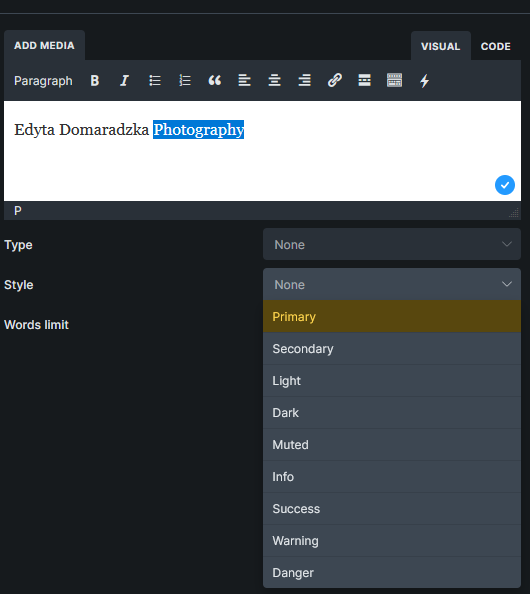
How do I change font-family using the UI? I have a single line of text, separated by
. Half of this text is displayed with one font, and the other half with another. Does the native UI support using tags for that purpose? Or can I manually select a part of the text in the field and change its font? I couldn’t find such an option within the UI.
Thanks so much for the detailed reply @x_std 
@primexaos
Instead of one text element, you could simply use two to assign the font/weight directly. Or you could manually insert a span (as you are currently doing anyways) and create a custom selector to which you can assign different font styles: https://youtu.be/chdGTb0RK_c?t=3108
Thanks for the response. I can not use 2 elements because it’s incorrect HTML and breaks SEO (search engines will recognize the text as 2 separate strings). When it comes to the custom selector, you mean using basic text element, wrapping the text I want to change in <span> without any classes or IDs, and then manually typin in in the selector GUI field? Sorry, didn’t quite get the video.
I didn’t saw video myself but you ca ntry with : First part of text <span class="alt-font">Second part of text</span> - where “Second part of text” should be styled as you intend to no? Sorry typing this on the go.
Hmmm.. but then the builder doesn’t know if the class is used, since it’s not attached to the element but typed in manually…?
How do you mean? Of course it does if you add it to the builder. It can be done in more ways. You can add a class directly in the widget (not recommended), via Bricks settings/Custom code, or 3rd party snippet manager and run conditionally, functions.php, or numerous ways.
You could even type and create class within that page from inside Bricks editor,style with Bricks panels, and reuseit on another page. Because once the class is created, you can reuse it on other pages. Editing thru dedicated CSS editor for advanced font styling would be more convenient, though.
I recommend you learn the basics of the tool you use. Not saying this in bad faith. I have a sense (maybe I am completely misunderstanding what you want), you want some magic Bricks editor areas or something, but I can guarantee you that what you want is possible in quite a few ways, and all of them are more optimal than asking Bricks developers to make a tool in the builder for this situation you have (it really seems basic).
I thought you preferred to use custom CSS, but it looks as if you don’t know how to apply that custom CSS to your work. What am I missing? Create your CSS class and define its style, call it inside the text editor via span, iterate until done ,and move on?
Try this: https://www.youtube.com/watch?v=Xa9lHdq5kWU
These are the basics and that channel is great for people who want to learn bthe asics. IMHO
In case I wasn’t clear:
Using a different font for specific text within a paragraph
- Wrap the text you want styled differently in a
<span>with a custom class:
html
First part of text <span class="alt-font">Second part of text</span>
- Add the CSS rule to your stylesheet (in this example I added Poppins because it was the first top of my mind):
css
.alt-font {
  font-family: 'Poppins', sans-serif;
}
Obviously, make sure
- the font is loaded with whatever method you prefer, since that’s the main dispute in this thread.
- CSS class is added to your stylesheet with whatever method you prefer. If you don’t know where or how starts with Bricks Settings/Custom Code - there’s area for that purpose.
Here is what happened:
- I set Bricks to preload custom fonts.
- I wrote the HTML and CSS manually.
- Bricks didn’t preload custom fonts, causing FOUT, because it doesn’t scan your CSS; therefore, it does not know whether this font is being used or not.
Now here come the points I don’t understand:
- You said Bricks doesn’t read custom CSS, and now you’re telling me to use custom CSS to trigger preloading. We have already established that this is not going to work.
- After wrapping the HTML content in
<span>and assigning it a class (which is kinda what I did in the first place), I would have to create that class and the declarations for it. If I assign the class via Bricks’ GUI (as you suggested before), it’s going to affect the whole element, which I do not want. - After assigning a class to the span tag covering the desired string part, if I define the class within the main stylesheet, Bricks is still not going to read that because it doesn’t read CSS.
From my point of view, it looks like you’re contradicting yourself, and that’s why I’m asking for clarifications because it looks like I misunderstood your instructions. I am not looking for a tutorial on how to use classes; I am asking for my options regarding triggering custom fonts preloading.
We already established that I can set the typography via GUI (not via custom CSS) which is messy and bad practice.
We also established that I can use 2 headings instead of 1 and style them independently via GUI, which is invalid HTML and negatively affects SEO.
Another option would be to add a script via page settings in the header template (since I use this fonts in the header), and add <link rel="preload" href="/wp-content/uploads/.../font-name.woff2" as="font" type="font/woff2" crossorigin> which triggers preloading correctly and does not cause any issues. This method works fine.
What are the other options? You mentioned using <span> but this is what I did at first to later find out that Bricks does not read your CSS for the purpose of font preloading. I’m not sure how to use the GUI without affecting the whole element.
Also, from what I understood, I can create a custom span selector via GUI, in the same place we use pseudoclasses and pseudoelements, and in this scenario, this custom span selector, would work only within the scope of this element, and (if styled via the GUI) would case custom font preloading - is that correct?
-
What!!! Where did I say or write that? I can’t see or understand what would motivate me to say that. I can’t even find that anywhere in this thread, probably because I didn’t say that? I don’t understand how you’re making those conclusions.
All you need to do is style your class (it goes without saying that it should be loaded in some way), load your font, and, of course, manually add the preload tags to the head scripts of your header - a step that was previously communicated, so I assume you understood that part. No one suggested that you add a script via page settings in the header template (what script, by the way?)
I did not suggest you use 2 heading elements, though I completely reject your claim that using 2 heading elements produces invalid HTML. Perhaps you misuse the term “invalid HTML”.
Look, I tried to help in good faith, but this is getting out of hand for me. It would help a lot if you stopped conflating terminology, stopped making conclusions based on info that does not exist in this thread, like people said something to you that they did not. Try to follow and understand what people are suggesting.
Good luck with everything.
Take a few deep breaths and calm down. Nobody is trying to fight you, I’m asking for a clarification because I’m not sure if I understood all the advices correctly. I am not looking for CSS tutorials, I’m trying to understand which mechanics cause Bricks to preload custom fonts and which do not. Your messages were unclear, and this is why FROM MY POINT IF VIEW it looked like you contradicted yourself - this why I asked for clarification because I’m pretty sure I got you wrong. Your messages were unclear to me.
Now:
Bricks does not read custom CSS to trigger font preloading automatically (even with preloading option on). This is why styling span with custom CSS caused FOUT on my client’s site. If I used the GUI to change the typography, it would detect that font and use it.
Using two separate HTML elements for a single string is semantically invalid. E.g. h1: Mc, h1: Donald’s is semantically invalid; for McDonald’s, it should be h1: McDonald’s. Wince McDonald’s is a single string, it shouldnt be separated into 2 distinct strings next to each other.
I have already triggered preloading manually by choosing the custom script option and adding a preloading instruction in the header template - it’s working. I was asking about the other options that were suggested in the conversation. From what I understood, i can span it like I did and add a custom selector via GUI, then style via GUI, which is messy, but technically speaking resolve the font preloading isssue.
I am trying to ensure whether I correctly understood the advice regarding creating a custom span selector via Bricks GUI and what other options do I have.