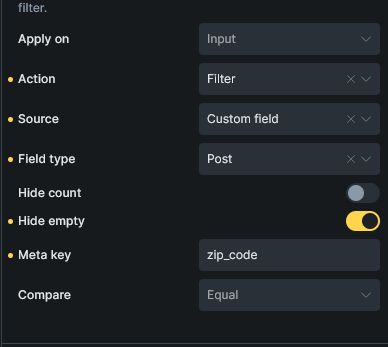
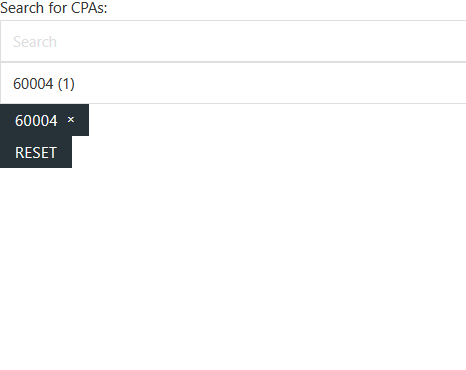
I have 3 Posts with a field called zip_code (60005, 60004, 60605). I’m using a Posts query and a Filter - Search that connects to my posts query. Then, within the Filter Search I’m using a search post meta fields and select zip_code.
When I type (you can test) in my search 60605, I get 3 results, even though I would expect only 1.
When I try searching by cities, same thing happens. Search for “Chicago” and I get bunch of unrelated results…
I’m not able to replicate the issue locally. I’ve added a custom field with ACF to my posts and filled in some data, enabled search criteria on custom fields, and tried to search it. It was correct every time.
Is it possible that the other posts also have that value somewhere?
Can you record a video of your setup (backend and builder settings), if I notice anything else, or maybe even better, because I can’t replicate the issue, can you send temporary login credentials to your website and a link to this topic to help@bricksbuilder.io using the email address you used during the purchase, so we can take a look?
By the way, DUPLICATE: Live Search Doesn't Work was a different issue. This one is relating that filters don’t properly work, the other one is that live search doesn’t properly work.
An issue I see is that you have two queries. One query on the Posts Block and one query on the Posts Element. You should only need the one query on the Posts Block (parent), then the use the header a basic text elements within as child elements and pull the dynamic data into each.
Here is a video I did showing the setup I had and was not able to replicate his issue. But as I noted, he does have two queries which I think might be the issue.
However, I did notice something weird and not sure if it is a BUG or not. But you can see when you reset the search filter it loads some of the query items back in. Thoughts?
@shingen Thanks so much for your video. I think me having the 2 queries might have been the problem.
On the removal of the filter, yes! I have the same issue and opened DUPLICATE: Live Search Doesn't Work (which got closed accidentaly). I love your workaround!
Excellent, glad it was helpful and glad the workaround helped too. Hopefully they can sort of the bug with the query showing items after the search filter is reset.
Here is a little video showing you of that setup for the reset and filter. Let me know if you have any questions.
Hey. First off, I want to thank you for your assistance in troubleshooting and resolving this. @debtadvice, I believe we can consider it NO BUG now, right?. In response to your inquiry, I believe you have to choose (or make) the wrapper element that surrounds the query loop and then utilize it there. Would you be able to try that?
As for your advice on the parent wrapper, perfect suggestion, as that works great (So no bug). Here is a little video showing the final result with the all the new updated changes.
Hey @shingen thanks so much. Another question is on “Filter Select”. I connected it to my query, for custom Post type and entered zip_code. I see 3 zip codes on the UI, but when selecting one of them it doesn’t filter the results. Does it work for you properly? I appreciate all the help!
is this still when using Live Search functionality? If you filter, and then if you click on the “Search”, it should show correct/filtered results.
But, it will only show on search, because live search is intended for searching.
Just as @Matej has said, the live search function is for the search field only and not the select.
There are other ways you can work with the select field and showing content, but you would need to turn off the “Live Search” function within your query.
@shingen@Matej so, if I use “Filter Search” with live search on, and filter for say city “Chicago”, I can THEN use the “Filter Select” correctly filtering further.
But if I start with “Filter Select” (connected to the same query), I can’t get the results to show up.
I feel there should be a way to get both to work..
No sorry that will not work. The reason for this is you have one query which the Live Search is using. The Select Filter also requires a query in order to work. If you have that Select Field on the outside of the query it will not show any data output, as it is query that is being control by the Live Search (which of course is hidden until you start a search query).
Could you be more specific on what it is you are trying to achieve? There might be a different approach if we know the full picture.
Sorry to say, but the native live search does not work that way. Live search hides things at start and then when you enter the character length you define, then results start too show.
If you are wanting to use the other filters after Live Search has run, what are those Select Filter drawing their data from? It cannot be the same query, as that query is being controlled by the Live Search and thus making only the content that you have called visible.
Typically when I make an Events page I usually always show all the events and then displayed them based on Event Start Date, Location, Event Title, etc. (most cases it is by start date). Then if someone wants to filter out to look for a specific event, then can.
Your approach could work, but not with the native elements, you would have to code it your queries and fields out by hand. To be honest, it seems like more work then what is needed – but that is just me.
 In response to your inquiry, I believe you have to choose (or make) the wrapper element that surrounds the query loop and then utilize it there. Would you be able to try that?