Hey there,
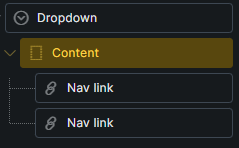
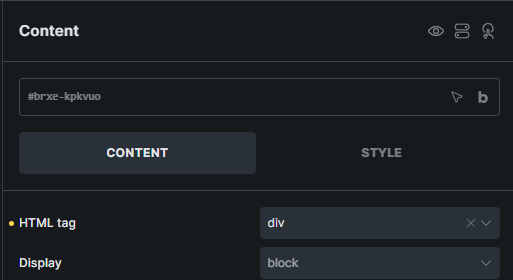
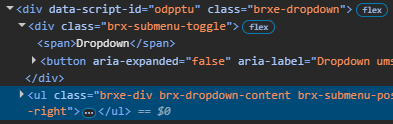
just noticed, no matter which HTML tag you choose for dropdown content, it renders as <ul> which can cause seminatic problems.
Hey there,
just noticed, no matter which HTML tag you choose for dropdown content, it renders as <ul> which can cause seminatic problems.
Hi @bbua97,
Thanks for your report.
This is expected behavior for the regular Dropdown element, so I’ll mark this as no bug.
For non-mega dropdowns, Bricks automatically renders the dropdown content as a navigation list structure:
<ul class="brx-dropdown-content">
  <li class="menu-item">...</li>
  <li class="menu-item">...</li>
</ul>
This is because child elements inside a regular dropdown are automatically wrapped in <li>
tags. If we allowed the Dropdown Content wrapper to be changed to something like <div> or <section> in this mode, the generated markup could become semantically invalid, for example <div><li>...</li></div>.
The HTML tag control for Dropdown Content only takes effect when Mega menu is enabled. In Mega menu mode, Bricks does not automatically wrap the children in <li> tags, so you can use a more custom structure and change the content wrapper tag as needed.
Best regards,
Matej
I see, but for dropdown use anywhere on a page without using it as a menu, it can be semantically incorrect with the default tag behaviour, I guess I have to build a custom dropdown for this purpose.
I see. You could try tagging it as a “mega menu,” and then you should be able to change it. Perhaps that will work for your specific use case.
Matej