Browser: Edge
OS: Windows
Video: Synology Drive
After componentizing an element, it seems some values no longer cascade the same way, requiring !important to work.
Browser: Edge
OS: Windows
Video: Synology Drive
After componentizing an element, it seems some values no longer cascade the same way, requiring !important to work.
Hi Jonathan,
Thanks again for your report!
I cannot reproduce the problem. I assume it’s also caused by the invalid CSS from the other report.
Best regards,
timmse
Still occurring after fixing the errant CSS variable. No value I enter in column gap or row gap within the component takes effect. The exact same elements outside the component work as expected.
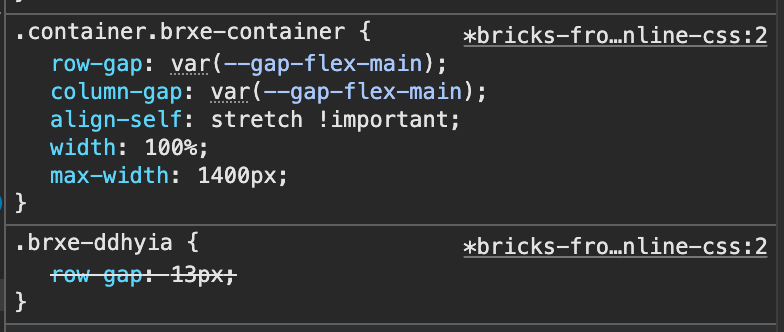
Looking at the code on the front end and comparing, it looks like it’s because the rules applied directly to the element (non-componentized) use the ID, while the rules applied to the componentized version use the same element hash, but in class form (.brxe-ddhyia).
You can see an example on this page. The first header element is componentized, the second is not: Who We Are – Coalition for a Multilingual RI
You’re running into a specificity issue. Disable class chaining in Bricks » Settings » Performance and it should work as expected.
.container.brxe-container has a higher specificity as .brxe-ddhyia.
Thank you, that does solve the issue. Interestingly, I noticed that rules applied to an element via ID are converted into a class with the same name when creating a component from an element. This behavior seems a bit unexpected, but I’m guessing there are technical restraints that make keeping the ID based rules impractical.
That’s right. The biggest limitation is that an ID should be unique and should only appear once on a page, which is simply not possible with buttons, cards, sections/section intros etc. that usually exist more than once per page. That’s why we automatically convert the ID into a class, just like with the query loop, to keep the HTML valid.
Of course. The simplest solution for creating components if you need automatically generated unique IDs per component would be to just code a custom component, correct? P.S., coming from Elementor, I deeply appreciate how familiar it is to develop components for Bricks. The front-end component builder is a marvelous bonus.
You can add a custom ID if needed: