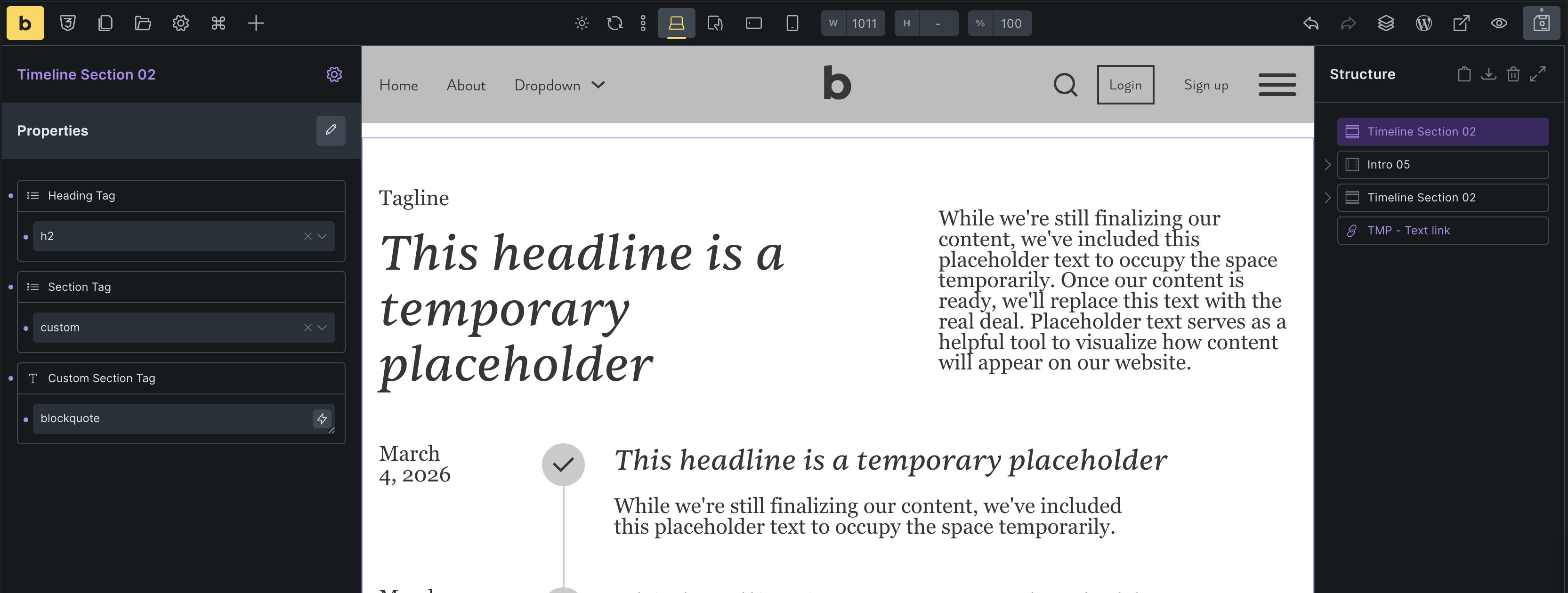
When creating a section component, create a select property hook it up to the HTML tag. When trying to pick a custom tag it won’t show the field to enter the custom HTML tag.
Also when creating a text link component, it is possible to include the icon selection but not to select which side it get situated. You have to go back inside the component to do it.
Maybe I’m doing something wrong, but both seem a bit odd to me.
I’m not entirely sure I understand your report correctly, but if you want to use a custom HTML tag, you need a text property that is linked to the custom tag’s text input field (see my screenshot, which doesn’t make sense and just serves as an example).
Currently, the alignment of the text link icon cannot be linked to a property, but you could use a class property to add a utility class that, for example, changes the flex-direction to row-reverse or uses flex order.
Thanks for the fast response. And thanks for the explanation. So before creating the actual select property you’d first have to setup the text property, link it to the custom tag field and only then create the property with the select for the actual select field. Not gonna lie it feels a bit like going backwards.
I think if someone hits custom on the select property for the tag it would be more intuitive if the text field then just pop ups instead of it being a separate property, but that’'s just me I could be wrong haha
As for the icon I ended up using a variant, but utility class might be a cleaner solutin
Thanks!
The problem is that the custom tag input depends on another control. We can link them in the builder itself, but not within the conditions at present, and I don’t know if that would even be technically possible. However, there is a solution in this case that may not be particularly intuitive, but it works. In general, the question arises as to when a custom tag is necessary, since you could just as easily add it to the select property, so there’s only the tag dropdown including your “custom” tag
Yeah I suppose it doesn’t happen often. Currently building my first bricks site wich is a recipe blog. So needing a header tag etc. for the article. I guess it’s one of the rare cases where you’d want that haha