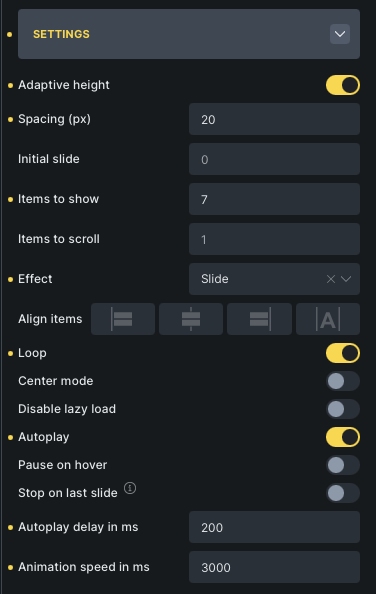
Sometimes I can set it as low as 100 or 200ms, but that also seems to depend on the “Animation speed in ms” - if that is higher, then the “Autoplay delay in ms” must also be set a little higher.
My objective is to set the “Autoplay delay in ms” to 0 for linear steady movement.
I can’t find anything about continuous or auto-scroll in the swiper docs (the slider library), so it seems this feature isn’t supported at all Let me know if I’ve missed anything.
I’m not sure if we’re on the same page here, but auto-scroll (more accurately Autoplay) is something you already provide in the Bricks Settings for Swiper based elements. As for “continuous”, “linear”, or similar, you’re right - it’s not documented. However it’s certainly very easily possible with the controls you already provide in Bricks.
Firstly, for Linear behaviour instead on the default “Ease” behaviour, this CSS does the trick:
%root% .swiper-wrapper {
  transition-timing-function: linear !important;
}
However regardless of Linear or Ease transition behaviour, I simply don’t understand why it’s not possible to set “Autoplay delay in ms” to “0” within Bricks. It seems arbitrary that it only works with a minimum of: sometimes 100ms, sometimes 200ms.. there seems to be no reliable figure (as shown in my initial screen recording).
Here’s an example within Bricks that shows that Linear behaviour with “Autoplay delay in ms” set to “0” does work: CleanShot 2026-02-02 at 18.12.29 · CleanShot Cloud. Although you’ll notice that it only works in the Backend preview, but not on the Frontend.
From my POV, if it works in the Backend, then it should work in the Frontend, unless there’s a bug?
I just tested it and set the autoplay delay to 0—it “works” for me both on the canvas and in the front end
The fact that it still slows down is due to the transition-timing-function, which I have not adjusted. This causes problems when resizing the viewport (especially on mobile devices), so I cannot imagine that this is the “correct” solution.
There are various bug reports for SplideJS (e.g., Nestable Slider) that all use a similar CSS solution that causes the same problems, but none of them are Bricks bugs. splide requires an extension for this to work properly.
I can’t say how it works with swiper due to a lack of documentation. I know that there are various “custom” approaches, but I’m not sure if they all actually work.
If you just want to scroll continuously, you don’t even need a JS slider; you can use CSS alone:
I appreciate the CSS Solution I can work around this, but I’m still perplexed as to why I’m not able to set the Autoplay Delay to 0 in Bricks. Perhaps it’s a Safari bug?
 Let me know if I’ve missed anything.
 I can work around this, but I’m still perplexed as to why I’m not able to set the Autoplay Delay to 0 in Bricks. Perhaps it’s a Safari bug?