Browser: Chrome 110 OS: macOS / Windows / Linux / etc. URL: Link to a page that illustrates this issue Video: Short screen recording that illustrates this issue (free tool: jam.dev)
Hi community,
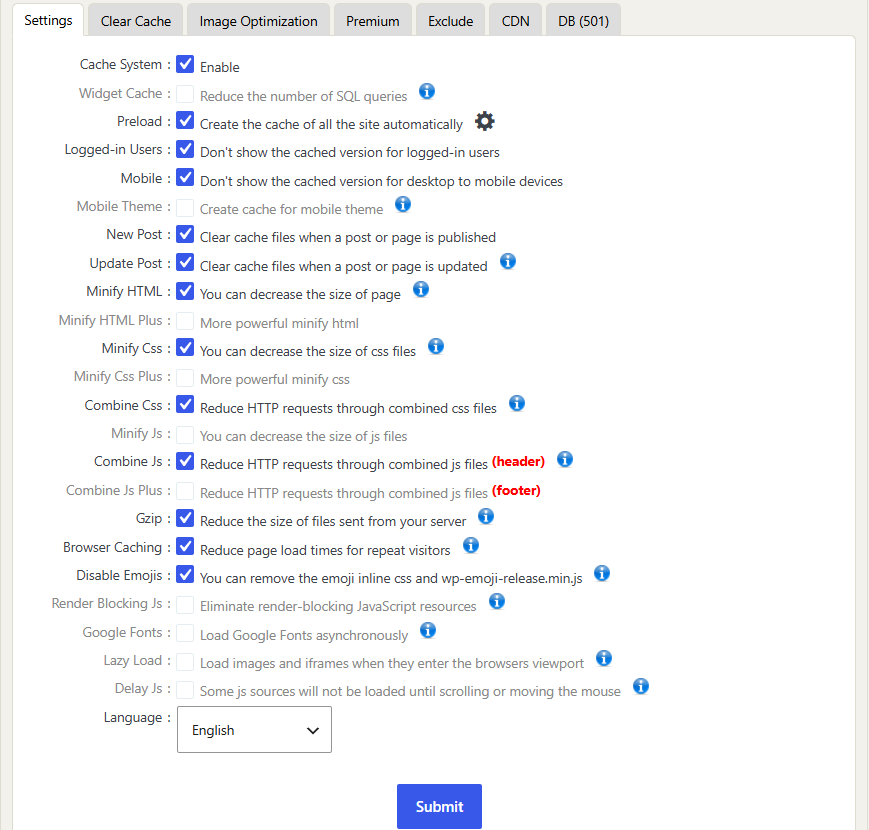
I am using WP Fastest Cache plugin with the settings in the screenshot below. The problem is that on desktop, after login, the user is still recognized as not logged in and the user login condition is not working as expected. After the site administrator clears the cache, the problem is resolved. Am I doing something wrong?
This looks like a caching configuration issue, not a Bricks condition issue.
The User login condition is evaluated when WordPress/Bricks renders the page. If a full-page cache serves HTML that was generated for a logged-out visitor, Bricks does not get a chance to re-evaluate the condition after the user logs in.
Please configure WP Fastest Cache so cached pages are not served to logged-in users, and exclude any login/account/user-specific pages from page cache. Then clear all cache and test again in a normal logged-in browser session.
If it still happens with page cache disabled for logged-in users, please send the Bricks version, the exact condition setup, the affected page URL, and screenshots of the relevant cache settings.