Browser: Firefox
OS: Windows
URL: Link to a page that illustrates this issue
Video:
Description
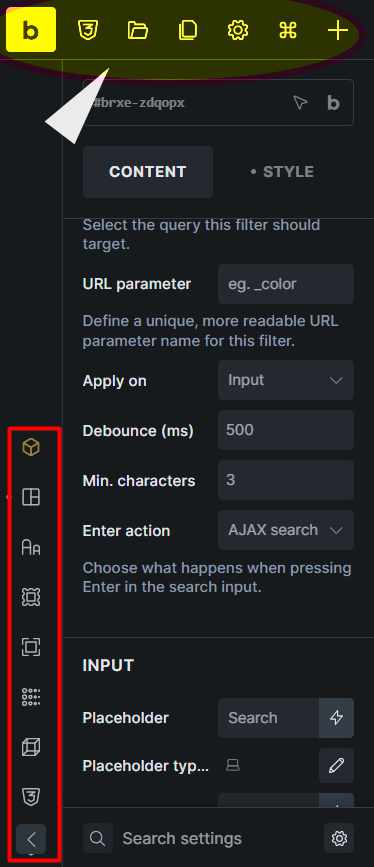
After updating Bricks, the top toolbar of the builder is almost completely hidden. This is the bar that contains the Save button, Preview mode, Edit in WordPress, Manage, and the other main actions. It is barely visible and the buttons cannot be clicked reliably.
Screenshot note
The screenshot below is not from my site. I took it from another post on this forum, only to show which part of the interface I’m referring to. The highlighted area is the menu that is missing or nearly invisible in my builder.
Expected behavior
The toolbar is fully visible at the top of the builder.
Actual behavior
The toolbar is cut off, overlapped, or hidden, so its buttons are not usable.
Hi @oltrecomics
If I understand correctly, you have a plugin or custom code that enables the WP top toolbar in the builder.
Please check with the plugin support or deactivate it until it’s compatible with Bricks 2.4
Maybe you are using an outdated plugin.
Reference: NO BUG: WordPress admin bar overlaps builder interface - #7 by mschmidt
Hi @itchycode,
Found it, thanks to your pointer! I’m using the BricksUltimate plugin, which has a setting called “Show Admin Bar In The Editor” under Miscellaneous Settings — it was enabled, and that’s what was causing the WP admin bar to overlap and hide the Bricks toolbar.
I disabled that specific setting (no need to deactivate the whole plugin) and the toolbar is fully visible and clickable again.
Thanks again for pointing me in the right direction!
We fixed it in latest version.
I really appreciated your quick response after the email I sent you, you guys are fantastic, thank you from the bottom of my heart