NO BUG: bricksData.leafletMapInstances[] does not populate correctly

Browser: Firefox
OS: Windows 11

Steps to reproduce:

  1. Drop a Map(Leaflet) element on a page
  2. Add a Code element and try to log bricksData.leafletMapInstances:
    document.addEventListener('DOMContentLoaded', () => { console.log(bricksData.leafletMapInstances); })

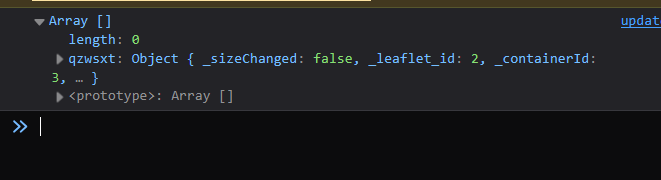
Issue# 1: The map gets assigned as a property to the array rather than a sub-item.
Issue #2: At runtime, accessing the instance with :
bricksData?.leafletMapInstances?.qzwsxt returns undefined.

Hi Mohammad,
Thanks for the report. We were able to confirm this and added it to our internal bug tracker. We’ll update this thread once it’s fixed.

1 Like

Brilliant!
Thanks Timmy!

Hey @khan360,

can you try to access this instance via bricksData.leafletMapInstances['qzwsxt']? If that is returning the same issue, though, can you share the live page where you are testing, so I can test as well directly on your install?

Thanks,
Matej

I tried that too along with a couple of other variations. Nothing but undefined.
I don’t have a live link yet. Will try to set one up later and share.

Yes please, I would like to investigate it and fix it, possibly for next version :slight_smile:

Thanks,
Matej

Thanks @Matej.

Co-incidentally, I am having some server issues right now and my sites are down. It may take some time for my hosting to fix it. It’s the first time this has happened.

Please bear with me.

P.S.: Silly question, but did you want me to hardcode qzwsxt inside bricksData.leafletMapInstances[‘qzwsxt’] for some reason? Because I replaced it with my Map Element’s Bricks ID.

Hey @khan360,

No problem. Hopefully you will get them back working without too much stress :crossed_fingers:

No no, that was only an example, you need to use the bricks mapId that you have. But I added it here, because qzwsxt is the same ID that you used in the first post :slight_smile:

@Matej , I’ve messaged you the live link. The page shows what I’m logging. Check the console too, please.

Hey @khan360,

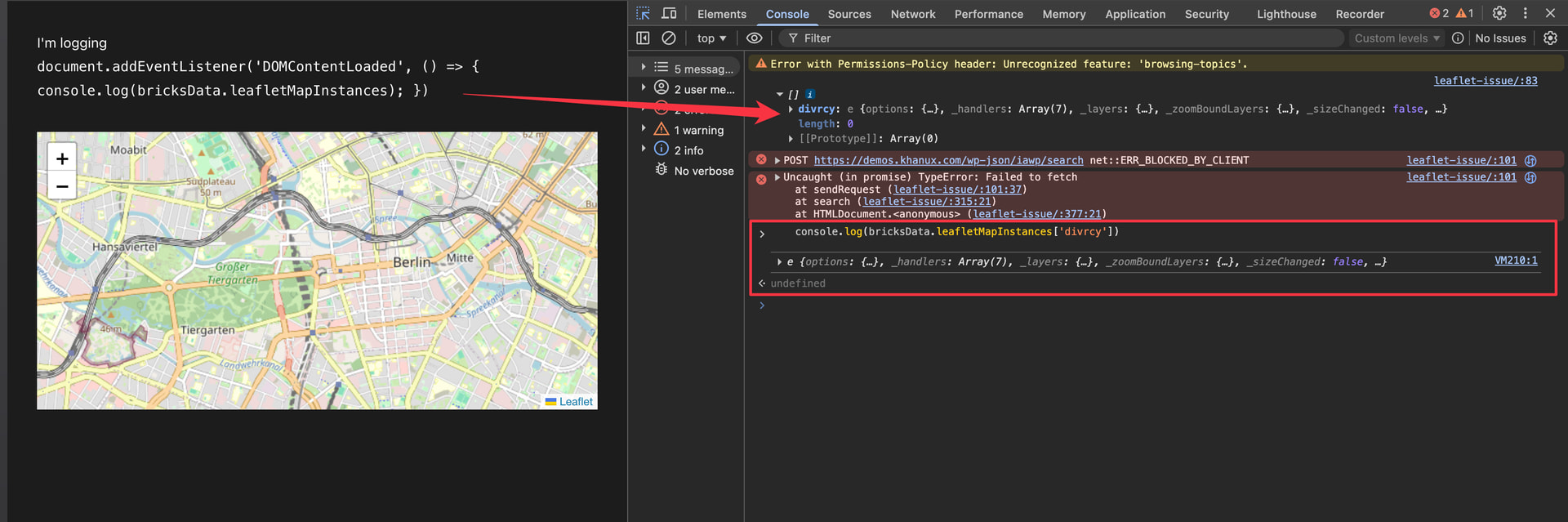
thank you so much for the live site. However, I was not able to replicate the issue. If I just open the website you provided, I can see that it will first output the bricksData.leafletMapInstances in the console. If I expand that array, I can see the divrcy map.

Then I tried to manually access this divrcy map data and could. Please look at the screenshot below and let me know what am I doing different than you?

Thanks,
Matej

Thanks for looking into it, @Matej .

Seems to be working in the console once the page has loaded. But just cant get it to work on init. I mean, even within a DOMContentLoaded listener the data is still not prepared by Bricks on runtime.
I have updated my OP to add a Code element to log leafletMapInstances.

Also, I guess rightfully the instances should be within the array, but yeah, that is me being nitpicky.

Ahhh, @khan360, I think I see what is happening now. :grin: Sorry it took me so long to get it, we’re in the middle of a heatwave, and apparently my brain switched to passive cooling mode. :sweat_smile: :rofl: But I hope it will be working now for you :folded_hands:

This is caused by timing plus how browser developer consoles display logged objects.

bricksData.leafletMapInstances is initialized as an empty array/object first (in PHP). Bricks then runs the Leaflet map init on DOMContentLoaded, but the actual map instance is only stored after Leaflet itself is available (the Leaflet library takes some time to become available) and the map has been initialized (this is important, because without Leaflet, we can’t have leaflet object :slight_smile: ).

So this can be confusing in DevTools:

console.log(bricksData.leafletMapInstances)
When you expand that logged object later, DevTools shows the object by reference, meaning it can show the updated state after Bricks has already added the Leaflet instance.

But this:

console.log(bricksData.leafletMapInstances.ckxrkx)
is evaluated immediately at that exact moment. If the Leaflet instance has not been created yet, it correctly returns undefined (which at the DOMContentLoaded, it has not yet been - waiting for the Leaflet to actually become availabe)

Ideal solution is that for custom runtime code, you wait until the instance exists:

function waitForBricksLeafletMap(mapId, callback, timeout = 5000) {
	const started = Date.now()

	const interval = setInterval(() => {
		const map = window.bricksData?.leafletMapInstances?.[mapId]

		if (map) {
			clearInterval(interval)
			callback(map)
			return
		}

		if (Date.now() - started > timeout) {
			clearInterval(interval)
			console.warn(`Leaflet map "${mapId}" was not initialized.`)
		}
	}, 50)
}

document.addEventListener('DOMContentLoaded', () => {
	waitForBricksLeafletMap('ckxrkx', (map) => {
		console.log(map)
		// Leaflet API is available here.
	})
})

Or, if you do not want to hardcode the ID:

document.addEventListener('DOMContentLoaded', () => {
	const mapEl = document.querySelector('.brxe-map-leaflet')
	const mapId = mapEl?.dataset.scriptId || mapEl?.id

	if (!mapId) {
		return
	}

	waitForBricksLeafletMap(mapId, (map) => {
		console.log(map)
	})
})

So the instance is being populated, but custom code needs to wait until Bricks has finished initializing Leaflet.

Can you test it? And if that works for you, I will mark it as no bug because there is nothing that we can do about it because we also wait for a leaflet to be available :slight_smile:

Please let me know,
Matej

1 Like

This seems to be working. Thanks.

Hey @khan360,

thank you for responding. I’ll mark the topic as no-bug, as it turns out it’s not a but afterall :slight_smile:

Thank you,
Matej

2 Likes