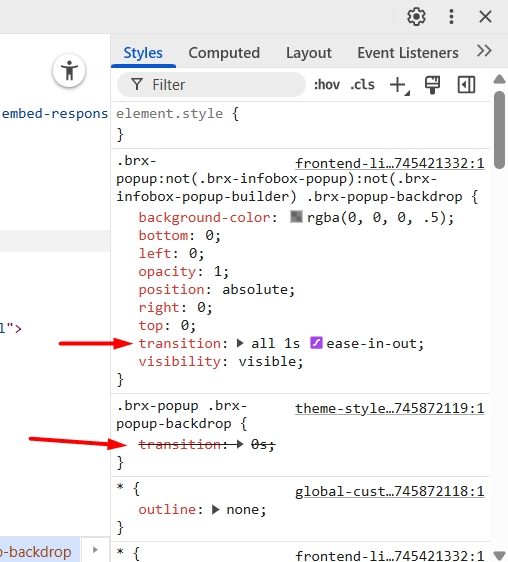
In version 1.12.4, in Theme style > popup, I had set the transition to 0s. After updating to version 2.0, the transition value of 0s has been canceled.
I didn’t use the 0 property for transition. I know this much about CSS
I am testing 1.12.4 and 2.0 at the same time. The transition control for the backdrop does not work at all, neither in the popup settings nor in the theme style. The default value is transition: all 1s ease-in-out;.
When I disable the cascade layer the problem is solved. Of course I just realized this.
It seems that in addition to the Transition control, even the background color of the backdrop in the popup does not work.
I reinstalled bricks 1.12.4 and the problem was solved. Then I reinstalled 2.0 alpha and the problem occurred again. I tried to record a short video of the process.
Thanks a million for the video. Seems like we were talking at cross purposes:
This is the opposite of what I see in your video. When you enable the toggle, you disable cascade layer, and that’s when the problem occurs, right? So with the “new standard” (cascade layer enabled - not disabled), there is no problem, correct?
If that’s the case:
Although not recommended, if needed you can disable the Cascade layer default under Bricks > Settings > Performance > Disable Bricks cascade layer. We won’t provide style bug fixes resulted by disabling this setting as using @layer is the way forward.
I hadn’t noticed the change in the behavior of the Cascading Layer option in the settings. Rather, given the recent versions, I was only paying attention to whether it was enabled or disabled.