Hi there. I have an ACF ‘File’ field and it’s set to return File URL (not File Array). When I use {acf_file} it gives just the filename only. When I use <?php echo get_field(‘file‘); ?> instead in same code snippet, it returns the full URL. It’s an mp4 file.
Hi @mindpattern ,
It should return a full HTML link. (Try click on it or inspect)
If you want the url only, please try Please try {acf_file:url}
Regards,
Jenn
It was only returning the filename for me. Why wouldn’t {acf_file} return the same as get_field(‘file‘)?
May I know where you place the dynamic tag? It’s on a basic text element or any specific field?
Please provide some sreenshots and link to that page.
By default, the dynamic tag will return as a fully working <a> link so user can use it directly on Rich Text, Basic Text element.
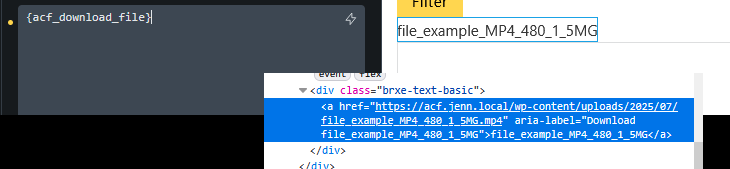
Use {acf_file:url} will force the dynamic tag to parse as full URL.

If yours is not working correctly, I would suggest you to resave your post (Maybe you changed the ACF field setting after the field saved and so it’s not in correct format in the database)
Regards,
Jenn
I’m using it inside a custom code block. I just realised now if I want {acf_file} on ACF field that’s set to return File URL I need to use {acf_file:url}. {acf_file} on it’s own just returns the filename.
For anyone reading this, just to be clear, I am not talking about when an ACF File field is set to return an array, this is all about when it’s set to just return File URL.
I guess this is how it was intended to work. I’m ok with this. I was confused because it’s natural to expect the full url to be returned because I’ve told ACF to return the File URL only.