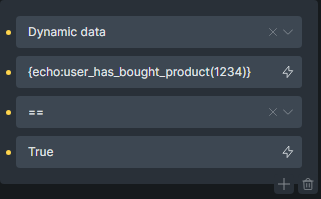
Membership Code: Add to a PHP file and then call it via your functions file or again, use a code snippets plugin.
/**

WooCommerce Course Access System for Bricks Builder

Features:

Creates WordPress accounts on completed purchases

Checks course access permissions

Integrates with Bricks Builder dynamic data

Handles clean username generation

Sends password setup emails
*/

// Security check
if (!defined(‘ABSPATH’)) {
exit;
}

/**

Check if user has purchased a specific product


@param int $product_id The product ID to check

@return bool True if purchased, false otherwise
*/
function user_has_bought_product($product_id) {
if (!is_user_logged_in()) return false;

$user_id = get_current_user_id();

// First check user meta for cached purchases
$purchased_courses = get_user_meta($user_id, ‘purchased_courses’, false);
if (in_array($product_id, $purchased_courses)) {
return true;
}

// If not found in meta, check order history
return check_orders_for_product($user_id, $product_id);
}

/**

Check order history for specific product purchase


@param int $user_id WordPress user ID

@param int $product_id WooCommerce product ID

@return bool True if found in orders
*/
function check_orders_for_product($user_id, $product_id) {
$orders = wc_get_orders([
‘customer_id’ => $user_id,
‘status’ => ‘completed’,
‘limit’ => -1,
‘return’ => ‘ids’,
]);

foreach ($orders as $order_id) {
$order = wc_get_order($order_id);
foreach ($order->get_items() as $item) {
if ($item->get_product_id() == $product_id) {
// Cache this purchase in user meta
add_user_meta($user_id, ‘purchased_courses’, $product_id);
return true;
}
}
}

return false;
}

/**

Register Bricks Builder dynamic data function
*/
add_filter(‘bricks/custom/dynamic_data’, function($tags) {
$tags[‘user_has_bought_product’] = [
‘label’ => ‘Check Product Purchase’,
‘callback’ => function($attributes) {
if (empty($attributes[‘product_id’])) {
error_log(‘Missing product_id parameter in user_has_bought_product’);
return false;
}
return user_has_bought_product(intval($attributes[‘product_id’]));
},
‘params’ => [
‘product_id’ => [
‘label’ => ‘Product ID’,
‘type’ => ‘number’,
‘required’ => true
]
]
];
return $tags;
});

/**

Create WordPress user when WooCommerce order is completed
*/
add_action(‘woocommerce_order_status_completed’, ‘create_wp_user_on_order_completion’, 10, 2);

function create_wp_user_on_order_completion($order_id, $order) {
// Get the customer email from the order
$customer_email = $order->get_billing_email();

// Check if a user already exists with this email
if (email_exists($customer_email)) {
    return; // User already exists, do nothing
}

// Get customer details from the order
$first_name = $order->get_billing_first_name();
$last_name = $order->get_billing_last_name();

// Generate clean username (firstname.lastname)
$username = generate_clean_username($first_name, $last_name, $customer_email);

// Generate a random password (will be reset via email)
$password = wp_generate_password();

// Create the new user with default role
$user_id = wp_create_user($username, $password, $customer_email);

if (is_wp_error($user_id)) {
    error_log('Failed to create user for order ' . $order_id . ': ' . $user_id->get_error_message());
    return;
}

// Assign course student role
$user = new WP_User($user_id);
$user->set_role('customer'); // Change to your preferred role

// Update user meta with names
wp_update_user([
    'ID' => $user_id,
    'first_name' => $first_name,
    'last_name' => $last_name,
    'display_name' => $first_name . ' ' . $last_name
]);

// Store billing information
update_user_meta($user_id, 'billing_first_name', $first_name);
update_user_meta($user_id, 'billing_last_name', $last_name);
update_user_meta($user_id, 'billing_email', $customer_email);
update_user_meta($user_id, 'billing_phone', $order->get_billing_phone());
update_user_meta($user_id, 'billing_address_1', $order->get_billing_address_1());
update_user_meta($user_id, 'billing_city', $order->get_billing_city());
update_user_meta($user_id, 'billing_postcode', $order->get_billing_postcode());
update_user_meta($user_id, 'billing_country', $order->get_billing_country());

// Track purchased courses
foreach ($order->get_items() as $item) {
    add_user_meta($user_id, 'purchased_courses', $item->get_product_id());
}

// Send password reset email
send_password_reset_email($user_id);

}

/**

Generate clean username (firstname.lastname)

Handles duplicates by adding incrementing number
*/
function generate_clean_username($first_name, $last_name, $email = ‘’) {
// Sanitize names - remove accents, special chars, etc.
$clean_first = sanitize_title($first_name);
$clean_last = sanitize_title($last_name);

// Remove any remaining special characters
$clean_first = preg_replace(‘/[^a-z0-9]/’, ‘’, $clean_first);
$clean_last = preg_replace(‘/[^a-z0-9]/’, ‘’, $clean_last);

// If either name is empty after cleaning, use email prefix as fallback
if (empty($clean_first) || empty($clean_last)) {
return sanitize_user(current(explode(‘@’, $email)), true);
}

// Create base username
$base_username = $clean_first . ‘.’ . $clean_last;
$username = $base_username;
$counter = 1;

// Check if username exists and increment if needed
while (username_exists($username)) {
$username = $base_username . $counter;
$counter++;
}

return $username;
}

/**

Send password reset email to new user
*/
function send_password_reset_email($user_id) {
$user = get_userdata($user_id);
if (!$user) return;

$key = get_password_reset_key($user);
if (is_wp_error($key)) return;

$reset_url = network_site_url(“wp-login.php?action=rp&key=$key&login=” . rawurlencode($user->user_login), ‘login’);

$subject = sprintf(__(‘Set your password for %s’), get_bloginfo(‘name’));

$message = sprintf(__(‘Hello %s,’), $user->first_name) . “\r\n\r\n”;
$message .= __(‘Your account has been created.’) . “\r\n\r\n”;
$message .= __(‘To set your password, please click the following link:’) . “\r\n\r\n”;
$message .= $reset_url . “\r\n\r\n”;
$message .= __(‘This link will expire in 24 hours.’) . “\r\n\r\n”;
$message .= __(“If you didn’t request this, please ignore this email.”) . “\r\n”;

wp_mail($user->user_email, $subject, $message);
}