First of all, I love Bricks, and the new media library is beautiful and cool. However, uploading new files/images now requires an extra step: clicking the Upload button.
I used to be able to just open up media library and drop my files in, but now I can’t (I instinctivly did, only to have my image open itself up in a new tab).
It would be awesome if we could still drop images to be uploaded on the first “tab” that opens up, before clicking on Upload. I’d even risk saying that changes to the interface are not necessary at all, because users have being doing that for years are super used to that workflow.
PS: While we’re at it, it would be absolutely incredible to be able to drop-in images to be uploaded directly over the “SELECT IMAGE” dotted box (or the image preview, if the widget already has a selected image) in the image widget panel, to the left, without having to open up media library at all. That is possible, for instance, in Wordpress’ featured image box.
I just logged in to say the same thing. It looks very slick, but as it is, the new Media Manager is less convenient than the built in WP media area, due to more clicks needed.
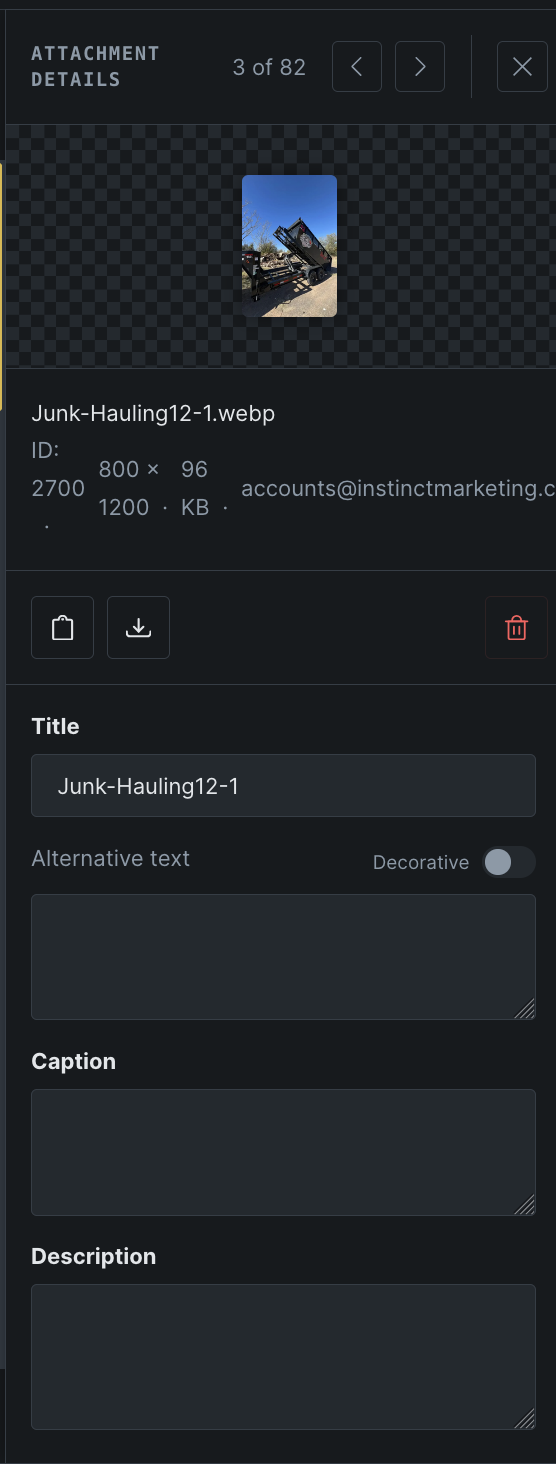
The thumbnail is too small to be useful - it ends up being smaller than the thumbnail in the main gallery, which is the opposite of what I would expect to happen when clicking on an image
The metadata (ID, dimensions, etc.) doesn’t read very well when being forced into a single row like it is currently, could definitely be laid out better. Probably an issue due to the long username.
The text boxes take up quite a lot of space by default even when not holding any text content
Also a difference between the bricks media gallery (on grid display) and the default wordpress one is that I can’t at a glance tell the aspect ratio of an image. The wordpress one will have empty space on the top and bottom for images with a wider aspect ratio, where bricks uses something more like object fit: cover, where the image always fills the space. It would be awesome if there were a way to differentiate by aspect ratio at a glance - there is probably a better way than the wordpress gallery method anyway.
Finally, I would love if we could customize how many columns there are in the gallery, to be able to see more images at once. It’s useful to be able to see many images at once when picking from a large gallery of images.
We agree that dragging files into the Media Browser should work without first clicking Upload. We’ve already implemented automatically opening the Upload view when files are dragged over the browser. This change is awaiting release; files still enter the preparation step before uploading.
––
Dropping an image directly onto “Select image” or an existing preview would make that workflow faster too.
The attachment-details feedback also makes sense: a larger preview, clearer metadata layout, and more compact empty text fields would improve usability. For browsing, showing the full image aspect ratio and offering adjustable thumbnail sizes would help users identify images and see more files at once.
These remaining suggestions haven’t been implemented yet, so we can’t give a release timeline for them.
We’ve addressed this in Bricks 2.4.3, now available as a one-click update in your WordPress Dashboard.
Dragging files over the Media Browser now switches it to the Upload view. The other media management suggestions in this thread are separate from this change.
Please read the changelog entry before updating, and let us know if you experience any issues.