Is that possible to disable the default breakpoint?

Hello, the breakpoints from Bricks are awesome, I can add many types there.

But for some reason, I see that landscape for mobile is not really needed for me and some of my projects.

So is it possible to disable landscape for mobile?
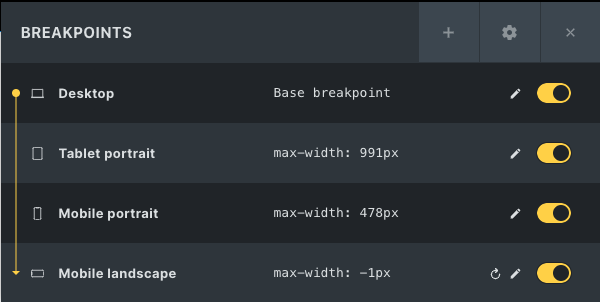
Because currently there are 4 default breakpoints. I want to make it only 3.

2 Likes

hi @iqbalmauludy,
Yes, you can definitely do this!
If you go to Bricks settings > General > Custom breakpoints

After you’ve enables this option you can change, add or disable certain breakpoints. More info can be read in this Academy article

Hi @Dennis, thank you for your answer. Actually, we cant disable default breakpoint event we active Custom Breakpoints. I try it before. That why I post it here maybe support have answer for that or someone already doing that.

I am too desperately searching for a solution… How did you proceed with this issue @iqbalmauludy?

Would like to know what the reason behind this is… When was the last time you have rotated your phone to landscape to view a website, for real? Why am I forced to waste my time to develop for that 3% population of retards when I can simply can add:
<meta http-equiv="ScreenOrientation" content="autoRotate:disabled">

Here is a nasty solution for anybody that also doesn’t give a damn about landscape:

image

1 Like

I just make the 2 mobile breakpoint same
your solution might create problem long term

for ex
image

and just ignore the last breakpoint use the first 3 point only for setting up your layouts :slight_smile:

Hi @n1xn, until now I just avoid landscape and focus Desktop, Tablet, and Mobile.
Agree with you, I never rotated my phone :sweat_smile:.

But I dont know. That would be amazing if we can remove that one so we only have 3 breakpoint.

This might be a solution, but until today I always skip landscape :rofl: