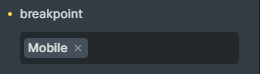
I wanted to create a popup and only display it on mobile. But I did not find any way to achieve this goal. The only solution that came to my mind was to set the display in the parent section of the popup equal to none. It works, but it is not optimal, nor is it fundamental.
Because we display the popup only for mobile, but its code is loaded on desktop as well.
In Elementor, in the popup settings there is an option to assign the popup to the desired breakpoint.
Thank you for your report I agree with you! ideally it would be better to control the visibility of the popup parent div rather than the section element. But this is more of a feature request rather than a bug.
I wanted to come here to report a bug about it. If your (bricks team) recommendation to display the pop at the desired breakpoint is Display:none in the parent div, I’d say there’s a backdrop problem here. If we do this, the popup Backdrop will also be displayed on the desktop and it is problematic.
So, what is the most appropriate way to assign the popup to the desired breakpoint? This is really a big challenge for me right now. Thanks in advance.
Oh if you’re asking about current solutions I think the best way is to set display rules for the parent section as you’ve described in your post. Let me know if you face issues with that approach.
Yes, there is a problem. If we display the popup using the display:none method at the desired breakpoint, there are two problems.
1- We only display the popup on mobile, but the code still loads on desktop.
2- If we use display:none to display the popup at the desired failure point (mobile), the popup Backdrop will be loaded on the desktop. Therefore, the backdrop will not be removed until we click on the page.
Wouldn’t it be better to provide an option for the popup, like Elementor, so we can choose at what breakpoint the popup is displayed? The current solution is not really suitable. Unless I’m missing something.
Hi again @charaf, Let me state the problem more clearly.
I want to show the popup only on mobile. So, I put the display in the parent container none. Then in mobile, I set the display to flex. Therefore, the pop-up will only be displayed on mobile. But the problem is that the popup backdrop is still displayed on the desktop! How can we hide the background popup on the desktop or in the desired breakpoints? The main issue is this.
Yes, I agree that there should be a better way to do this which is why I suggested sharing this as a feature request. Currently the way to handle not displaying backdrop is not ideal as you’d basically just set it to transparent but it’s technically still there.
I have added this to our internal tracker to consider adding new controls
 I agree with you! ideally it would be better to control the visibility of the popup parent div rather than the section element. But this is more of a feature request rather than a bug.