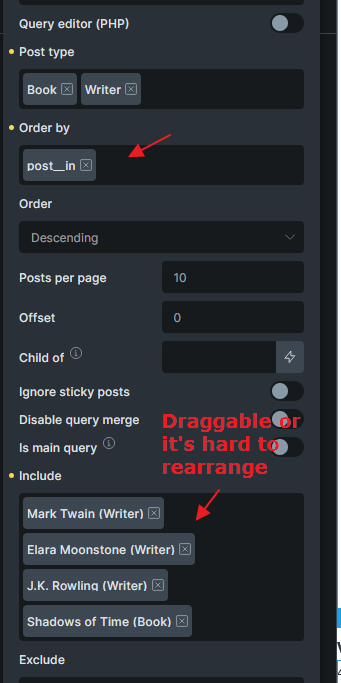
I am running a query loop for a taxonomy (post categories) and we need to do a manual sort, or at least pick some kind of sorting where we can push something to the front or back etc. The only way I can find to do a manual sort is by doing the “include list” option. Then I can add categories to the list and it sorts in that order.
The problem is, the order can’t be changed once I’ve added items to the include list. I have to basically delete everyting and re-add the list over again to change the ordering.
The second problem is that new categories won’t automatically be added to an include list, so it’s not really the best method in my situation.
All I want is a somewhat customizable sort order which will automatically include new categories when added.
I could add a custom field with ACF to the categories like a number field for a sort order, but how would I make use of it? I would want “default sort” to be by name and use the sort order as a priority. For example all the categories could be sort order 1 (alphabetical) unless I also have sort order 2 and 3 and 4 which go first. If multiple categories have sort order 2 then those are also sorted by name etc.
At the end of the day, we just want to sort by name but push a particular category or two to the top. Ultimately, the most flexible is a custom sort order like the include list, if only it could allow drag-n-drop resorting, and automatically adding new categories into the list.
Agreed! This is the first time I’ve even used the “include list” sort option (learned it today), and thankfully in my case I only have 3-5 items I need to sort, but I can’t imagine how that’d work if I had way more that needed to be explicitly set. Drag & drop of the items absolutely needs to be added here. Hoping this gets added for 2.0.
Could this possibly be looked at? I have a list of 50+ for a team member query, and if the client would like a member bumped up the list it’s a nightmare having to spend 5-10 minutes rebuilding it again. Where a simple drag and drop would take a a few seconds.
I have found this frustrating on other sites I’e built, but this one is particularly annoying as there is so many.
Over two years old request now. Are we any closer to being able to drag-n-drop the include list ordering?
This really needs to happen!
It’s very common for a CPT like BIOs (people) or FAQs or something similar where we query them in many pages and contexts, create lots of grids, selecting only a subset needed, AND want to set the order they will appear in, which could be different on any given page or context.
Only the include list can do this, but not being able to re-sort the list is so frustrating!
Hello everyone. Sorry for asking, I honestly didn’t understand exactly what this feature is. Using this feature, can we manually sort the post category query? WooCommerce categories have this capability, but WordPress post categories don’t, right?
On the other hand, how does the “include list” option work?