How to build transparent header by Bricks ?
The header-element is over the hero-element.
I try some methods, but it didn’t work.
Thanks very much.
How to build transparent header by Bricks ?
The header-element is over the hero-element.
I try some methods, but it didn’t work.
Thanks very much.
Just give z-index to header then use negative margin for body content to move it under header
Hi,
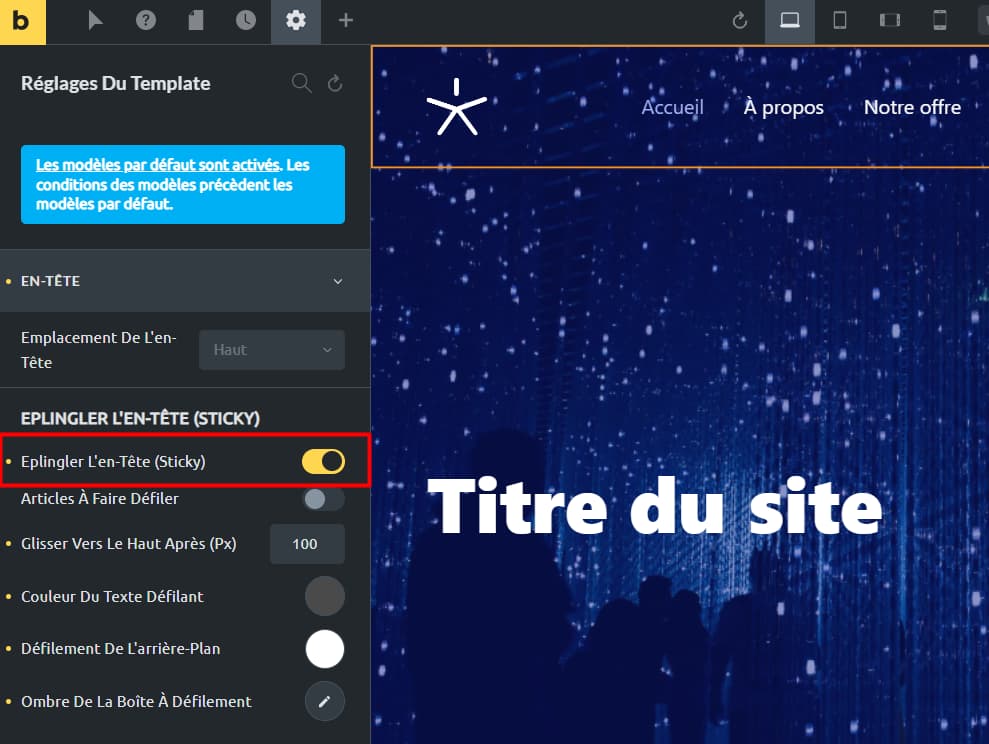
If you make the header sticky, it will be transparent and over your content.
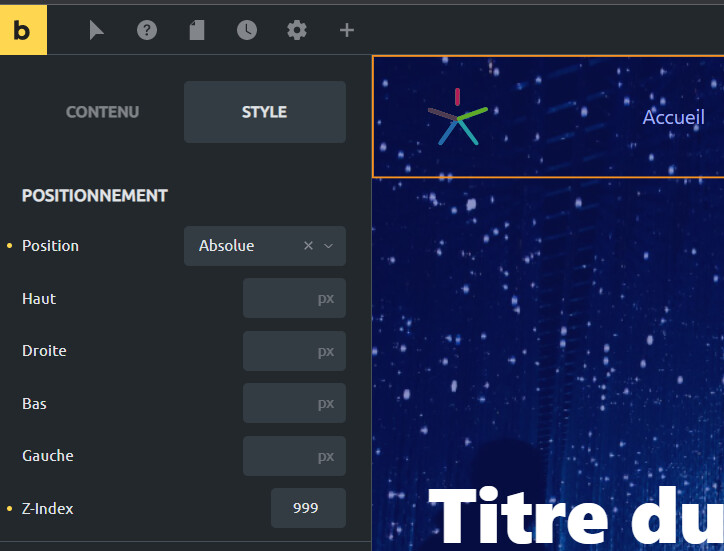
If you want a transparent header but NOT sticky, just use absolute position and z-index on your header’s root container:
Thanks so much, yankiara.
I try 2 methods you mentioned. The 2nd suit for me. but I need set top value as 10 px, otherwise the header can’t display totally.
Thanks ninmorfeo. I try your way. It’s also a good method.
I did this but the main page background still starts below the header. Am I missing something?
Thanks 
Negative margin
In the first section, try adding a minus margin like -30px or something scalable for the size of your section.
Not sure if possible, but maybe if you add a negative margin to the menu bottom, it pulls the page up. Might save you a lot of page edits if it works.
Make sure to test on tablet and phone as this might do something other than desktop.