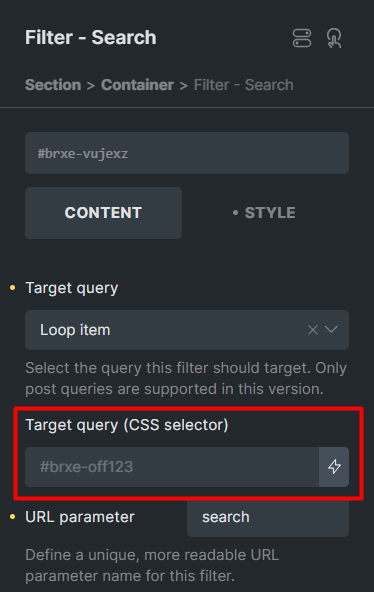
I display filters in both the product archive and the offcanvas element (for mobile users). In order to be able to control the style, conditions and other things of the filters in one place, I put the filters in a section and then using the template element, put the filters in the product archive and the offcanvas element. But the problem is that in this situation, the Target query in the filters does not identify the Loop query.
But there is no problem with the old filter element and it works well. This also works well in the Jet smart filters plugin. Because the filters are connected to the list of products using query id.
I’m experiencing the same issue — it’s currently not possible to select the target query outside the template. Hopefully, we’ll soon be able to manually input the query ID.
Currently we have this limitation even in Offcanvas interactions. Adding the offcanvas target option to detect offcanvas within the page greatly improves the workflow.
hi @timmse , i just hit this limitation a minute ago. I want my search element to live in my header template, but since its a different context than an archive (where i want to target the main query), the builder effectively creates a complete development stoppage for this use case.
in an attempt to work around this, i tried populating the content with my archive, but that did not make any difference.
this issue was raised in February 2024.
22.5 months have elapsed since. has the development team weighed in on a workaround?