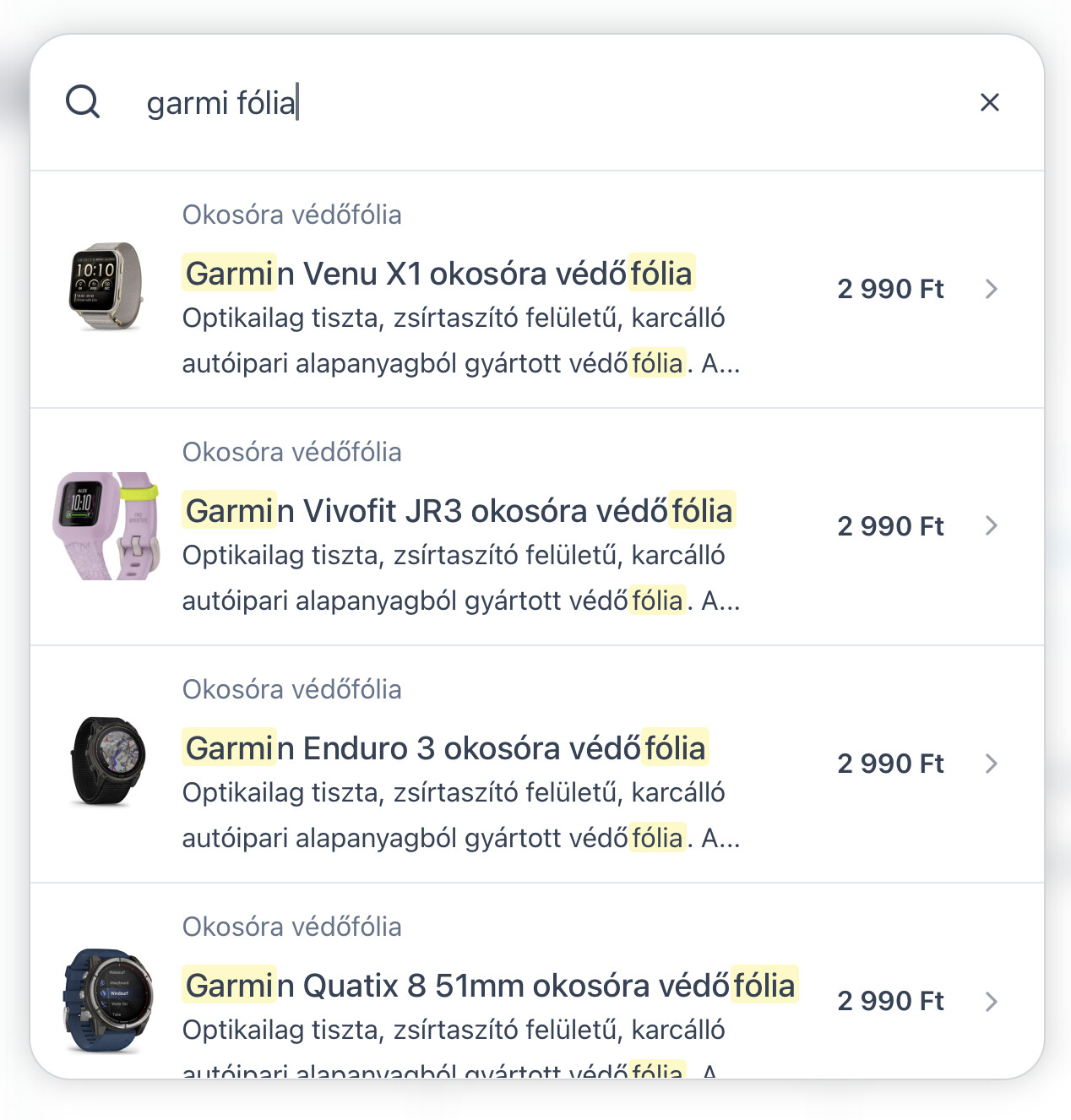
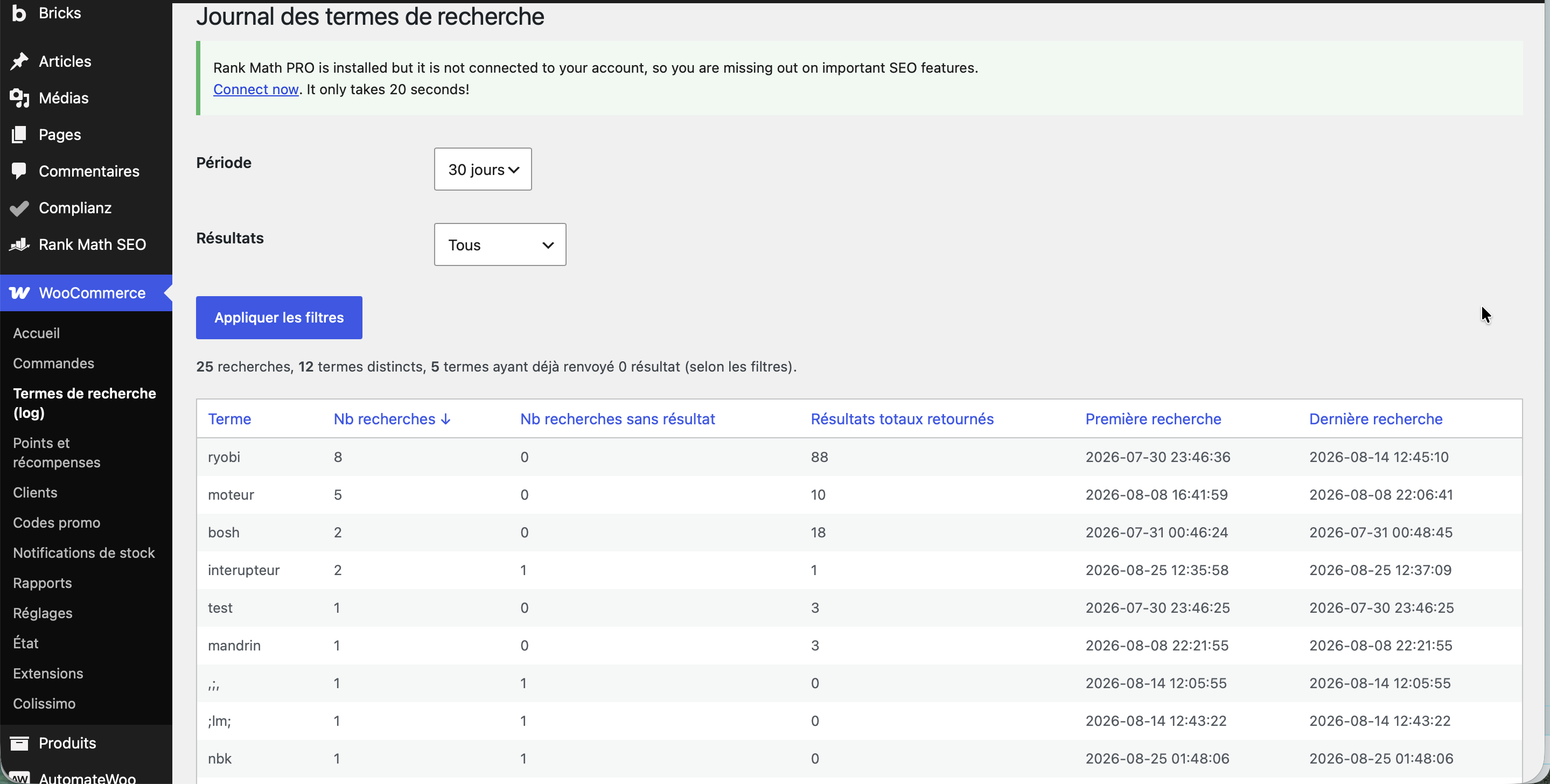
thank you Timmse
I placed the code snippet in Claude Code, and here’s what it suggests in my case:
/**
 * Plugin Name: ES - Recherche Bricks tolérante (multi-mots + fautes de frappe)
 * Description: Quand le filtre de recherche Bricks ne trouve rien, relance la recherche
 *              mot par mot puis, si besoin, avec les mots approchants du catalogue.
 *              N'intervient QUE sur les recherches à zéro résultat : aucune requête
 *              supplémentaire quand la recherche fonctionne déjà.
 * Version: 1.0.0
 */

if ( ! defined( 'ABSPATH' ) ) {
	exit;
}

if ( ! class_exists( 'ES_Bricks_Fuzzy_Search' ) ) {

final class ES_Bricks_Fuzzy_Search {

	/** Longueur minimale de la recherche pour déclencher le rattrapage. */
	const MIN_SEARCH_LENGTH = 3;

	/** Longueur minimale d'un mot pour tenter un rattrapage de faute. */
	const MIN_FUZZY_LENGTH = 4;

	/** Nombre max de mots approchants testés pour un mot saisi. */
	const MAX_VARIANTS = 5;

	/** Garde-fou sur la taille du vocabulaire mis en cache. */
	const DICT_LIMIT = 20000;

	/** Durée de vie du vocabulaire. */
	const DICT_TTL = 12 * HOUR_IN_SECONDS;

	public static function init() {
		add_filter( 'bricks/query_filters/filter_query_vars', [ __CLASS__, 'rescue_empty_search' ], 20, 4 );

		// Le vocabulaire bouge quand un produit ou un terme change
		add_action( 'saved_term',        [ __CLASS__, 'flush_dictionary' ] );
		add_action( 'delete_term',       [ __CLASS__, 'flush_dictionary' ] );
		add_action( 'save_post_product', [ __CLASS__, 'flush_dictionary' ] );
	}

	/* -----------------------------------------------------------------
	 * 1) Point d'entrée : Bricks vient de ne rien trouver
	 * --------------------------------------------------------------- */

	public static function rescue_empty_search( $query_vars, $filter, $query_id, $index ) {

		if ( ( $filter['instance_name'] ?? '' ) !== 'filter-search' ) {
			return $query_vars;
		}

		// Bricks signale "zéro résultat" avec post__in = [0]
		if ( ! isset( $query_vars['post__in'] ) || $query_vars['post__in'] !== [ 0 ] ) {
			return $query_vars;
		}

		if ( ! class_exists( '\Bricks\Search' ) ) {
			return $query_vars;
		}

		$search = trim( (string) ( $filter['value'] ?? '' ) );

		if ( mb_strlen( $search ) < self::MIN_SEARCH_LENGTH ) {
			return $query_vars;
		}

		$config = self::get_search_config( $filter['settings'] ?? [] );

		if ( ! $config ) {
			return $query_vars;
		}

		$cache_key = 'resolve_' . md5( $search . '|' . $query_id . '|' . wp_json_encode( $config ) );
		$post_ids  = wp_cache_get( $cache_key, 'es_bricks_fuzzy' );

		if ( $post_ids === false ) {
			$post_ids = self::resolve( $search, $config, $filter['filter_id'] ?? '', $query_id );
			wp_cache_set( $cache_key, $post_ids, 'es_bricks_fuzzy', 5 * MINUTE_IN_SECONDS );
		}

		if ( empty( $post_ids ) ) {
			return $query_vars; // toujours rien : on laisse le [0] de Bricks
		}

		$query_vars['post__in']            = $post_ids;
		$query_vars['ignore_sticky_posts'] = true;

		return $query_vars;
	}

	/* -----------------------------------------------------------------
	 * 2) Stratégie de repli
	 * --------------------------------------------------------------- */

	/**
	 * Mot par mot : correspondance exacte, sinon mots approchants du catalogue.
	 * Les mots sont ensuite croisés (ET). Si le croisement ne donne rien,
	 * on retombe sur le mot le plus long, le plus discriminant.
	 */
	private static function resolve( $search, $config, $filter_id, $query_id ) {

		$words = preg_split( '/[^\p{L}\p{N}]+/u', $search, -1, PREG_SPLIT_NO_EMPTY );
		$sets  = [];

		foreach ( (array) $words as $word ) {

			if ( mb_strlen( $word ) < 2 ) {
				continue;
			}

			$ids = self::search( $word, $config, $filter_id, $query_id );

			// Rien pour ce mot : on retente avec les mots approchants
			if ( ! $ids ) {
				foreach ( self::fuzzy_variants( $word, $config ) as $variant ) {
					$ids = array_merge( $ids, self::search( $variant, $config, $filter_id, $query_id ) );
				}
				$ids = array_unique( $ids );
			}

			if ( $ids ) {
				$sets[ $word ] = $ids;
			}
		}

		if ( ! $sets ) {
			return [];
		}

		$result = count( $sets ) === 1 ? reset( $sets ) : array_intersect( ...array_values( $sets ) );

		// Aucun produit ne réunit tous les mots : on garde le mot le plus
		// discriminant, c'est-à-dire celui qui remonte le moins de produits.
		if ( ! $result ) {
			$best = null;

			foreach ( $sets as $word => $ids ) {
				if ( $best === null
					|| count( $ids ) < count( $sets[ $best ] )
					|| ( count( $ids ) === count( $sets[ $best ] ) && mb_strlen( $word ) > mb_strlen( $best ) ) ) {
					$best = $word;
				}
			}

			$result = $sets[ $best ];
		}

		return array_values( array_unique( array_map( 'intval', $result ) ) );
	}

	/**
	 * Relance le moteur de recherche de Bricks sur un mot,
	 * avec exactement les champs configurés dans l'élément.
	 */
	private static function search( $word, $config, $filter_id, $query_id ) {
		$ids = \Bricks\Search::get_post_ids_by_combined_search(
			$config['post_fields'],
			$config['meta_fields'],
			$config['tax_fields'],
			$word,
			$filter_id,
			$query_id,
			false
		);

		return is_array( $ids ) ? $ids : [];
	}

	/* -----------------------------------------------------------------
	 * 3) Tolérance aux fautes de frappe
	 * --------------------------------------------------------------- */

	/**
	 * Mots du catalogue à faible distance d'édition du mot saisi.
	 * "mandrain" -> "mandrin", "perceusse" -> "perceuse".
	 */
	private static function fuzzy_variants( $word, $config ) {

		if ( mb_strlen( $word ) < self::MIN_FUZZY_LENGTH ) {
			return [];
		}

		// Une référence / un UGS ne se devine pas : 0601473600 != 0601473601
		if ( preg_match( '/\d/u', $word ) ) {
			return [];
		}

		$needle = self::normalize( $word );
		$length = strlen( $needle );

		if ( $length < self::MIN_FUZZY_LENGTH ) {
			return [];
		}

		$max_distance = $length <= 5 ? 1 : 2;
		$candidates   = [];

		foreach ( self::get_dictionary( $config ) as $normalized => $original ) {

			if ( abs( strlen( $normalized ) - $length ) > $max_distance ) {
				continue;
			}

			$distance = levenshtein( $needle, $normalized );

			if ( $distance > 0 && $distance <= $max_distance ) {
				$candidates[ $original ] = $distance;
			}
		}

		asort( $candidates );

		return array_slice( array_keys( $candidates ), 0, self::MAX_VARIANTS );
	}

	/**
	 * Vocabulaire du catalogue, construit sur les sources réellement
	 * configurées dans l'élément de recherche. Format : normalisé => original.
	 */
	private static function get_dictionary( $config ) {

		$key   = 'es_bricks_fuzzy_dict_' . md5( wp_json_encode( $config ) );
		$cached = get_transient( $key );

		if ( is_array( $cached ) ) {
			return $cached;
		}

		global $wpdb;

		$values = [];
		$limit  = (int) self::DICT_LIMIT;

		// Noms de termes des taxonomies configurées (catégories, marques, UGS, titre produit…)
		if ( $config['tax_fields'] ) {
			$taxonomies   = array_column( $config['tax_fields'], 'taxonomy' );
			$placeholders = implode( ',', array_fill( 0, count( $taxonomies ), '%s' ) );

			$values = array_merge( $values, (array) $wpdb->get_col(
				$wpdb->prepare(
					"SELECT t.name
					 FROM {$wpdb->terms} t
					 INNER JOIN {$wpdb->term_taxonomy} tt ON tt.term_id = t.term_id
					 WHERE tt.taxonomy IN ($placeholders)
					 LIMIT %d",
					array_merge( $taxonomies, [ $limit ] )
				)
			) );
		}

		// Titres des contenus publiés
		if ( $config['post_fields'] ) {
			$values = array_merge( $values, (array) $wpdb->get_col(
				$wpdb->prepare(
					"SELECT post_title FROM {$wpdb->posts} WHERE post_status = 'publish' LIMIT %d",
					$limit
				)
			) );
		}

		// Valeurs des champs personnalisés configurés
		if ( $config['meta_fields'] ) {
			$meta_keys = [];

			foreach ( $config['meta_fields'] as $meta_field ) {
				if ( ! empty( $meta_field['metaKey'] ) ) {
					$meta_keys[] = $meta_field['metaKey'];
				}
			}

			if ( $meta_keys ) {
				$placeholders = implode( ',', array_fill( 0, count( $meta_keys ), '%s' ) );

				$values = array_merge( $values, (array) $wpdb->get_col(
					$wpdb->prepare(
						"SELECT meta_value FROM {$wpdb->postmeta} WHERE meta_key IN ($placeholders) LIMIT %d",
						array_merge( $meta_keys, [ $limit ] )
					)
				) );
			}
		}

		// Découpage en mots + normalisation
		$dictionary = [];

		foreach ( $values as $value ) {
			foreach ( preg_split( '/[^\p{L}\p{N}]+/u', (string) $value, -1, PREG_SPLIT_NO_EMPTY ) as $word ) {

				$normalized = self::normalize( $word );

				if ( strlen( $normalized ) < self::MIN_FUZZY_LENGTH ) {
					continue;
				}

				if ( ! isset( $dictionary[ $normalized ] ) ) {
					$dictionary[ $normalized ] = $word;
				}
			}
		}

		if ( count( $dictionary ) > $limit ) {
			$dictionary = array_slice( $dictionary, 0, $limit, true );
		}

		set_transient( $key, $dictionary, self::DICT_TTL );

		return $dictionary;
	}

	public static function flush_dictionary() {
		global $wpdb;

		$wpdb->query(
			"DELETE FROM {$wpdb->options}
			 WHERE option_name LIKE '_transient_es_bricks_fuzzy_dict_%'
			    OR option_name LIKE '_transient_timeout_es_bricks_fuzzy_dict_%'"
		);
	}

	/* -----------------------------------------------------------------
	 * 4) Utilitaires
	 * --------------------------------------------------------------- */

	/**
	 * Rejoue la configuration de l'élément filter-search
	 * (cf. Bricks\Query_Filters::build_search_query_vars).
	 */
	private static function get_search_config( $settings ) {

		$post_fields = ! empty( $settings['searchPostFields'] )
			? ( $settings['searchPostQuery'] ?? [ 'default' ] )
			: [];

		$meta_fields = [];

		if ( ! empty( $settings['searchPostMeta'] ) ) {
			foreach ( (array) ( $settings['searchPostMetaKeys'] ?? [] ) as $index => $row ) {
				foreach ( (array) $row as $key => $value ) {
					if ( $key !== 'id' ) {
						$meta_fields[ $index ][ $key ] = function_exists( 'bricks_render_dynamic_data' )
							? trim( bricks_render_dynamic_data( $value ) )
							: trim( (string) $value );
					}
				}
			}
		}

		$tax_fields = [];

		if ( ! empty( $settings['searchPostTerms'] ) ) {
			foreach ( (array) ( $settings['searchPostTaxonomies'] ?? [] ) as $row ) {
				$taxonomy = isset( $row['taxonomy'] ) ? trim( $row['taxonomy'] ) : '';

				if ( $taxonomy !== '' ) {
					$tax_fields[] = [ 'taxonomy' => $taxonomy, 'weightScore' => 1 ];
				}
			}
		}

		if ( ! $post_fields && ! $meta_fields && ! $tax_fields ) {
			return null;
		}

		return [
			'post_fields' => $post_fields,
			'meta_fields' => $meta_fields,
			'tax_fields'  => $tax_fields,
		];
	}

	/** Minuscules, sans accent, sans ponctuation : comparable avec levenshtein(). */
	private static function normalize( $value ) {
		$value = remove_accents( (string) $value );
		$value = strtolower( $value );

		return preg_replace( '/[^a-z0-9]/', '', $value );
	}
}

ES_Bricks_Fuzzy_Search::init();

}
It works perfectly and has no impact on the plugin created with Claude Code to save all the search terms entered in the form.
pluguin :
<?php
/*
Plugin Name: ES Search Analytics
Description: Journalise les termes de recherche (WordPress + Bricks Filter-Search) et affiche un rapport dans WooCommerce.
Author: Electro-Spare / ChatGPT
Version: 1.2.0
*/

if ( ! defined( 'ABSPATH' ) ) {
	exit;
}

class ES_Search_Analytics {

	const TABLE_NAME = 'es_search_log';

	/*
	 * Init général
	 */
	public static function init() {
		// Création de la table à l’activation
		register_activation_hook( __FILE__, array( __CLASS__, 'activate' ) );

		// Log recherche native WordPress (?s=...)
		add_action( 'wp', array( __CLASS__, 'maybe_log_native_search' ) );

		// Endpoint AJAX pour le JS (Bricks Filter-Search)
		add_action( 'wp_ajax_es_log_search', array( __CLASS__, 'ajax_log_search' ) );
		add_action( 'wp_ajax_nopriv_es_log_search', array( __CLASS__, 'ajax_log_search' ) );

		// JS côté front pour capter Bricks Filter-Search
		add_action( 'wp_footer', array( __CLASS__, 'print_frontend_script' ) );

		// Page d’admin dans WooCommerce
		add_action( 'admin_menu', array( __CLASS__, 'register_admin_menu' ) );
	}

	/*
	 * Nom complet de la table
	 */
	protected static function table_name() {
		global $wpdb;
		return $wpdb->prefix . self::TABLE_NAME;
	}

	/*
	 * Création de la table
	 */
	public static function activate() {
		global $wpdb;

		$table_name      = self::table_name();
		$charset_collate = $wpdb->get_charset_collate();

		$sql = "CREATE TABLE {$table_name} (
			id BIGINT(20) UNSIGNED NOT NULL AUTO_INCREMENT,
			term VARCHAR(255) NOT NULL,
			results_count INT(11) UNSIGNED NOT NULL DEFAULT 0,
			has_results TINYINT(1) NOT NULL DEFAULT 0,
			is_product TINYINT(1) NOT NULL DEFAULT 0,
			user_id BIGINT(20) UNSIGNED NULL,
			ip_address VARCHAR(45) NULL,
			user_agent TEXT NULL,
			created_at DATETIME NOT NULL,
			PRIMARY KEY  (id),
			KEY term (term),
			KEY has_results (has_results),
			KEY is_product (is_product),
			KEY created_at (created_at)
		) {$charset_collate};";

		require_once ABSPATH . 'wp-admin/includes/upgrade.php';
		dbDelta( $sql );
	}

	/*
	 * Insertion générique dans la table
	 */
	protected static function insert_log( $term, $results_count = 0, $is_product = 0 ) {
		$term = trim( wp_strip_all_tags( (string) $term ) );
		if ( $term === '' ) {
			return;
		}

		global $wpdb;

		$table_name = self::table_name();

		$results_count = max( 0, (int) $results_count );
		$has_results   = $results_count > 0 ? 1 : 0;
		$is_product    = $is_product ? 1 : 0;

		$user_id    = get_current_user_id() ?: null;
		$ip_address = isset( $_SERVER['REMOTE_ADDR'] ) ? sanitize_text_field( wp_unslash( $_SERVER['REMOTE_ADDR'] ) ) : '';
		$user_agent = isset( $_SERVER['HTTP_USER_AGENT'] ) ? sanitize_textarea_field( wp_unslash( $_SERVER['HTTP_USER_AGENT'] ) ) : '';

		// Gestion longueur terme
		if ( function_exists( 'mb_substr' ) ) {
			$term_db = mb_substr( $term, 0, 255 );
		} else {
			$term_db = substr( $term, 0, 255 );
		}

		$wpdb->insert(
			$table_name,
			array(
				'term'         => $term_db,
				'results_count'=> $results_count,
				'has_results'  => $has_results,
				'is_product'   => $is_product,
				'user_id'      => $user_id,
				'ip_address'   => $ip_address,
				'user_agent'   => $user_agent,
				'created_at'   => current_time( 'mysql' ),
			),
			array(
				'%s',
				'%d',
				'%d',
				'%d',
				'%d',
				'%s',
				'%s',
				'%s',
			)
		);
	}

	/*
	 * 1) Log des recherches natives WordPress (?s=...)
	 */
	public static function maybe_log_native_search() {
		if ( is_admin() ) {
			return;
		}

		if ( ! is_search() ) {
			return;
		}

		global $wp_query;

		if ( ! ( $wp_query instanceof WP_Query ) ) {
			return;
		}

		$search_term = get_search_query( false );
		if ( $search_term === '' ) {
			return;
		}

		$results_count = isset( $wp_query->found_posts ) ? (int) $wp_query->found_posts : 0;

		$is_product = 0;
		$post_type  = $wp_query->get( 'post_type' );
		if ( ! empty( $post_type ) ) {
			$types = (array) $post_type;
			if ( in_array( 'product', $types, true ) || in_array( 'product_variation', $types, true ) ) {
				$is_product = 1;
			}
		}

		self::insert_log( $search_term, $results_count, $is_product );
	}

	/*
	 * 2) AJAX : log depuis le JS (Bricks Filter-Search)
	 */
	public static function ajax_log_search() {
		// Simple protection : uniquement POST
		if ( 'POST' !== $_SERVER['REQUEST_METHOD'] ) {
			wp_send_json_error( array( 'message' => 'Invalid method.' ), 405 );
		}

		if ( empty( $_POST['_nonce'] ) || ! wp_verify_nonce( sanitize_text_field( wp_unslash( $_POST['_nonce'] ) ), 'es_log_search' ) ) {
			wp_send_json_error( array( 'message' => 'Invalid nonce.' ), 403 );
		}

		$term          = isset( $_POST['term'] ) ? sanitize_text_field( wp_unslash( $_POST['term'] ) ) : '';
		$results_count = isset( $_POST['results'] ) ? (int) $_POST['results'] : 0;
		$is_product    = isset( $_POST['is_product'] ) ? (int) $_POST['is_product'] : 1;

		if ( $term === '' ) {
			wp_send_json_error( array( 'message' => 'Empty term.' ), 400 );
		}

		self::insert_log( $term, $results_count, $is_product );

		wp_send_json_success();
	}

	/*
	 * 3) JS front : écoute Bricks Filter-Search et envoie les infos à admin-ajax
	 *
	 * Détection automatique des éléments Bricks (2.x) :
	 *  - champ de recherche : input[data-brx-filter] avec filterType "search"
	 *  - nombre de résultats : span[data-brx-qr-count] ou Query Results Summary
	 * Les anciennes classes manuelles (.es-search-input, .es-search-loop,
	 * .es-search-item) restent supportées en priorité si présentes.
	 */
	public static function print_frontend_script() {
		if ( is_admin() ) {
			return;
		}

		$ajax_url = admin_url( 'admin-ajax.php' );
		$nonce    = wp_create_nonce( 'es_log_search' );
		?>
<script id="es-search-analytics-js">
(function() {
	var ajaxUrl = '<?php echo esc_js( $ajax_url ); ?>';
	var esNonce = '<?php echo esc_js( $nonce ); ?>';

	// La recherche live déclenche un event par frappe : on attend une pause
	// avant de logger, pour ne garder que le terme final ("ryobi" et non "ryo").
	var DEBOUNCE_MS = 2000;
	var pending = { term: null, queryId: null, timer: null };

	function buildFormData(term, resultsCount) {
		var formData = new FormData();
		formData.append('action', 'es_log_search');
		formData.append('_nonce', esNonce);
		formData.append('term', term);
		formData.append('results', resultsCount != null && resultsCount >= 0 ? resultsCount : 0);
		formData.append('is_product', 1);
		return formData;
	}

	function logSearch(term, resultsCount, useBeacon) {
		try {
			if (!term || term.length === 0) {
				return;
			}
			var formData = buildFormData(term, resultsCount);
			if (useBeacon && navigator.sendBeacon) {
				navigator.sendBeacon(ajaxUrl, formData);
				return;
			}
			fetch(ajaxUrl, {
				method: 'POST',
				credentials: 'same-origin',
				body: formData
			}).catch(function() {
				// silent
			});
		} catch (e) {
			// silent
		}
	}

	function parseBrxFilter(input) {
		try {
			return JSON.parse(input.getAttribute('data-brx-filter'));
		} catch (e) {
			return null;
		}
	}

	function getSearchInput(queryId) {
		// 1) Classe manuelle historique
		var wrapper = document.querySelector('.es-search-input');
		if (wrapper) {
			var legacy = wrapper.matches('input') ? wrapper : wrapper.querySelector('input[type="search"], input[type="text"]');
			if (legacy) {
				return legacy;
			}
		}
		// 2) Auto-détection Bricks : input de type "search" ciblant cette query
		var inputs = document.querySelectorAll('input[data-brx-filter]');
		var fallback = null;
		for (var i = 0; i < inputs.length; i++) {
			var cfg = parseBrxFilter(inputs[i]);
			if (!cfg || cfg.filterType !== 'search') {
				continue;
			}
			if (queryId && cfg.targetQueryId === queryId) {
				return inputs[i];
			}
			if (!fallback) {
				fallback = inputs[i];
			}
		}
		return queryId ? null : fallback;
	}

	function countResults(queryId) {
		// 1) Classes manuelles historiques
		var loop = document.querySelector('.es-search-loop');
		if (loop) {
			return loop.querySelectorAll('.es-search-item, [data-query-loop-item]').length;
		}
		if (!queryId) {
			return -1;
		}
		// 2) Span de comptage Bricks
		var countSpan = document.querySelector('span[data-brx-qr-count="' + queryId + '"]');
		if (countSpan) {
			var n = parseInt(countSpan.textContent, 10);
			if (!isNaN(n)) {
				return n;
			}
		}
		// 3) Élément "Query Results Summary" : on relit le total dans le texte
		var summary = document.querySelector('.brxe-query-results-summary[data-brx-qr-stats="' + queryId + '"]');
		if (summary) {
			var text = (summary.textContent || '').trim();
			var cfg = null;
			try {
				cfg = JSON.parse(summary.getAttribute('data-brx-qr-stats-data'));
			} catch (e) {}
			if (cfg) {
				if (cfg.noResultsText && text === cfg.noResultsText.trim()) {
					return 0;
				}
				if (cfg.oneResultText && text === cfg.oneResultText.trim()) {
					return 1;
				}
				if (cfg.statsFormat) {
					var esc = cfg.statsFormat.trim().replace(/[.*+?^${}()|[\]\\]/g, '\\$&');
					esc = esc.replace(/%start%/g, '\\d+').replace(/%end%/g, '\\d+').replace(/%total%/g, '(\\d+)');
					var m = text.match(new RegExp(esc));
					if (m && m[1]) {
						return parseInt(m[1], 10);
					}
				}
			}
			var digits = text.match(/\d+/);
			if (digits) {
				return parseInt(digits[0], 10);
			}
		}
		return -1;
	}

	function flushPending(useBeacon) {
		if (pending.timer) {
			clearTimeout(pending.timer);
			pending.timer = null;
		}
		if (!pending.term) {
			return;
		}
		var results = countResults(pending.queryId);
		logSearch(pending.term, results, useBeacon);
		pending.term = null;
		pending.queryId = null;
	}

	function handleBricksAjaxEvent(e) {
		var queryId = (e && e.detail && e.detail.queryId) ? e.detail.queryId : null;
		var input = getSearchInput(queryId);
		if (!input) {
			return;
		}
		var term = input.value.trim();
		if (!term) {
			return;
		}
		if (pending.timer) {
			clearTimeout(pending.timer);
		}
		pending.term = term;
		pending.queryId = queryId;
		pending.timer = setTimeout(function() {
			flushPending(false);
		}, DEBOUNCE_MS);
	}

	// Bricks : quand la query AJAX est affichée
	document.addEventListener('bricks/ajax/query_result/displayed', handleBricksAjaxEvent);

	// Si l'utilisateur quitte la page avant la fin du délai, on envoie quand même
	document.addEventListener('visibilitychange', function() {
		if (document.visibilityState === 'hidden') {
			flushPending(true);
		}
	});
	window.addEventListener('pagehide', function() {
		flushPending(true);
	});

	// Fallback : log au submit du formulaire (recherche non AJAX)
	document.addEventListener('DOMContentLoaded', function() {
		var input = getSearchInput(null);
		if (!input) {
			return;
		}
		var form = input.closest('form');
		if (!form) {
			return;
		}
		form.addEventListener('submit', function() {
			var current = getSearchInput(null);
			if (!current) {
				return;
			}
			var term = current.value.trim();
			if (!term) {
				return;
			}
			// La recherche native (?s=) est déjà loggée côté PHP : on annule
			// le log AJAX en attente pour éviter un doublon.
			if (pending.timer) {
				clearTimeout(pending.timer);
				pending.timer = null;
			}
			pending.term = null;
		});
	});
})();
</script>
		<?php
	}

	/*
	 * 4) Menu WooCommerce → Termes de recherche (log)
	 */
	public static function register_admin_menu() {
		add_submenu_page(
			'woocommerce',
			__( 'Termes de recherche (log)', 'es-search-analytics' ),
			__( 'Termes de recherche (log)', 'es-search-analytics' ),
			'manage_woocommerce',
			'es-search-analytics',
			array( __CLASS__, 'render_admin_page' )
		);
	}

	/*
	 * 5) Page d’admin : filtres + tri
	 */
	public static function render_admin_page() {
		if ( ! current_user_can( 'manage_woocommerce' ) ) {
			wp_die( __( 'Accès refusé.', 'es-search-analytics' ) );
		}

		global $wpdb;
		$table_name = self::table_name();

		$exists = $wpdb->get_var(
			$wpdb->prepare(
				'SHOW TABLES LIKE %s',
				$table_name
			)
		);

		echo '<div class="wrap">';
		echo '<h1>' . esc_html__( 'Journal des termes de recherche', 'es-search-analytics' ) . '</h1>';

		if ( $exists !== $table_name ) {
			echo '<p style="color:red;">Table de log introuvable. Vérifie que le plugin est bien activé et qu’une recherche a été faite sur le site.</p>';
			echo '</div>';
			return;
		}

		// --- Filtres & tri ---

		// Période
		$allowed_periods = array( '7d', '30d', '90d', '180d', '365d', 'all' );
		$period          = isset( $_GET['period'] ) ? sanitize_text_field( wp_unslash( $_GET['period'] ) ) : '30d';
		if ( ! in_array( $period, $allowed_periods, true ) ) {
			$period = '30d';
		}

		// Filtre résultats (tous, avec résultat, sans résultat)
		$has_results = isset( $_GET['has_results'] ) ? sanitize_text_field( wp_unslash( $_GET['has_results'] ) ) : '';
		if ( ! in_array( $has_results, array( '', '0', '1' ), true ) ) {
			$has_results = '';
		}

		// Tri
		$allowed_orderby = array(
			'term'               => 'term',
			'searches'           => 'searches',
			'no_result_searches' => 'no_result_searches',
			'total_results'      => 'total_results',
			'first_search'       => 'first_search',
			'last_search'        => 'last_search',
		);

		$orderby = isset( $_GET['orderby'] ) ? sanitize_key( wp_unslash( $_GET['orderby'] ) ) : 'searches';
		if ( ! isset( $allowed_orderby[ $orderby ] ) ) {
			$orderby = 'searches';
		}

		$order = isset( $_GET['order'] ) ? strtolower( sanitize_text_field( wp_unslash( $_GET['order'] ) ) ) : 'desc';
		$order = ( 'asc' === $order ) ? 'ASC' : 'DESC';

		$where  = '1=1';
		$params = array();

		$now = current_time( 'mysql' );

		switch ( $period ) {
			case '7d':
				$where    .= ' AND created_at >= DATE_SUB( %s, INTERVAL 7 DAY )';
				$params[] = $now;
				break;
			case '30d':
				$where    .= ' AND created_at >= DATE_SUB( %s, INTERVAL 30 DAY )';
				$params[] = $now;
				break;
			case '90d':
				$where    .= ' AND created_at >= DATE_SUB( %s, INTERVAL 90 DAY )';
				$params[] = $now;
				break;
			case '180d':
				$where    .= ' AND created_at >= DATE_SUB( %s, INTERVAL 180 DAY )';
				$params[] = $now;
				break;
			case '365d':
				$where    .= ' AND created_at >= DATE_SUB( %s, INTERVAL 365 DAY )';
				$params[] = $now;
				break;
			case 'all':
			default:
				// pas de filtre de date
				break;
		}

		if ( '0' === $has_results ) {
			$where .= ' AND has_results = 0';
		} elseif ( '1' === $has_results ) {
			$where .= ' AND has_results = 1';
		}

		$sql = "
			SELECT
				term,
				COUNT(*) AS searches,
				SUM(results_count) AS total_results,
				SUM(CASE WHEN has_results = 0 THEN 1 ELSE 0 END) AS no_result_searches,
				MIN(created_at) AS first_search,
				MAX(created_at) AS last_search
			FROM {$table_name}
			WHERE {$where}
			GROUP BY term
		";

		// ORDER BY sécurisé (alias seulement)
		$sql .= ' ORDER BY ' . $allowed_orderby[ $orderby ] . ' ' . $order;

		$sql .= ' LIMIT 500';

		if ( ! empty( $params ) ) {
			$sql = $wpdb->prepare( $sql, ...$params );
		}

		$rows = $wpdb->get_results( $sql );

		$total_searches   = 0;
		$total_terms      = is_array( $rows ) ? count( $rows ) : 0;
		$total_zero_terms = 0;

		if ( $rows ) {
			foreach ( $rows as $row ) {
				$total_searches += (int) $row->searches;
				if ( (int) $row->no_result_searches > 0 ) {
					$total_zero_terms++;
				}
			}
		}

		// --- UI Filtres ---

		?>
		<form method="get" style="margin-bottom: 16px;">
			<input type="hidden" name="page" value="es-search-analytics" />

			<table class="form-table">
				<tr>
					<th scope="row">Période</th>
					<td>
						<select name="period">
							<option value="7d" <?php selected( $period, '7d' ); ?>>7 jours</option>
							<option value="30d" <?php selected( $period, '30d' ); ?>>30 jours</option>
							<option value="90d" <?php selected( $period, '90d' ); ?>>3 mois</option>
							<option value="180d" <?php selected( $period, '180d' ); ?>>6 mois</option>
							<option value="365d" <?php selected( $period, '365d' ); ?>>12 mois</option>
							<option value="all" <?php selected( $period, 'all' ); ?>>Tout</option>
						</select>
					</td>
				</tr>
				<tr>
					<th scope="row">Résultats</th>
					<td>
						<select name="has_results">
							<option value="" <?php selected( $has_results, '' ); ?>>Tous</option>
							<option value="1" <?php selected( $has_results, '1' ); ?>>Avec résultat</option>
							<option value="0" <?php selected( $has_results, '0' ); ?>>Sans résultat</option>
						</select>
					</td>
				</tr>
			</table>

			<p>
				<button type="submit" class="button button-primary">Appliquer les filtres</button>
			</p>
		</form>
		<?php

		// --- Résumé ---

		echo '<p>';
		echo '<strong>' . esc_html( number_format_i18n( $total_searches ) ) . '</strong> recherches, ';
		echo '<strong>' . esc_html( number_format_i18n( $total_terms ) ) . '</strong> termes distincts, ';
		echo '<strong>' . esc_html( number_format_i18n( $total_zero_terms ) ) . '</strong> termes ayant déjà renvoyé 0 résultat (selon les filtres).';
		echo '</p>';

		// --- Tableau ---

		if ( empty( $rows ) ) {
			echo '<p>Aucune donnée à afficher pour les filtres actuels.</p>';
			echo '</div>';
			return;
		}

		// Helper pour lien de tri
		$current_url = remove_query_arg( array( 'orderby', 'order' ) );

		echo '<table class="widefat striped" style="margin-top:20px;">';
		echo '<thead><tr>';
		echo '<th>' . self::sort_link( 'term', 'Terme', $orderby, $order, $current_url ) . '</th>';
		echo '<th>' . self::sort_link( 'searches', 'Nb recherches', $orderby, $order, $current_url ) . '</th>';
		echo '<th>' . self::sort_link( 'no_result_searches', 'Nb recherches sans résultat', $orderby, $order, $current_url ) . '</th>';
		echo '<th>' . self::sort_link( 'total_results', 'Résultats totaux retournés', $orderby, $order, $current_url ) . '</th>';
		echo '<th>' . self::sort_link( 'first_search', 'Première recherche', $orderby, $order, $current_url ) . '</th>';
		echo '<th>' . self::sort_link( 'last_search', 'Dernière recherche', $orderby, $order, $current_url ) . '</th>';
		echo '</tr></thead><tbody>';

		foreach ( $rows as $row ) {
			echo '<tr>';
			echo '<td>' . esc_html( $row->term ) . '</td>';
			echo '<td>' . esc_html( number_format_i18n( (int) $row->searches ) ) . '</td>';
			echo '<td>' . esc_html( number_format_i18n( (int) $row->no_result_searches ) ) . '</td>';
			echo '<td>' . esc_html( number_format_i18n( (int) $row->total_results ) ) . '</td>';
			echo '<td>' . esc_html( $row->first_search ) . '</td>';
			echo '<td>' . esc_html( $row->last_search ) . '</td>';
			echo '</tr>';
		}

		echo '</tbody></table>';
		echo '</div>';
	}

	/**
	 * Helper : lien de tri pour les colonnes du tableau admin.
	 */
	protected static function sort_link( $col_key, $label, $current_orderby, $current_order, $base_url ) {
		$new_order = 'asc';
		if ( $current_orderby === $col_key && 'ASC' === $current_order ) {
			$new_order = 'desc';
		}

		$url = add_query_arg(
			array(
				'orderby' => $col_key,
				'order'   => $new_order,
			),
			$base_url
		);

		$arrow = '';
		if ( $current_orderby === $col_key ) {
			$arrow = ( 'ASC' === $current_order ) ? ' ↑' : ' ↓';
		}

		return '<a href="' . esc_url( $url ) . '">' . esc_html( $label . $arrow ) . '</a>';
	}
}

ES_Search_Analytics::init();
It would be interesting to add this function to the search form.