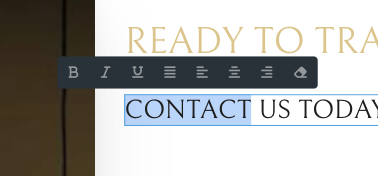
I’m trying to add the capability to add/change hyperlinks to the text elements for editors with an assigned “Edit Content” capability through the Builder Access settings.
The link item in that toolbar shows up for basic text & rich text elements, not the header element (which I assume is what’s selected in your screenshot). This behaviour is the same whether the user has full access, edit content, or a custom capability.
Unfortunately I’m unable to replicate the issue on my end. Can you maybe try disabling all plugins and use a different browser? If the issue persists, please share temporary admin access to help@bricksbuilder.io so we can investigate further.