Edit One Page Without Affecting Others — How to Change Only One Page in bricks builder?

Hi everyone,

I’m having a bit of trouble with page templates in Bricks.

I have a default page template applied to several pages. When I open a specific page and click “Edit with Bricks”, it loads the default template, not the page itself. So any changes I make end up affecting all pages using that template, not just the one I’m trying to edit.

What I’d like to do:

Edit one page only, without touching the default template or changing other pages. Basically, I want it to work like Elementor, where editing a single page automatically overrides the template just for that page.
Hi najmeh,
Welcome to the forum!

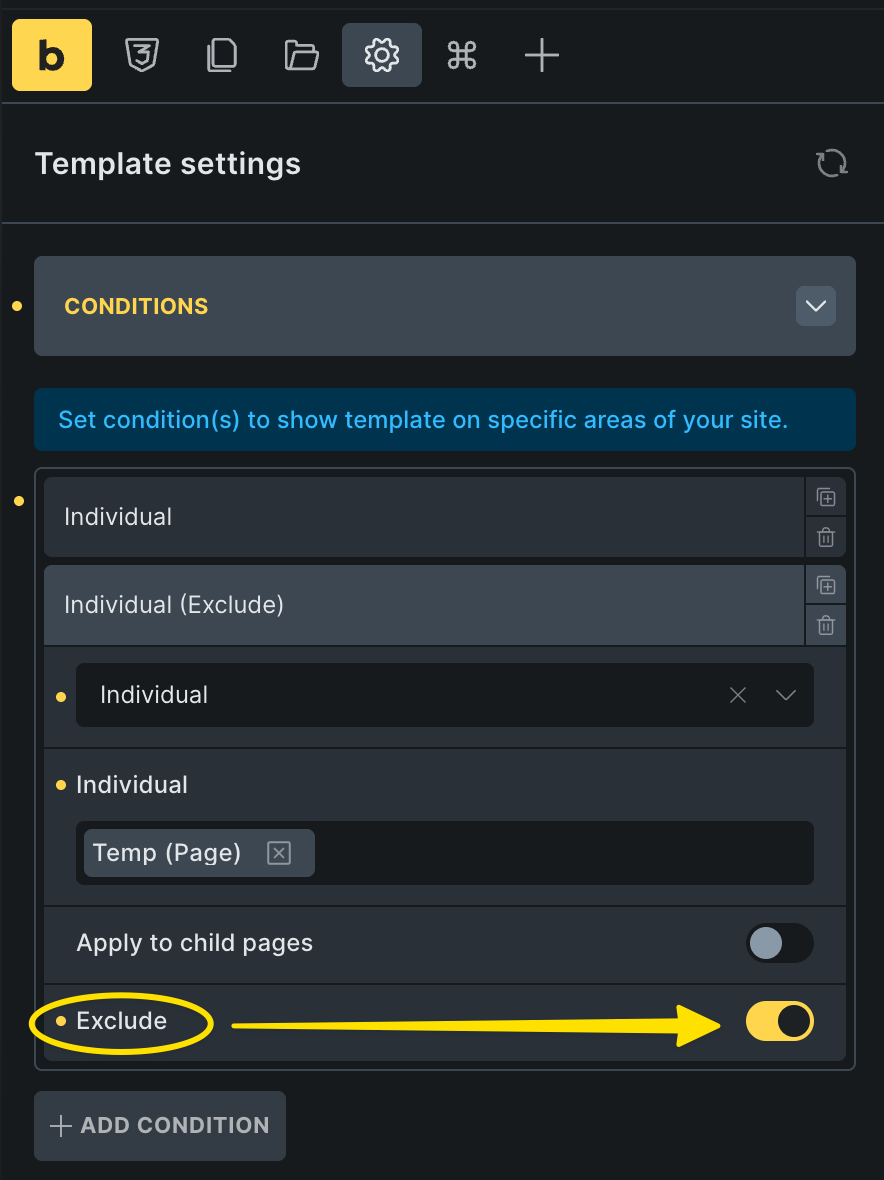
You can add an eclusion to your page template conditions to exclude it from specific pages.

Best regards,
timmse

If you want to actually edit the content in the template for only one page, then you would need to import the template into the page and then editing it doesn’t change the template.

If you want to edit around the template then you can add it to the page with the template element or use the template shortcode in a shortcode element.

There is probably a way to include it in the page with PHP too.