I created two typography scales, for text and headings. The preview in the scale generator is as expected and the behaviour on the front-end is as expected too.
However, I’ve had reports from several of my students that the exact same settings aren’t producing the correct/expected font sizes in their own installs. The sizes are way too big, and are not limited by the maximum viewport size.
Since I recorded the video below, I’ve found that I think it’s because ‘Generate Variables’ isn’t working as it should.
I tried clicking it many times, as have my students (one said she lost track of how many times she clicked it). But then suddenly, it works.
For example, in the ‘not working as expected’ site I show you, I’d personally clicked ‘Generate Variables’ for both scales, many times. Then, in the spirit of never giving up, I tried it again just now, and that worked. Now the clamp values are correct, and it’s all behaving as expected.
This happened with another student too, which makes me think this is probably the issue (unless it’s a massive coincidence).
Hi Dave,
Thanks so much for your report and the detailed video!
I believe that I already spotted the issue in your video. It looks like the one reported here:
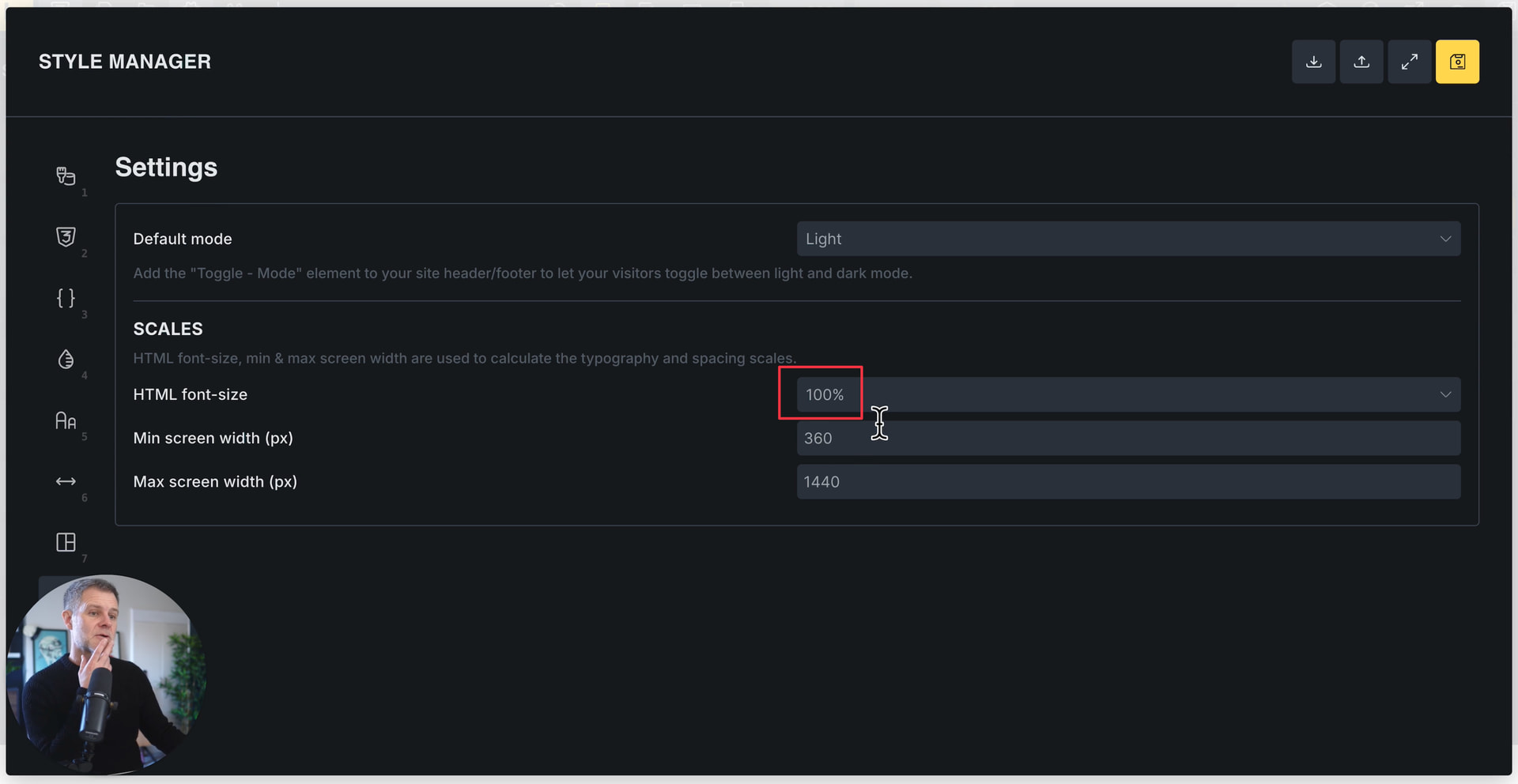
Even if the placeholder shows “100%”, it’s still using 62.5% for the calculations. Please deliberately select 100% from the dropdown in the style manager settings, and regenerate the variables. Then it should work as expected.
Ps: I’m watching the last few minutes of the video right now, but I haven’t seen you regenerating the variables (unless I missed it) after setting the HTML font size to 100%. So I still think that’s exactly what’s causing the problem.
When I set up the type size scales in my own install I specifically set 100% HTML font size.
And in the student’s install I showed in the video, I could very well have set that myself while testing, but didn’t try generating variables again until after the video.
I’ve asked all the people who reported this issue to me to set 100% HTML font size specifically and then generate variables again. Confident this must be the issue, but I’ll report back either way.
I did this several times, resaving each time. Switching from the default grayed out 100% to the 100% (1rem = 16px) in the dropdown and back resaving each time. I must have clicked Generate Variables a dozen times. I think there might be a glitch some where. Honestly, I am glad others are having the same issue just so I know I am not crazy.
Unfortunately, I don’t know how to reproduce this because it always works for me on the first try – and believe me, I’ve tested it more than a dozen times (just to track down the known bug). I think we can rule out caching (which is always my first thought in situations like this), right?
Perhaps your student could also provide a detailed screen recording and/or access data for his installation so that we can test it ourselves?
Yes, I appreciate it’s impossible to track down bugs when they can’t be reproduced. I’ve also had two others so far tell me they specifically chose 100% again, regenerated variables, and now the problem is fixed.
I’ll keep an eye on other responses but I’m inclined to say that this one is solved.
 I’ll mark the thread as a duplicate for now, but leave it open in case you receive further information