Browser: Chrome 110
OS: macOS / Windows / Linux / etc.
URL: Link to a page that illustrates this issue
Video: Jam
EDIT: i created a video of this issue, look up here ↑ ↑ ↑
I think i have found a bug in case of the new search widget “Filter - Search” - it kind of works, but there are these problems:
I have a Posts on a page, which is set OK, i have a Filter Search widget, that is connected to that posts, this works OK - it search and find a post that iam searching for BUT there are following problems:
FILTER - SEARCH settings:
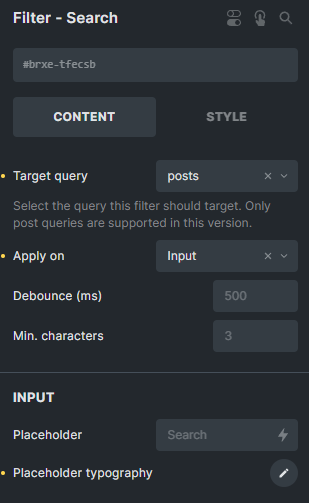
I am trying to search posts, that has a name TYSON in it. (i tried to attach more screen shots, but forum says, that as a new member, i cannot attach more then one embeded pictures) - i can send it to someone, if neccesary).
a) If i type in the search field “tys” - it finds nothing:
b) If i type in the search field “tyso” - it works perfect:
c) If i type in the search field “tyson” - it finds nothing:
d) If i type in the search field “tyson” + i add next character a space (i just hit space on my keybord) - it works perfect:
Maybe the problem is on my side, but i dont thing so…
maybe it has some problem with even/odd numbers of characters in the search field.
- when the widget is set to "Apply on - Submit, the problem is exactly the same.
Thank you for help to find problem on my side, or fixing the bug.
I love Bricks btw 
ps: i tried to search another boxer name “Marciano” which has 8 characters (odd number) and it works OK. So maybe it really is a bug in even/odd number of characters written in the search field.