Browser: Chrome 110
OS: macOS / Windows / Linux / etc.
Bricks version: 2.4 Beta 2
Area: Builder → Element settings → Style → CSS → Custom CSS
Description
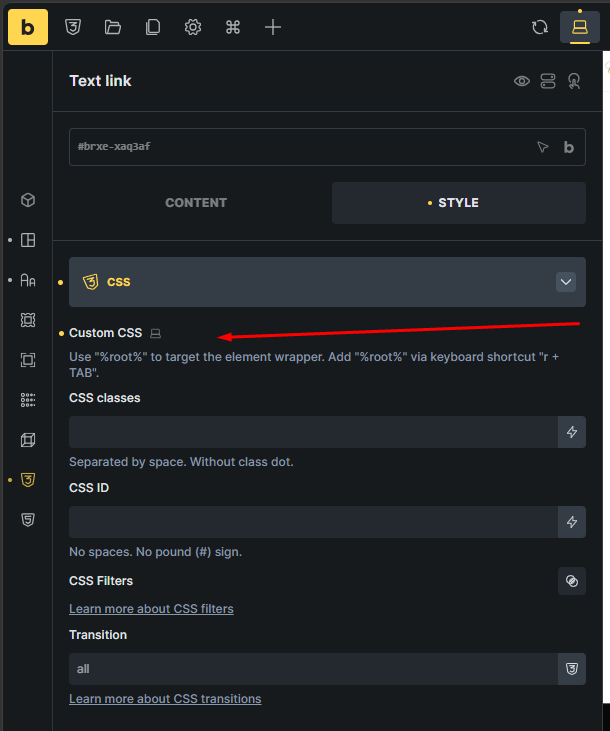
The Custom CSS code editor is not displayed for some elements in Bricks Builder 2.4 Beta 2.
For example, when editing a Text Link element, the Custom CSS section only shows the instructional text:
Use “%root%” to target the element wrapper.
However, the actual CSS editor field is missing. The CSS Classes, CSS ID, CSS Filters, and Transition fields are still displayed.
The editor displays correctly when selecting other elements, such as a Container.
Steps to reproduce
- Open a page or template in Bricks Builder 2.4 Beta 2.
- Select a Text Link element.
- Open the Style tab.
- Open the CSS section.
- Locate the Custom CSS setting.
Actual behavior
The Custom CSS code editor is missing, so custom CSS cannot be entered for the selected element.
Expected behavior
The Custom CSS editor should appear above the %root% instructional text, as it does for Container elements and in previous Bricks versions.