DonX
November 4, 2025, 9:22am
1
Hello,
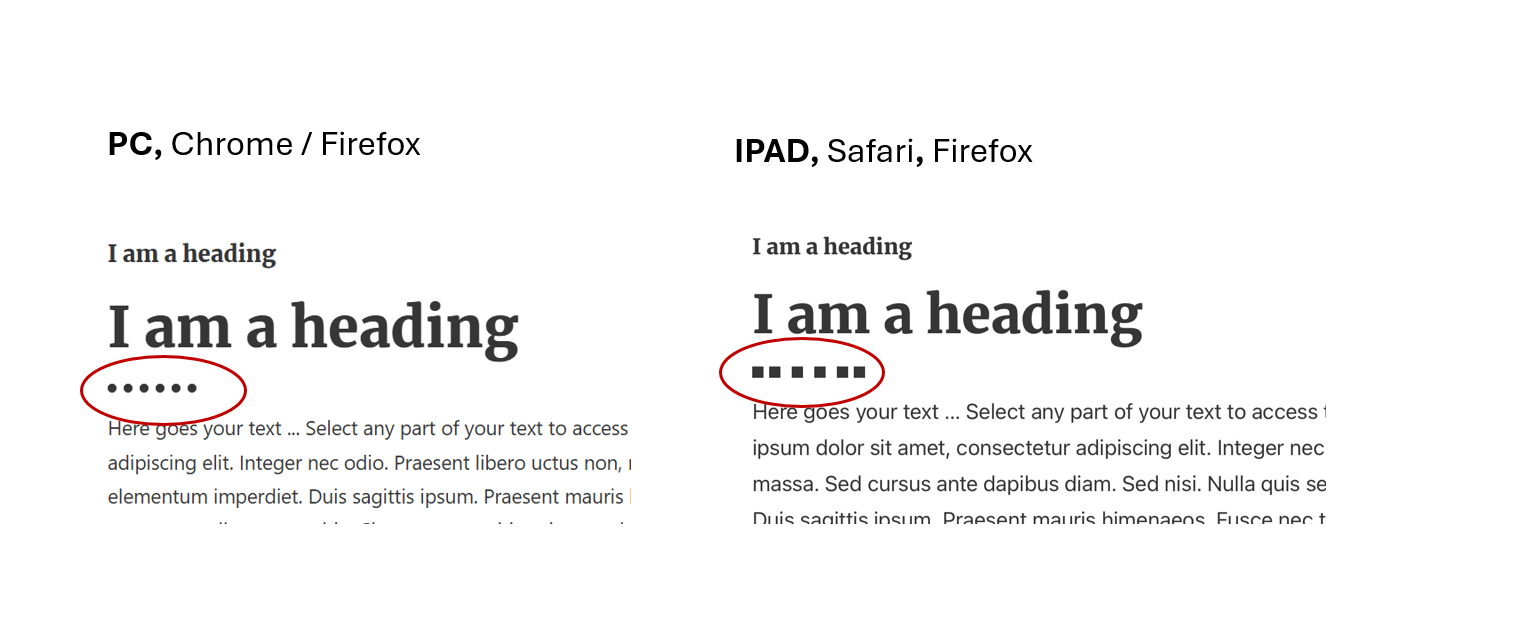
I’m using a divider that’s 10px high and 100px wide with a dotted line.
What could be causing this, and how can I fix it?
Best regards
Ferry
November 4, 2025, 11:43am
2
seems to be a known bug in webkit
Then the only fix might be faking the line by replacing it with some svg or or…
You can try if you can force some style onto it with CSS, but also the uneven spaced dots gonna make it difficult.
DonX
November 4, 2025, 2:01pm
3
Thanks for your help.
I asked chat GPT for a solution.
%root% {http://www.w3.org/2000/svg’ width=‘20’ height=‘10’%3E%3Ccircle cx=‘5’ cy=‘5’ r=‘5’ fill=‘black’ /%3E%3C/svg%3E”);
This solves the problem.
BR
1 Like