Hi, How to I create a simple curve shape divider at the bottom of my section? There seems to be everything but ‘Curve’ as an option in Bricks.

svg overlay might work. svg is like a image but from points saving data as it is just text coordinates. It will block out a part of the background image.
You might need negative margin to get this to work.
Here’s a short demo

Thanks @Ferry , that looks fairly quick to implement. Much appreciated.
I just expected that there was a quick option in Bricks.
Seems strange that there are all kinds of whacky options like Clouds and Drips that would get used extremely rarely, but no simple curve.
+1 on this! It’s the only thing I miss from Elementor.
Hi @sly, you can make a simple curve quickly using Bricks built in “Triangle Concave” shape divider. Just set its width to 200%, and its height to something like 150px. By aligning it left or right (or flipping it) you can get the curve to angle either way.
Here is an example from my website (levodigital.ca)
Editor:
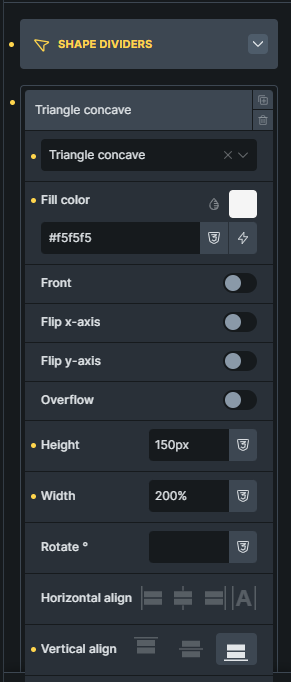
2 Likes

Nice one @LevoDigital. I wouldn’t have through to use ‘Triangle Concave’ for a curve.